215575 310 Revision B
5.10 Draper Speed Sensor
The draper speed sensor is mounted to a support on the right side of the header. It reads the speed of the driven roller on
the rear deck.
This section does NOT apply to Case IH and New Holland combines. For Case IH and New Holland combines, refer to your
combine operator’s manual for further information.
5.10.1 Checking Draper Speed Sensor Position
The draper speed sensor position is factory-set, but it may require adjustment if problems occur with the draper speed
system or when replacing sensor components. Check the draper speed sensor position prior to making any adjustments.
WARNING
To avoid bodily injury or death from unexpected startup of machine, always stop the engine and remove the key from
the ignition before leaving the operator’s seat for any reason.
1. Shut down the engine, and remove the key from the ignition.
2. Remove the right endshield. For instructions, refer to 3.3.5 Removing Right Endshield, page 30.
$
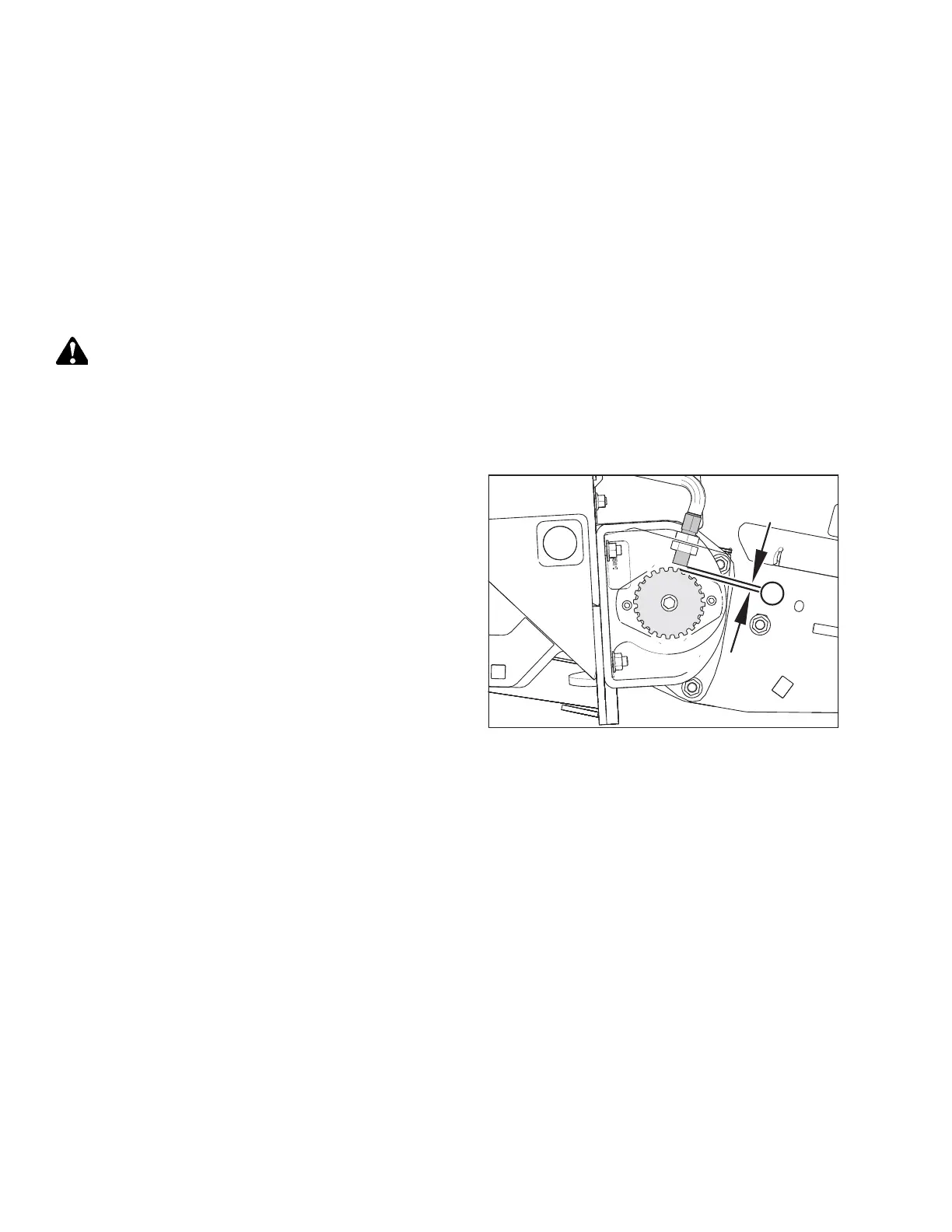
Figure 5.209: Disc Clearance
3. Check clearance (A) between the speed sensor and the disc.
If you are attaching the pick-up header to a non-AGCO
combine, the recommended clearance is 3 mm (1/8 in.). If
you are attaching the pick-up header to an AGCO combine,
the recommended clearance is 0.5–1.5 mm (1/64–3/64 in.).
If the clearance requires adjustment, refer to 5.10.2
Adjusting Draper Speed Sensor, page 311.
MAINTENANCE AND SERVICING



 To Next Page