215575 141 Revision B
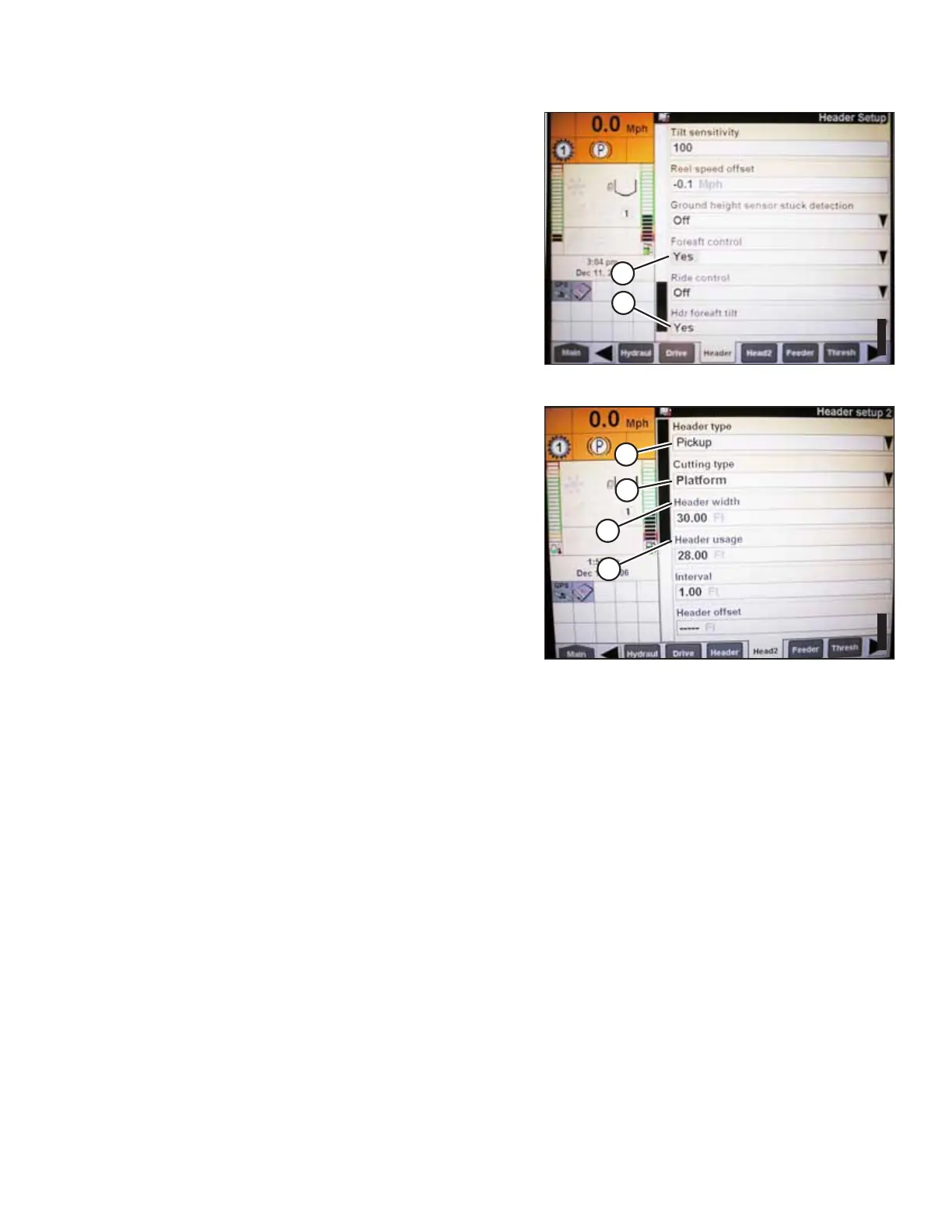
Figure 4.79: Case IH Combine Display
8. Select YES for FORE-AFT CONTROL (A) and HDR FORE-AFT
TILT (B) (if applicable).
Figure 4.80: Case IH Combine Display
9. Select the HEAD2 tab at the bottom of the page.
10. Ensure that PICKUP (A) is selected from the HEADER
TYPE list.
NOTE:
If the recognition resistor is plugged into the header
harness, you will not be able to change the header type.
11. Set the cutting type to PLATFORM (B).
12. Set the appropriate HEADER WIDTH (C) and HEADER
USAGE (D) values.
4.7.4 Calibrating Auto Header Height Control (Case IH 7010/8010; 7120/8120/9120;
7230/8230/9230; 7240/8240/9240) – Software Versions Above 28.00
The auto header height control (AHHC) sensor output must be calibrated for Case IH 7, 8, or 9 series combines with
software versions above 28.00, or the AHHC feature will not work properly.
NOTE:
Changes may have been made to the combine controls or the display since this document was published. For instructions,
refer to the combine operator’s manual for updated information.
AUTO HEADER HEIGHT CONTROL



 To Next Page