215575 85 Revision B
Adjusting Auger Position
The auger is adjustable on both ends in order to maintain uniform clearance across the entire width of the header.
WARNING
To avoid bodily injury or death from unexpected startup of machine, always stop the engine and remove the key from
the ignition before leaving the operator’s seat for any reason.
1. Lower the header to the ground.
2. Shut down the combine and remove the key from the ignition.
3. Open the left endshield. For instructions, refer to 3.3.1 Opening Left Endshield, page 25.
4. Remove the right endshield. For instructions, refer to 3.3.5 Removing Right Endshield, page 30.
NOTE:
Access the auger/pan area from the top of the header.
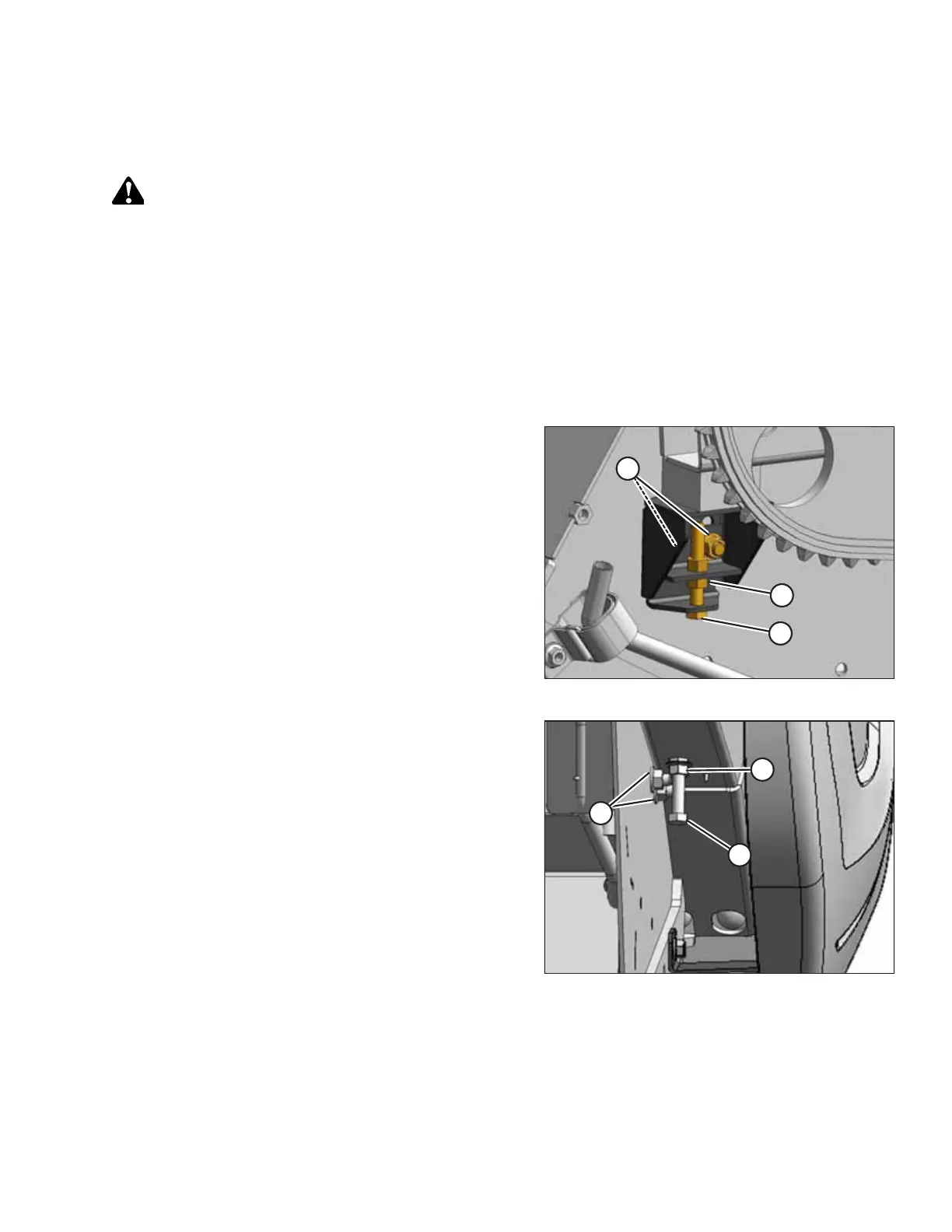
Figure 3.133: Left Auger Stop
5. Loosen two nuts (A) on the auger stops at both ends of
the header.
6. Loosen jam nuts (B) on adjuster bolts (C).
7. Turn adjuster bolt (C) to raise or lower the auger.
8. Manually rotate the auger to check for interference and to
check the clearance between the auger flighting and the
auger pan. Adjust the clearance if necessary.
9. Tighten jam nuts (B) and downstop nuts (A).
10. Check the clearance between the auger flighting and the
stripper plates and adjust it if necessary. For instructions,
refer to Stripper Plate Clearance, page 86.
Figure 3.134: Right Auger Stop
OPERATION



 To Next Page