215575 155 Revision B
$
%
&
'
(
)
*
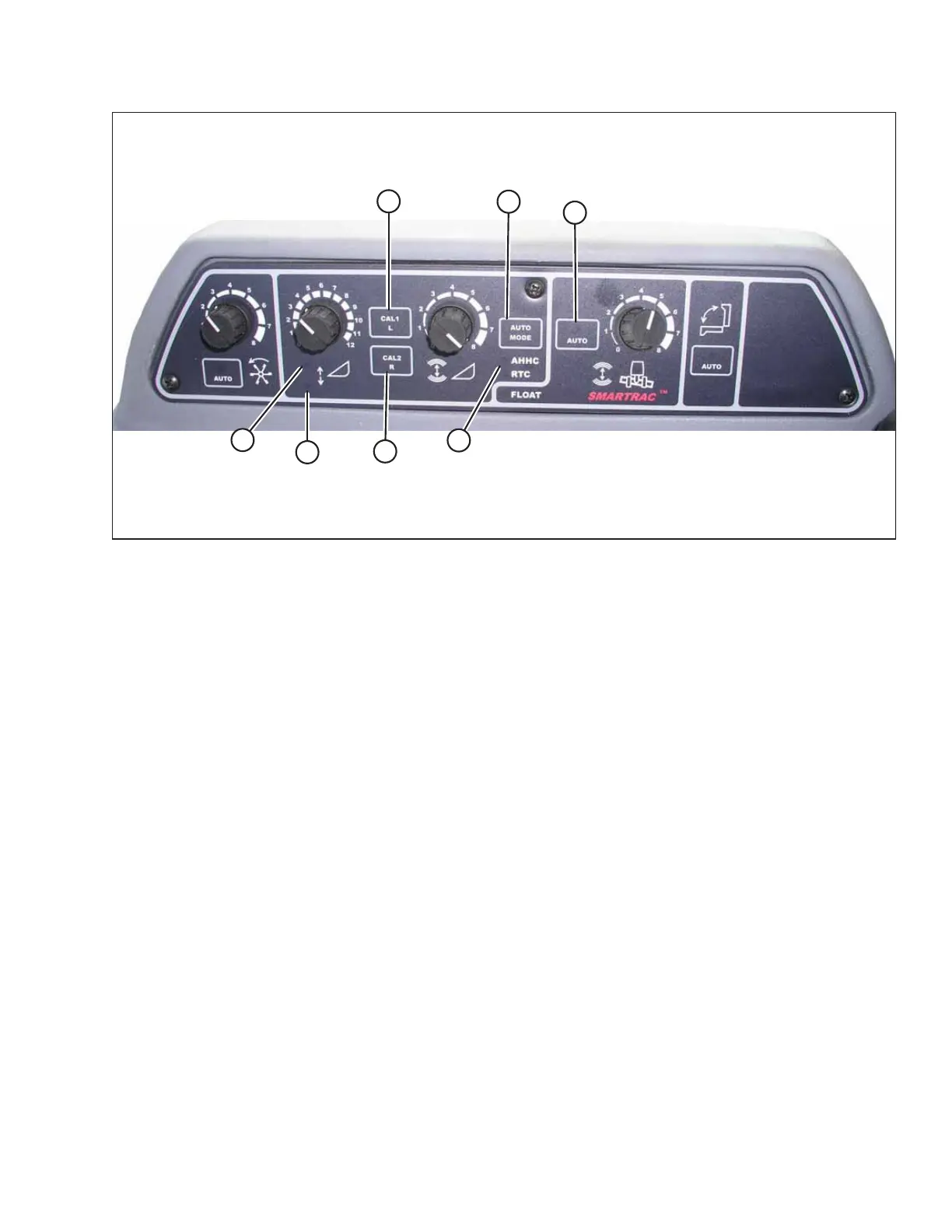
Figure 4.107: Combine Auto Header Height Controls
A - AUTO MODE Button B - AHHC Light C - CAL1 Button
D - Raise Header E - Lower Header F - Auto Mode
G - CAL2 Button
1. Press AUTO MODE button (A) until AHHC light (B) is activated.
2. Press and hold CAL1 button (C) until the following lights flash: raise header (D), lower header (E), tilt auto mode (F),
and AHHC (B).
3. Fully lower the header.
4. Press CAL2 button (G) until lower header light (E) stops flashing. Release the button when raise header light (D) begins
flashing.
5. Raise the header to its maximum height.
6. Press CAL2 button (G) until raise header light (D) turns off.
NOTE:
The following steps are applicable only to model year 2005 and newer combines with Smartrac feeder houses.
7. Wait for the HEADER TILT LEFT light (not shown) to start flashing and then tilt the header to its maximum left position.
8. Press CAL2 button (G) until the HEADER TILT LEFT light (not shown) stops flashing and release the button when the
HEADER TILT RIGHT light (not shown) begins flashing.
9. Tilt the header to its maximum right position.
10. Press CAL2 button (G) until all of following lights flash: raise header (D), lower header (E), height auto mode (A), right
header and left header (not shown), and tilt auto mode (F).
11. Center the header.
12. Press CAL1 button (C) to exit the calibration procedure. Exiting will save all values to memory. All the lights on the
console should stop flashing.
AUTO HEADER HEIGHT CONTROL



 To Next Page