215575 207 Revision B
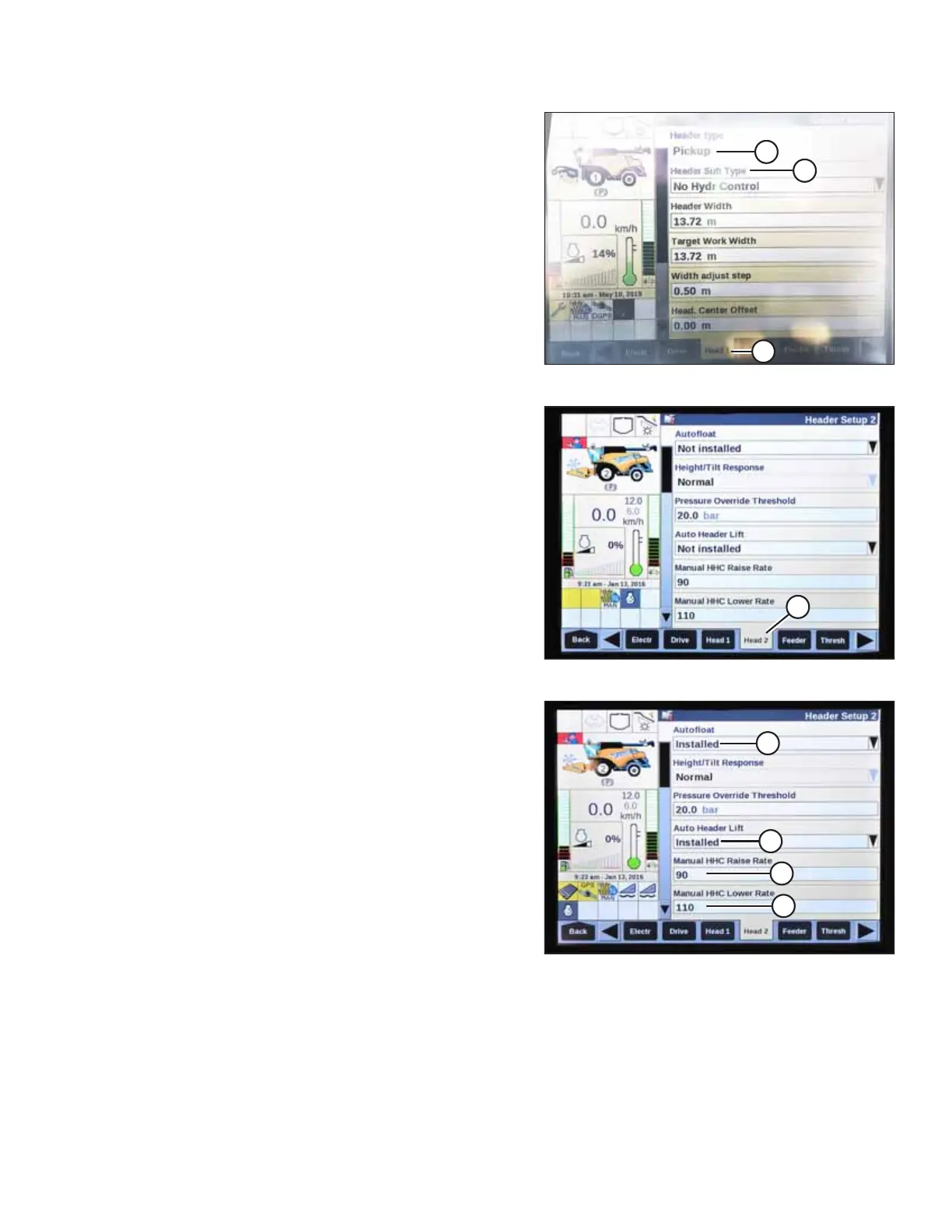
Figure 4.211: New Holland Combine Display
2. Select HEAD 1 (A). The HEADER SETUP 1 page appears. The
HEADER TYPE field will automatically register as PICKUP (B).
NOTE:
HEADER SUB TYPE menu (C) is not applicable to MacDon
pickup headers. The menu’s two selectable options – NO
HYDR CONTROL and SPARE – have no effect on header
performance.
Figure 4.212: New Holland Combine Display
3. Select HEAD 2 (A). The HEADER SETUP 2 page appears.
Figure 4.213: New Holland Combine Display
4. Select the AUTOFLOAT drop-down arrow and set
AUTOFLOAT to INSTALLED (A).
5. Select the AUTO HEADER LIFT drop-down arrow and set
AUTO HEADER LIFT to INSTALLED (B).
NOTE:
With the AUTO HEADER LIFT feature installed and the AHHC
system engaged, the header will lift up automatically
whenever you pull back on the hydro handle.
6. Set the values for MANUAL HHC RAISE RATE (C) and
MANUAL HHC LOWER RATE (D) according to harvest
conditions.
AUTO HEADER HEIGHT CONTROL



 To Next Page