215575 209 Revision B
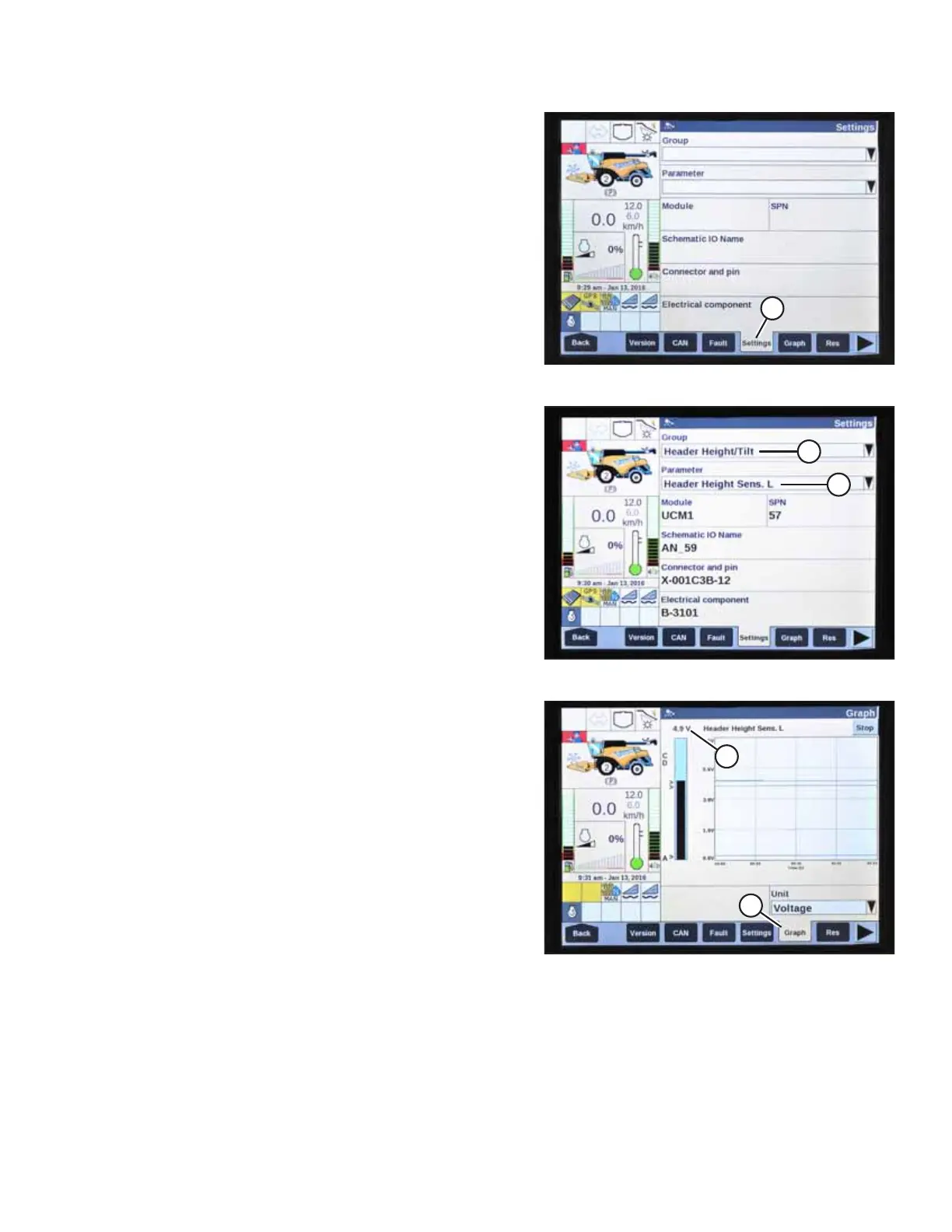
Figure 4.216: New Holland Combine Display
3. Select SETTINGS (A). The SETTINGS page appears.
Figure 4.217: New Holland Combine Display
4. Select HEADER HEIGHT/TILT (A) from the GROUP drop-
down menu.
5. Select HEADER HEIGHT SENS. L (B) from the PARAMETER
drop-down menu.
Figure 4.218: New Holland Combine Display
6. Select GRAPH (A). Height sensor out voltage (B) is displayed
at the top of the page.
7. Raise and lower the header to see the full range of voltage
readings.
8. If the sensor voltage is not within the low and high limits
shown in 4.4 Height Sensor Output Voltage Range –
Combine Requirements, page 111, or if the range between
the low and high limits is insufficient, the height sensors
will need to be adjusted. For instructions, refer to 4.4.2
Adjusting Header Height Sensor Voltage Range – Left Side,
page 114 and 4.4.3 Adjusting Header Height Sensor Voltage
Range – Right Side, page 114.
AUTO HEADER HEIGHT CONTROL



 To Next Page