3-16 SECURITY MANAGEMENT
GGS-000547-01E iPASOLINK EX Advanced: SET NETWORK AND SYSTEM PROVISIONING
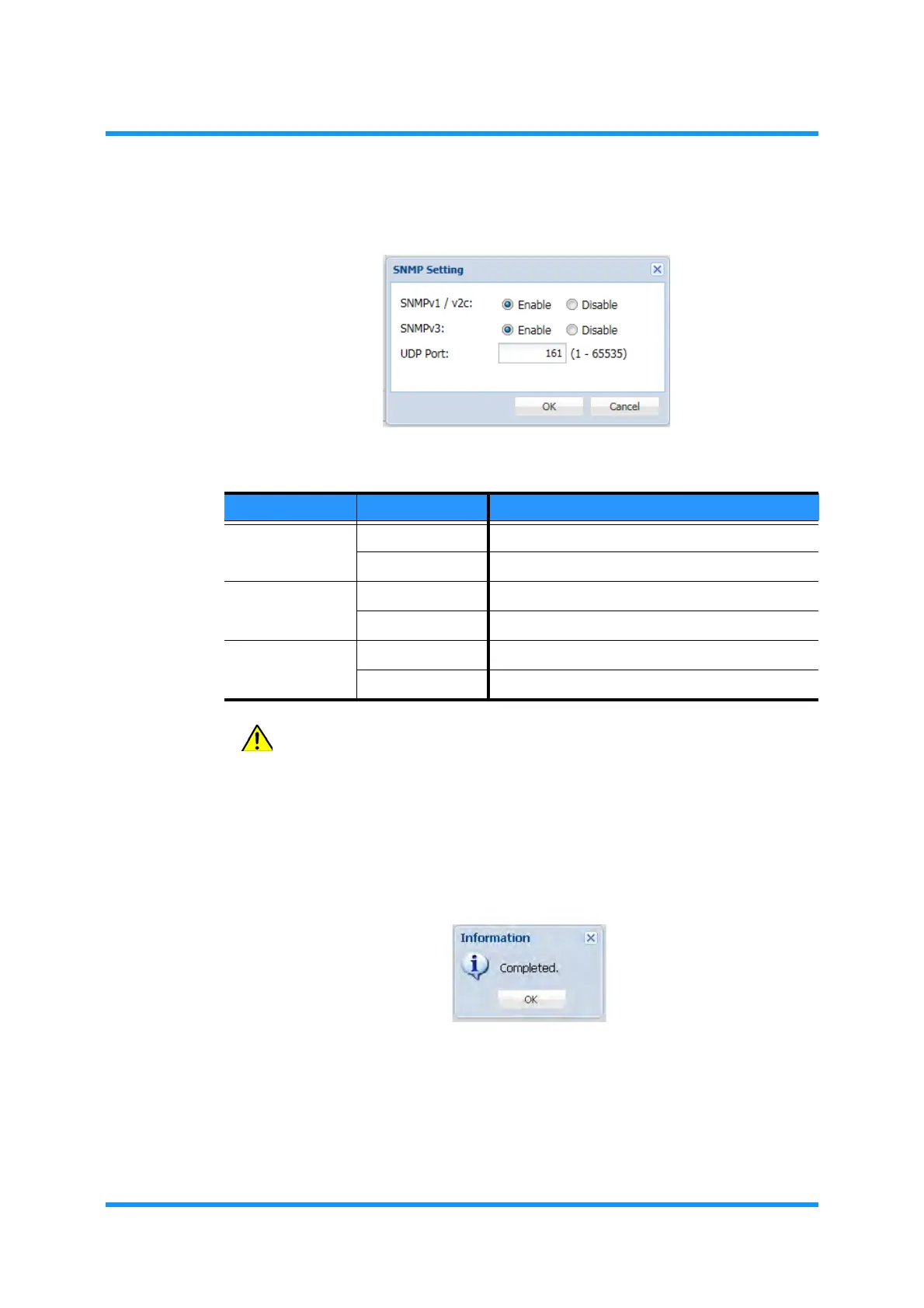
4. Specify an appropriate value to each parameter.
Figure 3-5 SNMP Setting Option Window
CAUTION: In order to apply the values properly, CPU must be
rebooted when UDP Port Number(s) is/are changed.
5. When completed, click the OK button. Information dialog box appears.
6. Click the
OK button to proceed.
Figure 3-6 Information Dialog Box
The Service Status Setting window updates the information.
Table 3-13 SNMP Setting Parameters
Parameter Value Description
SNMPv1/v2c Enable Enables SNMPv1/SNMPv2c (Running)
Disable Disables SNMPv1/SNMPv2c (Stopped)
SNMPv3 Enable Enables SNMPv3 (Running)
Disable Disables SNMPv3 (Stopped)
UDP Port 1 to 65535 From 1 to 65535 are available for UDP Port No.
161 161 is the default UDP Port No.


 To Next Page