4-48 CONTROL ITEMS
GGS-000548-01E iPASOLINK EX Advanced: Operation & Maintenance
4.6.2 ALS Manual Switch Control
Procedure 4-16
1. Click the Maintenance tool button on the tool bar of the WebLCT to put the
system into the Maintenance Mode. The
MAINT indicator on the tool bar
changes to orange.
2. In the
MENU frame on the left, expand the Maintenance Control to select
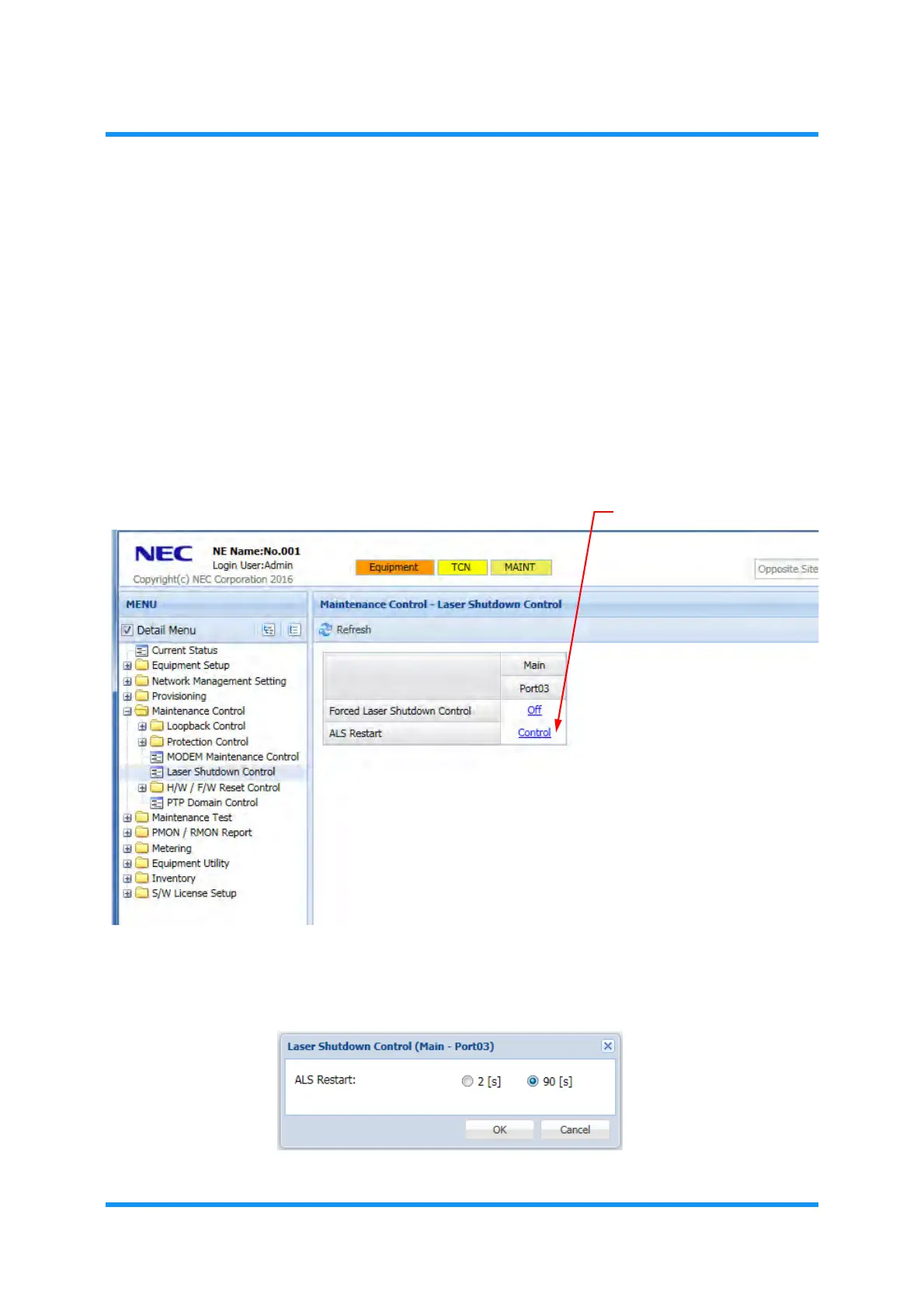
Laser Shutdown Control. The Laser Shutdown Control window appears.
3. Select
Control in the ALS Restart option.
Figure 4-72 Laser Shutdown Control Window
4. Laser Shutdown Control option window appears. Select a proper value for the
ALS Restart parameter, then click the OK button.
Figure 4-73 Laser Shutdown Control Option Window


 To Next Page