CONTROL ITEMS 4-49
iPASOLINK EX Advanced: OPERATION & MAINTENANCE GGS-000548-01E
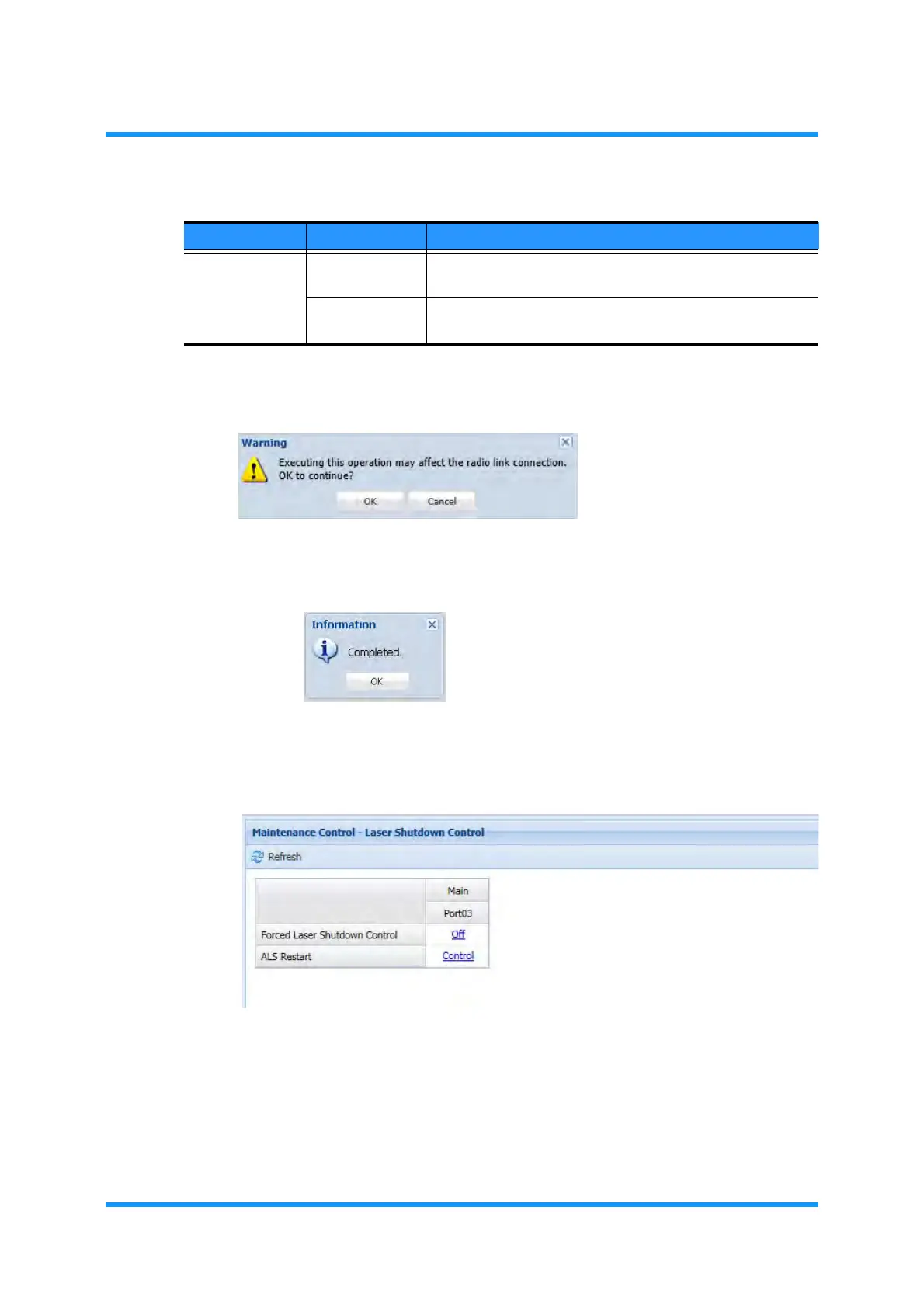
5. Warning dialog box appears. Click the OK button.
Figure 4-74 Warning Dialog Box
6. Information dialog box appears. Click the OK button.
Figure 4-75 Information Dialog Box
7. The Laser Shutdown Control window updates the information. Verify the
displayed parameters.
Figure 4-76 Laser Shutdown Control
8. When confirmed, click the Maintenance tool button on the WebLCT tool bar to
exit from the Maintenance Mode.
9. Confirm that the
MAINT indicator on the tool bar changes from orange to
white. This step ends the procedure.
Table 4-9 ALS Restart
Parameter Value Description
ALS Restart 2s Forcibly issues the optical output for 2 seconds where the
ALS (Automatic Laser Shutdown) is executed.
90s Forcibly issues the optical output for 90 seconds where the
ALS (Automatic Laser Shutdown) is executed.


 To Next Page