4-26 CONTROL ITEMS
GGS-000548-01E iPASOLINK EX Advanced: Operation & Maintenance
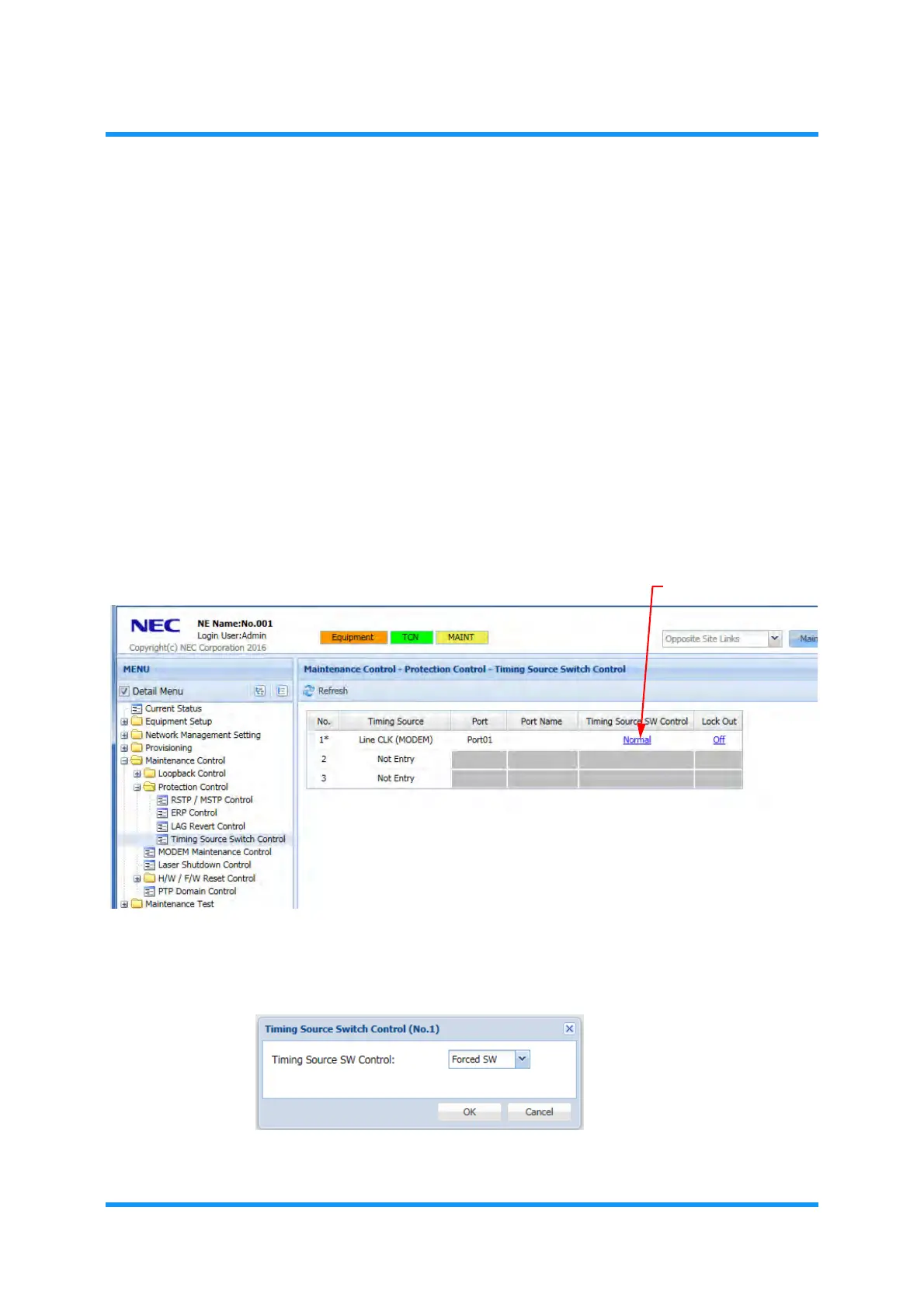
4.4.5.2 Switch Timing Sources
Procedure 4-9
1. Launch and log in to WebLCT.
2. Click the
Maintenance button on the top of the WebLCT window to switch the
state to the maintenance mode. See
4.2.1 Change to Maintenance Mode (for
WebLCT Operation)
for operating steps.
3. In the
MENU frame on the left, expand Maintenance Control, then its
submenu
Protection Control to select Timing Source Switch Control. The
Timing Source Switch Control window appears.
4. Click a link in the Timing Source SW Control fields:
NOTE: The target object must NOT be in the Lockout mode.
Figure 4-38 Timing Source Switch Control Window
5. Timing Source Switch Control option window appears. Select a switching
mode (
Manual SW or Forced SW), then click the OK button.
Figure 4-39 Timing Source Switch Control Option Window
Warning
dialog box appears.



 To Next Page