SECURITY MANAGEMENT 3-19
iPASOLINK EX Advanced: SET NETWORK AND SYSTEM PROVISIONING GGS-000547-01E
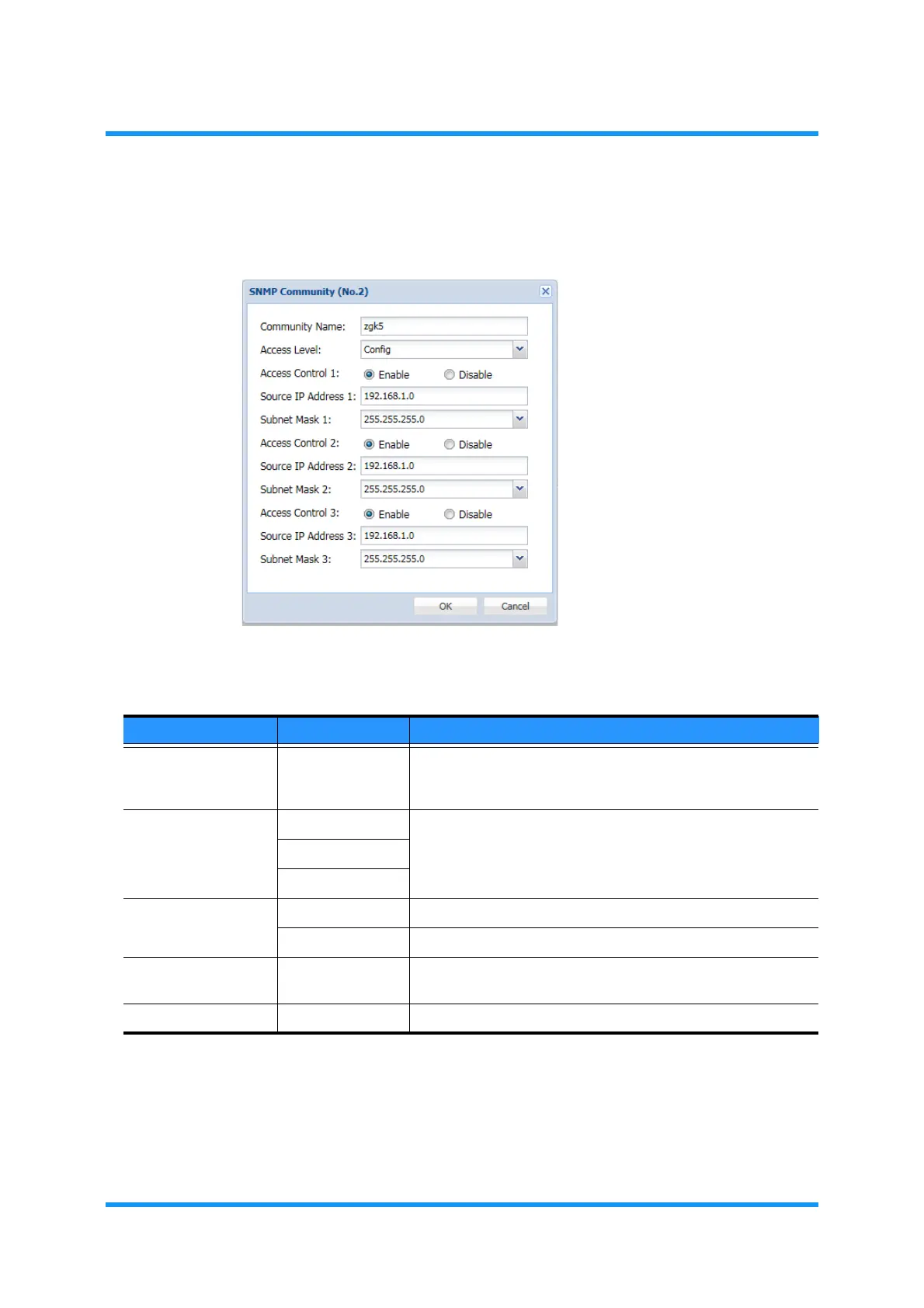
4. The SNMP Community option window appears. Specify the appropriate value
to each parameter:
Figure 3-9 SNMP Community Option Window
5. Click the OK button when completed. The Information dialog box appears.
Table 3-14 SNMP Community Parameters
Parameter Value Description
Community Name (text field) Specify an SNMP Community Name. Valid value: One to 31
characters long. A request with a different Community Name
will be rejected.
Access Level Admin Specify the user access level. Refer to Table 2-3 User Access
Privilege Levels for details.
Config
Operator
Access Control Enable Enables to restrict the access to the SNMP Manager(s).
Disable Disables to restrict the access to the SNMP Manager(s).
Access Address xxx.xxx.xxx.xxx Specifies the valid IP address or network address of the SNMP
Manager(s).
Subnet Mask x.x.x.x Specify the Subnet Mask of SNMP Manager(s).


 To Next Page