3-64 SECURITY MANAGEMENT
GGS-000547-01E iPASOLINK EX Advanced: SET NETWORK AND SYSTEM PROVISIONING
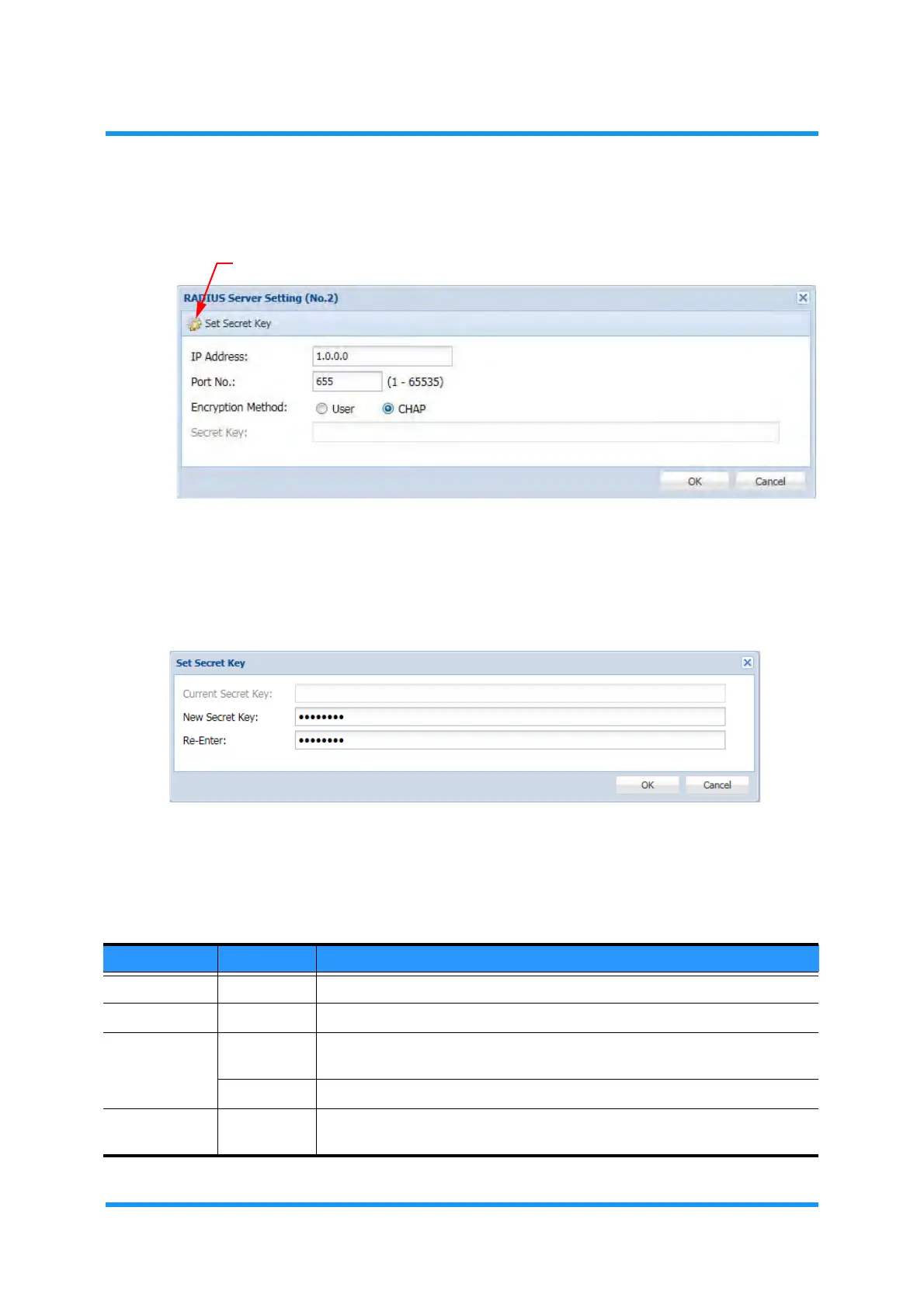
4. In the RADIUS Server Setting option window, specify the values.
Figure 3-84 RADIUS Server Setting Option Window
5. Click the Set Secret Key tool button.
6. The
Set Secret Key option window appears. Enter the password as the
authentication key to
RADIUS:
Figure 3-85 Set Secret Key Option Window
i) Enter a new password to New Secret Key entry field.
ii) Enter the same password to
Re-Enter entry field for confirmation.
iii) Click the
OK button. The Set Secret Key option window disappears.
Table 3-25 RADIUS Server Setting Parameters
Parameter Value Description
IP Address x.x.x.x Enter the IP Address of RADIUS Server.
Port No. 1 to 65535 Enter the number of Port connecting for authentication.
Encryption
Method
User Communication with a shared key for the authentication by the external server.
(RADIUS)
CHAP MD5 with a shared key for the authentication by the external server (RADIUS).
Secret Key (read only) Indicates the authentication key to RADIUS that is specified by the Set Secret
Key option.



 To Next Page