5-10 NETWORK MANAGEMENT
GGS-000547-01E iPASOLINK EX Advanced: SET NETWORK AND SYSTEM PROVISIONING
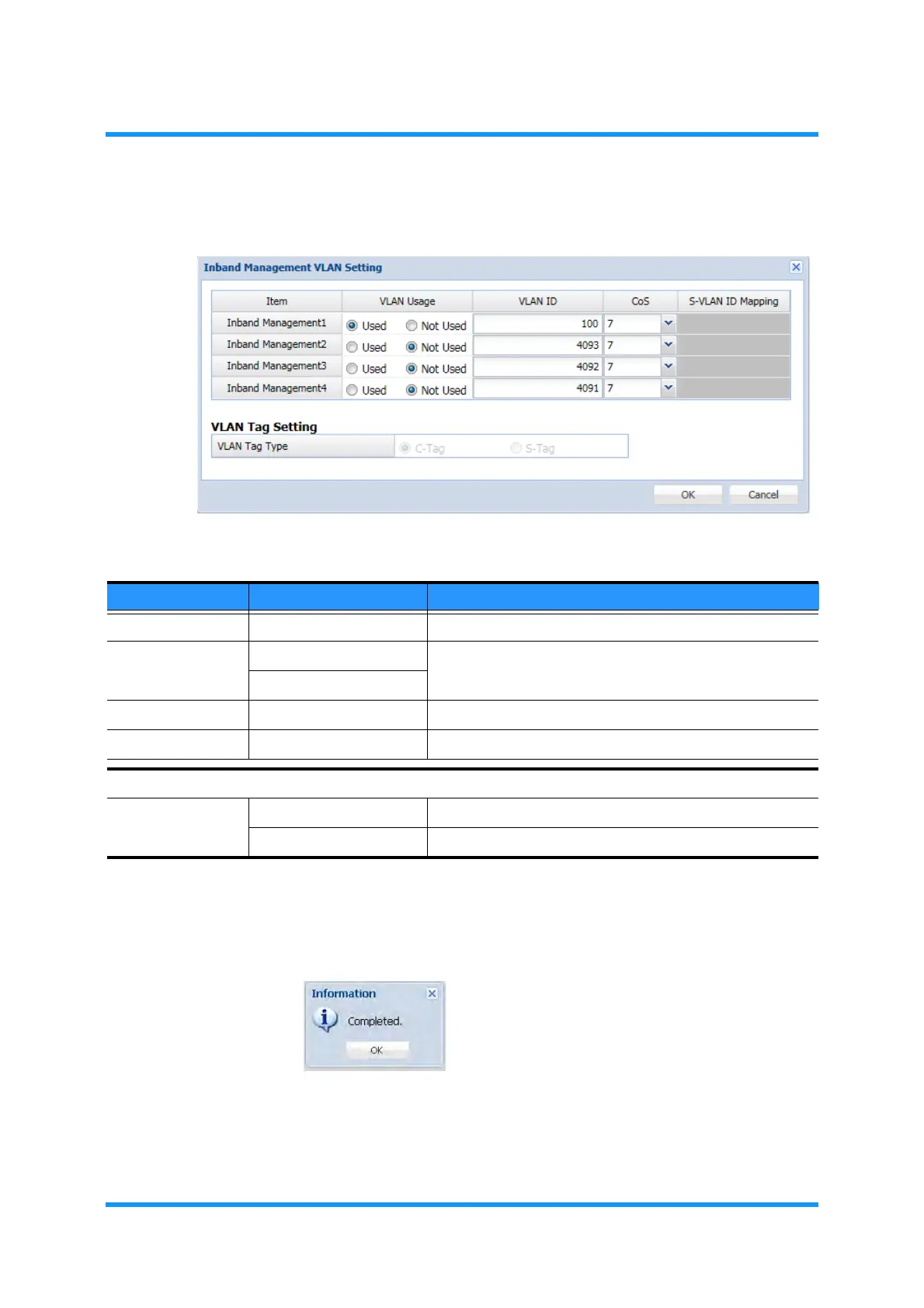
4. Inband Management Setting option window appears. Specify parameters:
Figure 5-12 Inband Management VLAN Setting Option Window
5. When completed, click the OK button.
6. Information dialog box appears.Click the OK button to proceed.
Figure 5-13 Information Dialog Box
The Inband Management VLAN Setting option box in the Port/VLAN Setting
window updates the information.
Table 5-3 Inband Management VLAN Setting Parameters
Parameter Value Description
ITEM Inband Management ——
VLAN Usage Used Set to use or not to use VLAN.
Not Used
VLAN ID 1 to 4094 Assign the VLAN ID to the Inband Management VLAN.
CoS 0 to 7 Assign the Class of Service
VLAN Tag Setting (This option is currently disabled.)
VLAN Tag Type C-Tag Enables the use of C-Tag to the Inband Management VLAN.
S-Tag Enables the use of S-Tag to the Inband Management VLAN.



 To Next Page