8-24 Set ETH Function
GGS-000547-01E iPASOLINK EX Advanced: SET NETWORK AND SYSTEM PROVISIONING
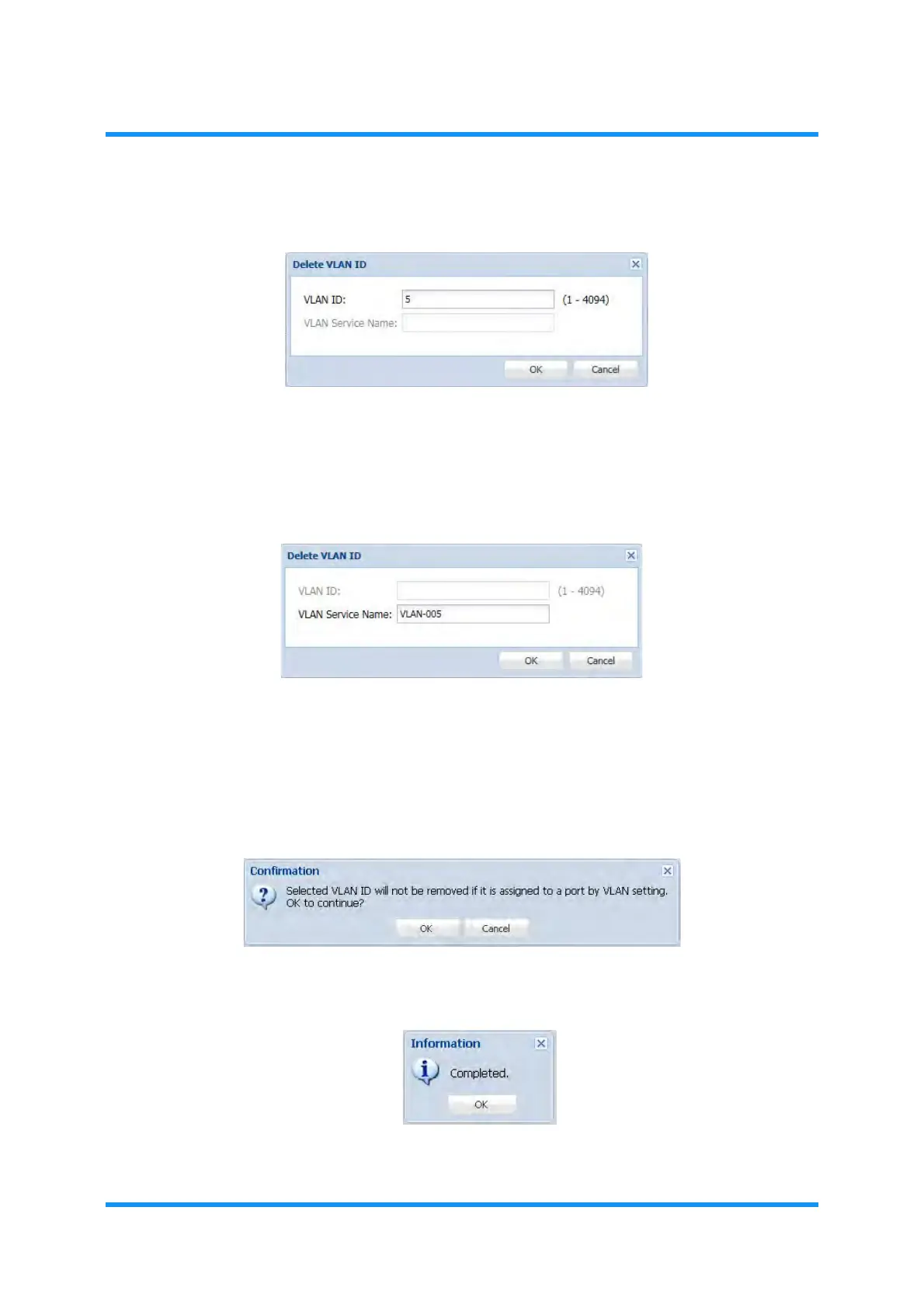
4. Enter the VLAN ID / S-VLAN ID or VLAN Service Name to be removed:
Figure 8-27 Delete VLAN ID Option Window — by VLAN ID (example: 802.1q)
Figure 8-28 Delete VLAN ID Option Window — by VLAN Service Name
5. When completed, click the OK button.
NOTE: A VLAN ID that has (an) assignment(s) cannot be removed. Check
other settings if the target VLAN ID is not removed from the list.
6.
Confirmation dialog box appears. Click the OK button to proceed.
Figure 8-29 Confirmation Dialog Box
7. Information dialog box appears. Click the OK button to proceed.
Figure 8-30 Information Dialog Box
Multiple numbers (range, and/or individuals) can be
entered as well.
Range: 1–15
Individuals: 1,4,15
e.g.,


 To Next Page