Set ETH Function 8-157
iPASOLINK EX Advanced: SET NETWORK AND SYSTEM PROVISIONING GGS-000547-01E
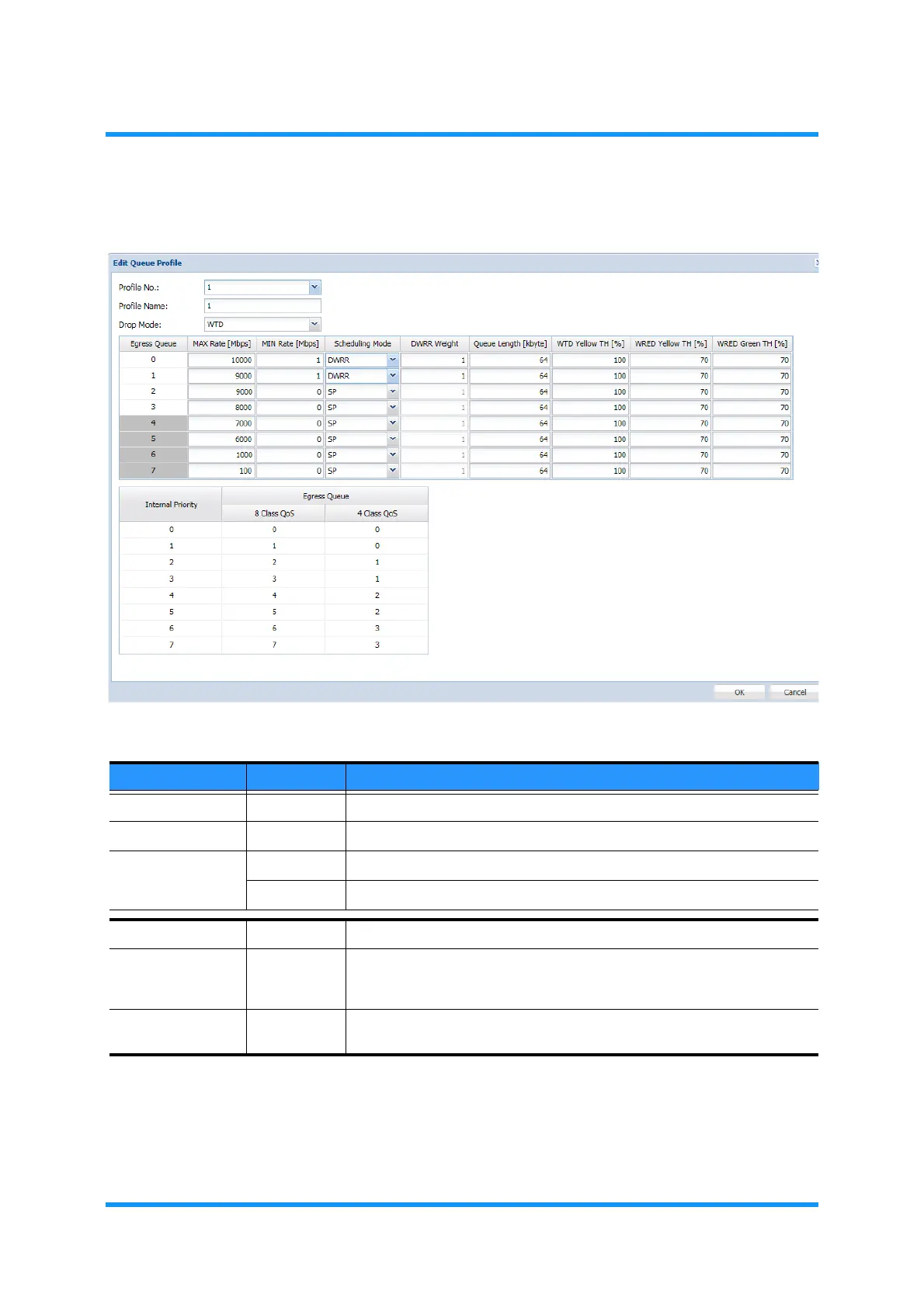
4. Specify the parameters, then click the OK button.
Figure 8-215 Edit Queue Profile Option Window
Table 8-41 Number of Queue Setting Options (1 of 2)
Parameter Value Description
Profile No. 1 to 15 Specify the Shaper Queue Profile number.
Profile Name (text field) Enter the profile name within 0 to 32 characters long
Drop Mode WTD Specifies Weighted Tail Drop (WTD) for the method to discard frames.
WRED Specifies Weighted Random Early detection (WRED)
Egress Queue 0 to 7 Indicates the Egress Queue number.
MAX Rate 1 to 10000 Enter the maximum bandwidths guaranteed rate. It is recommended to
set 3 or greater when changing the Queue Length from the default value.
[unit: Mbit/s; default: 1000]
MIN Rate 0 to 10000 Enter the minimum bandwidths guaranteed rate.
[unit: Mbit/s; default: 0]



 To Next Page