ADJUST ANTENNA ANGLE 8-3
iPASOLINK EX Advanced: INSTALLATION GGS-000546-01E
CAUTION:
Surface of iPASOLINK EX/A may be hot during the operation.
Ensure not to touch the equipment by mistake.
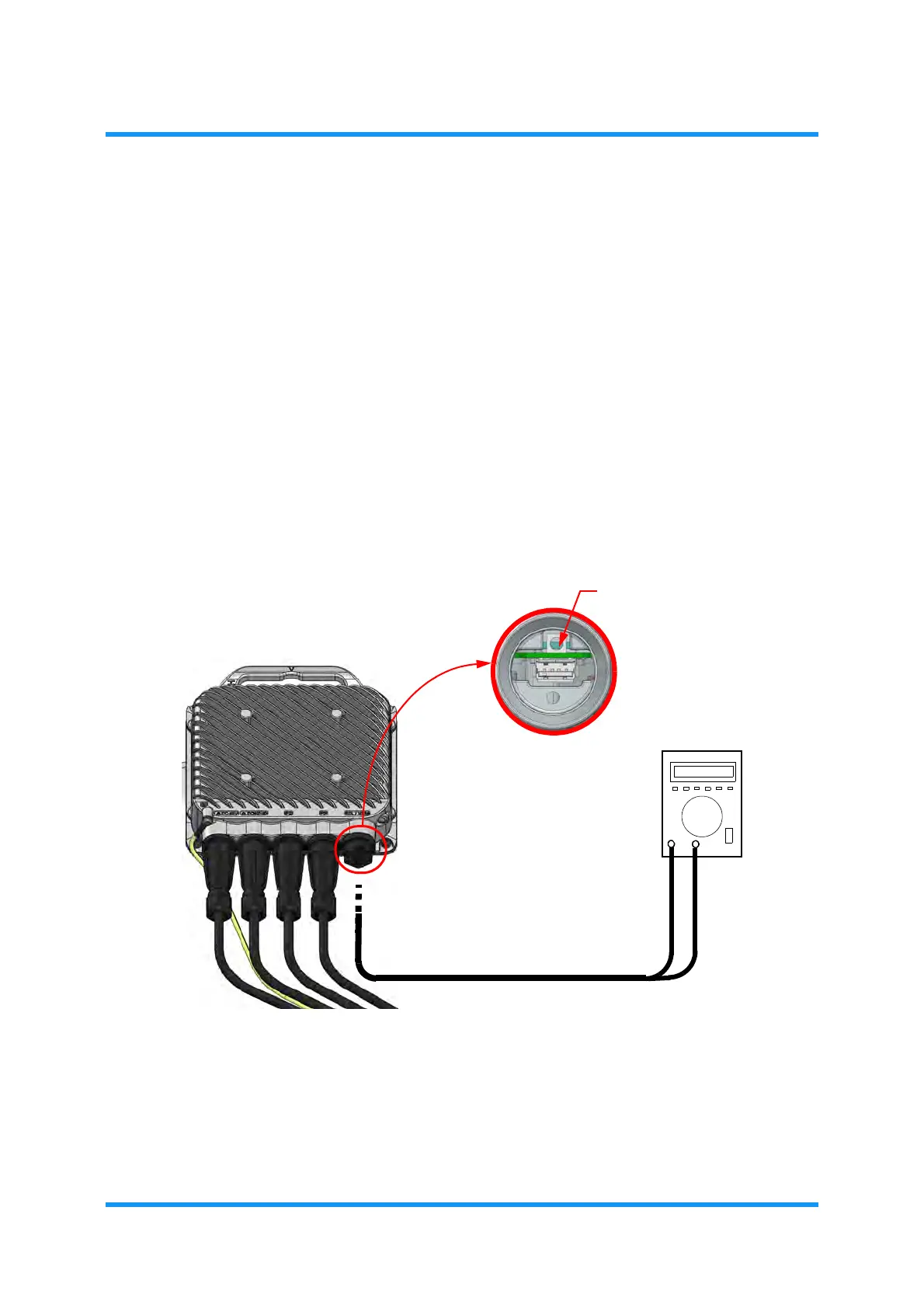
(1) Remove a protective cap from RSL terminal on iPASOLINK EX/A, and
connect it to a digital multimeter using the lead between.
(2) Monitor levels at both the local and opposing site, and fix the reception
level to its maximum by turning iPASOLINK EX/As up and down and/or
left to right.
NOTES:
1. RSL monitor conforms to IEC61169-24.
2. When the checks are done, put the waterproofing cap on to the RSL
terminal to protect it.
Figure 8-3 Example to Measure Levels for Fixing Angles
Following shows the relationship between RX INPUT LEVEL and RSL (V).
RSL TERMINAL
DIGITAL MULTIMETER
iPASOLINK EX/A



 To Next Page