EasyManua.ls Logo

palmOne Tungsten E2 - Setting an Alarm

palmOne Tungsten E2
653 pages
Print Icon
To Next Page IconTo Next Page
To Previous Page IconTo Previous Page
Loading...
Tungstenā„¢ E2 Handheld 217
CHAPTER 11 Managing Your Tasks
Setting an alarm
0
1
Press the Tasks button.
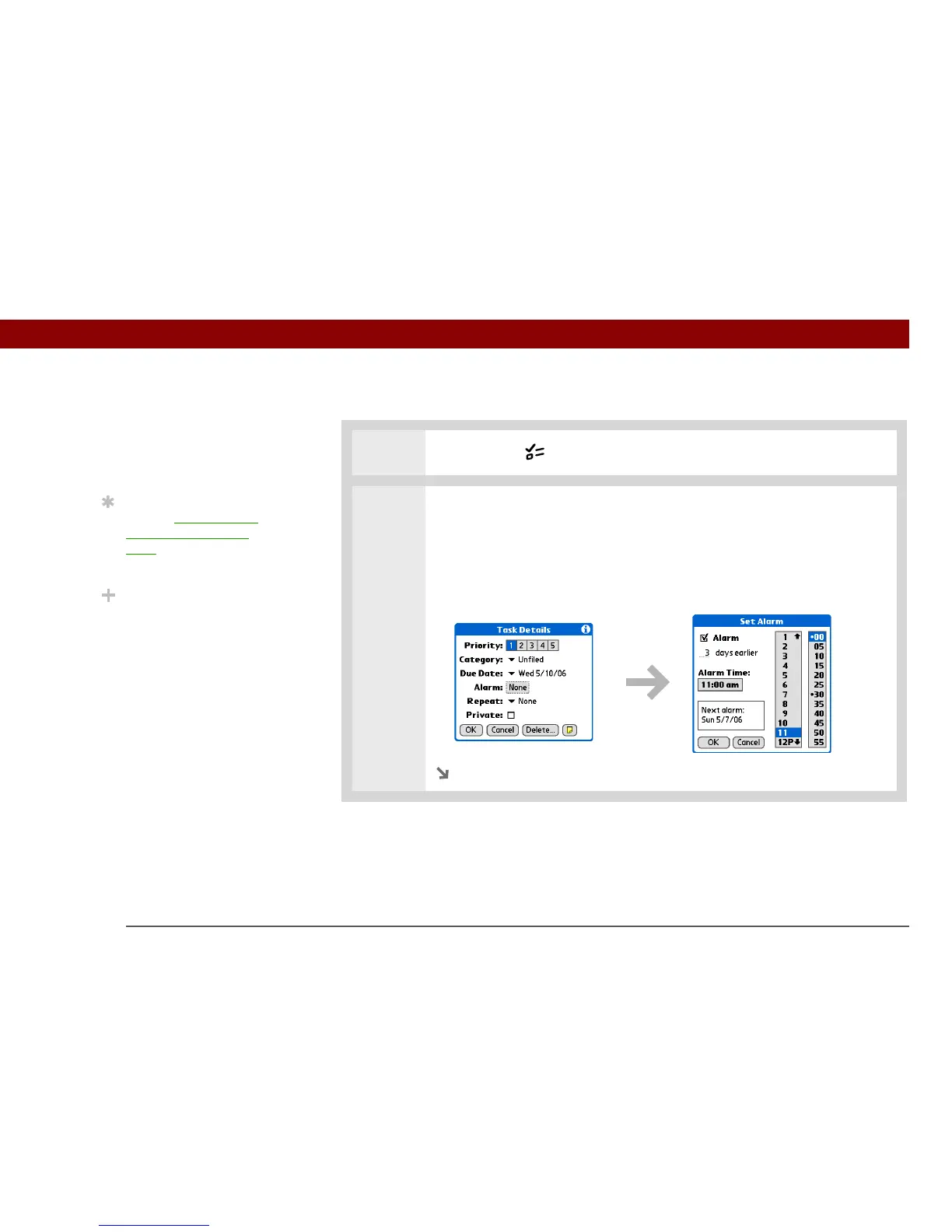
2 Open the Set Alarm dialog box:
a. Select the task you want to assign an alarm to.
b. Select Details.
c. Select the Alarm box.
Continued
Before You Begin
[ ! ]
Create a task and assign it
a due date. A task must
have a due date before
you can set an alarm.
Tip
You can customize the
alarm sound for your
tasks in the Tasks
Preferences dialog box.
Did You Know?
When you set an alarm, a
little alarm clock appears
to the right of the task
description.

Table of Contents

Other manuals for palmOne Tungsten E2

Related product manuals