ExpressionMR400InstructionsforUseImportantInformation1‐27
Removing the Battery from the wSpO2 Module
ToremovethebatteryfromthewSpO2module
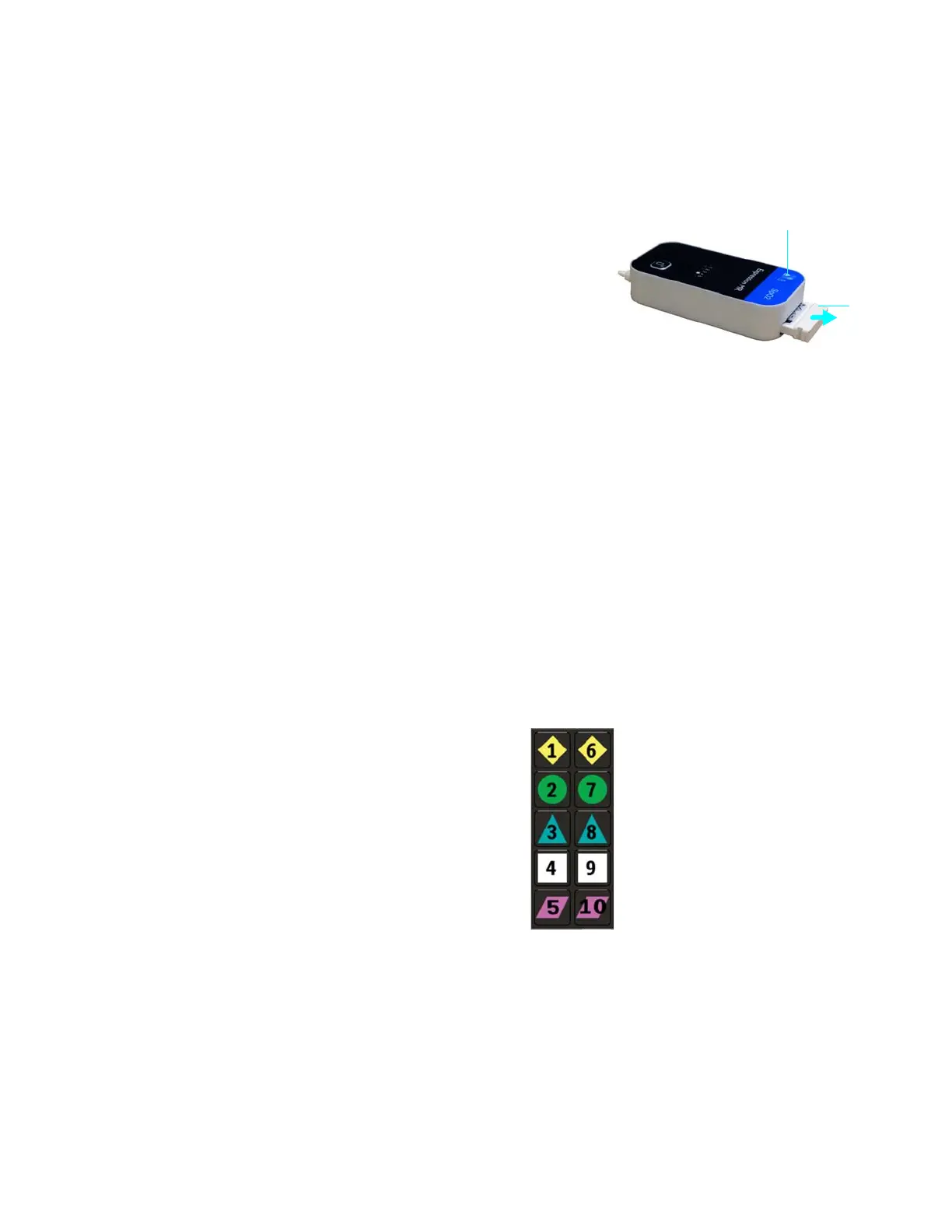
Pressthebatteryejectbutton(item1,right).Then
graspthepartiallyejectedmodulebattery(item2)
andpulltoremoveit.
Understanding Wireless Network Operations
AwirelessnetworkchannelisusedforsystemcommunicationbetweentheMR400cartandthe
wECGandwSpO2modules(and,ifequipped,theIP5).Allwirelessdevicesmustusethesame
wirelessnetworkchannelforpropersystemcommunications.Also,wheremultipleInvivo(Royal
Philips)MRIpatientmonitoringsystemsareinuse,
theselectedwirelessnetworkchannelshould
benotusedbyanyothersysteminyourfacility(forthefrequencyrange,seepage1‐8).
Setting the Wireless Network Channel of the Cart
AllcontrolsforselectingthewirelessnetworkchanneloftheMR400arelocatedonthecart’s
touchscreen.Uniquesymbolsandnumbersareusedtoidentifyeachavailablechannelforthe
MR400,asshownbelow.
Network channel 1 Network channel 6
Network channel 2 Network channel 7
Network channel 3 Network channel 8
Network channel 4 Network channel 9
Network channel 5 Network channel 10



 To Next Page