7-50
Exhaust cover
Removing the exhaust cover
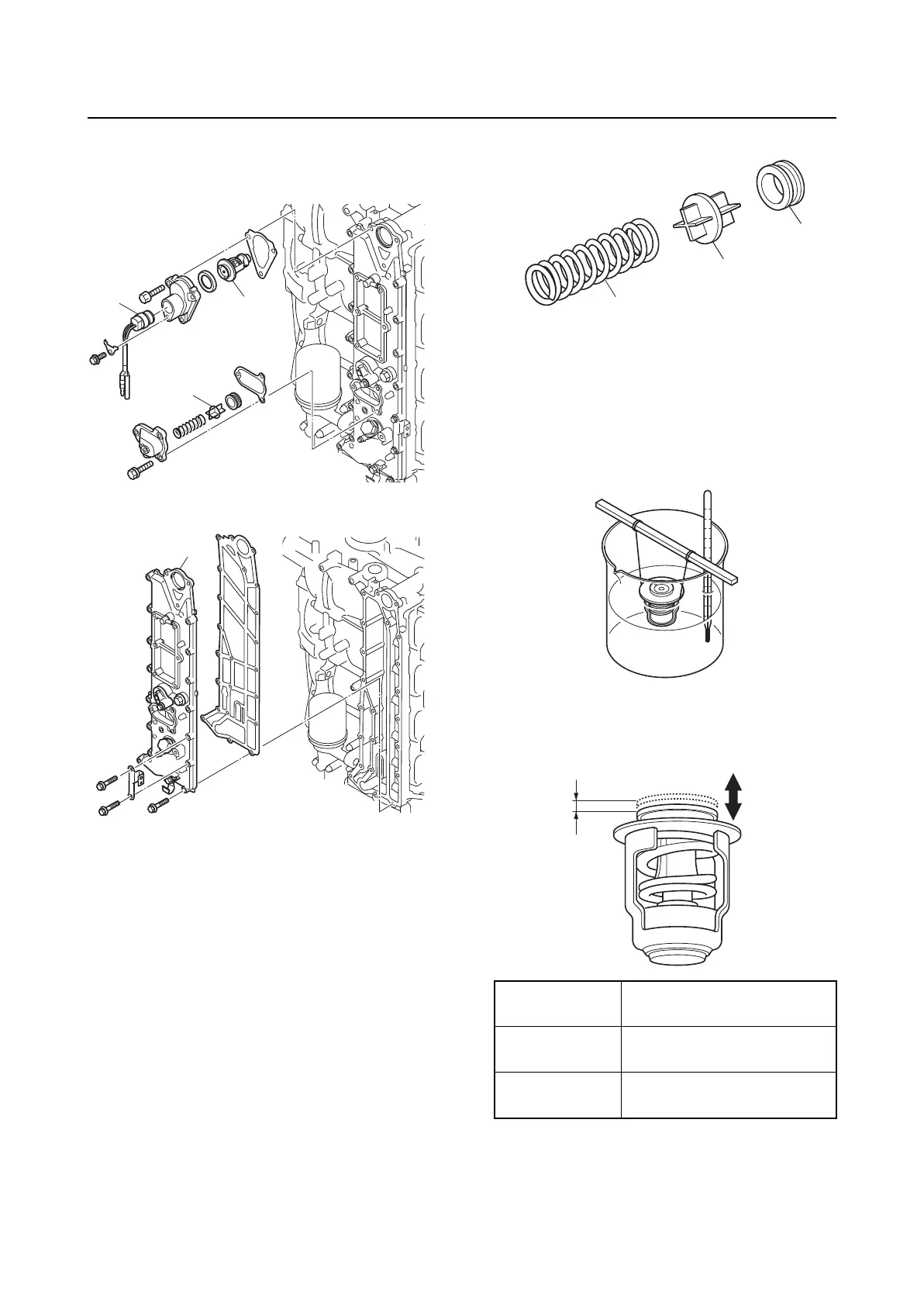
1. Remove the thermoswitch “1”, thermo-
stat “2”, and PCV “3”.
2. Remove the exhaust cover “1”.
Checking the PCV
1. Check the PCV “1”. Replace if damaged
or worn.
2. Check the grommet “2”. Replace if
deformed.
3. Check the spring “3”. Replace if
deformed or fatigued.
Checking the thermostat
1. Suspend the thermostat in a container of
water.
2. Place a thermometer in the water, and
then heat the water slowly.
3. Measure the thermostat valve opening
“a” at the specified water temperatures.
Replace if out of specification.
Checking the exhaust cover anode
1. Check the anodes. Clean if there is
grease, oil, or scales.
1
3
2
1
Water
temperature
Valve opening “a”
58–62 °C
(136–144 °F)
Starts opening
above 70 °C
(158 °F)
4.3 mm (0.17 in) or above
1
2
3
a


 To Next Page