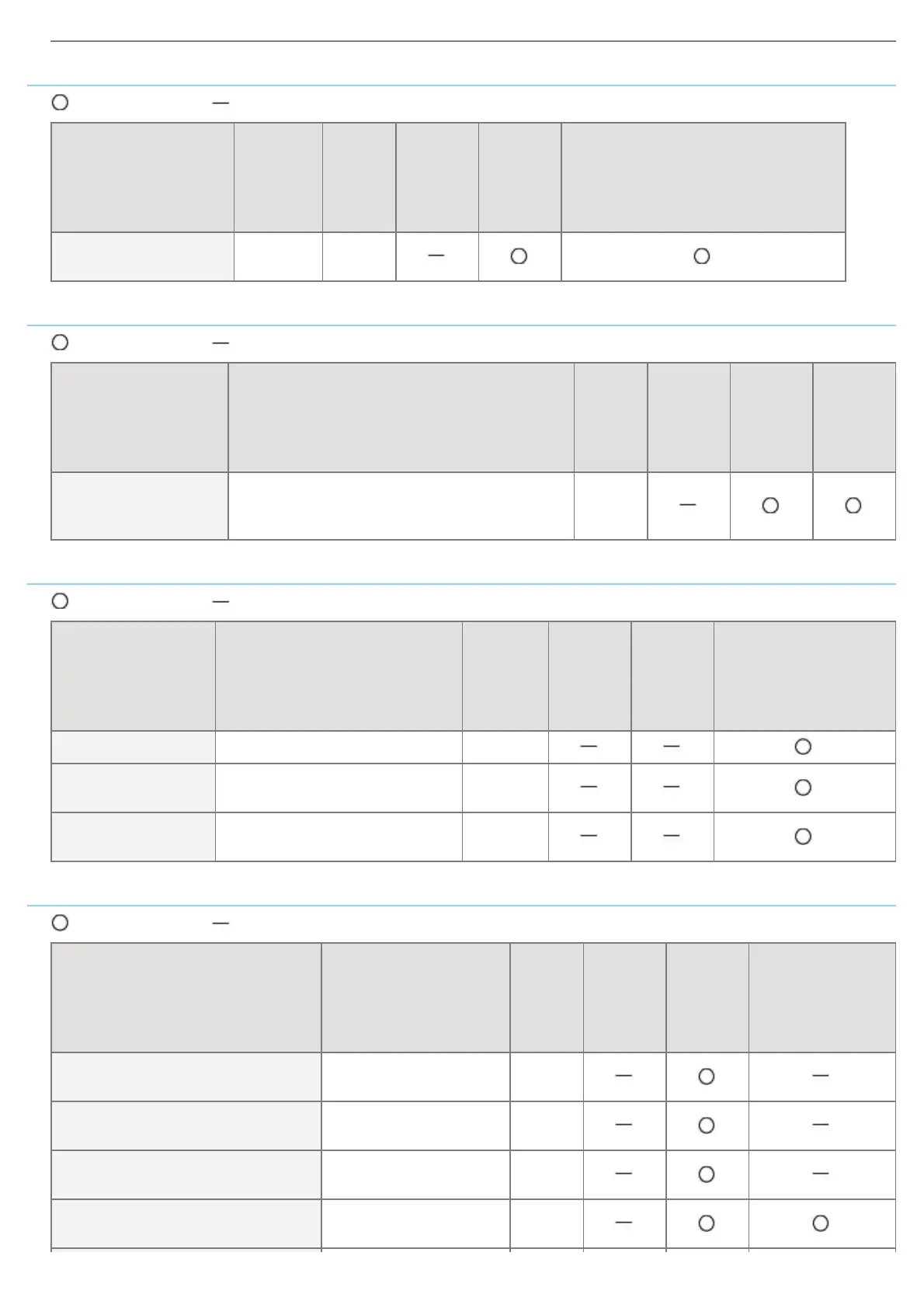
Spooler Settings
: Can be specified : Cannot be specified
Option Contents Default
Settings
Using
NetSpot
Device
Installer
Settings
Using
FTP
Client
Settings Using the Control Panel
[Use
Spooler](SPOOL_ENB)
ON, OFF OFF
Startup Time Setting
: Can be specified : Cannot be specified
Option Contents Default
Settings
Using
NetSpot
Device
Installer
Settings
Using
FTP
Client
Settings
Using
the
Control
Panel
[Startup Time]
(STRT_DELAY_TIME)
Waiting time from when you turn the printer
ON to when the printer starts obtaining the
address (0 to 300 seconds)
0
Ethernet Driver Setting
: Can be specified : Cannot be specified
Option Contents Default
Settings
Using
NetSpot
Device
Installer
Settings
Using
FTP
Client
Settings Using the
Control Panel
[Auto Detect] ON, OFF ON
[Communication
Mode]
[Half Duplex], [Full Duplex]
[Half
Duplex]
[Ethernet Type]
[10 Base-T], [100 Base-TX],
[1000 Base-T]
[10
Base-T]
E-Mail Print Settings
: Can be specified : Cannot be specified
Option Contents Default
Settings
Using
NetSpot
Device
Installer
Settings
Using
FTP
Client
Settings Using
the Control
Panel
[POP3 Server
Name](EMAIL_POP_ADDR)
Up to 48 alphanumeric
characters
(Blank)
[POP3 User
Name](EMAIL_POP_ACCOUNT)
Up to 32 alphanumeric
characters
(Blank)
[Password](EMAIL_POP_PASSWD)
Up to 32 alphanumeric
characters
(Blank)
[POP3 RX
Interval](EMAIL_POP_INTERVAL)
0 to 90 minutes 0
*
㻠㻜㻢㻌㻛㻌㻥㻣㻜



 To Next Page