permitted.
"Specifying the Job Operation Permission for End-Users"
(6) [Dept. ID]
If department ID is set, the department ID for the job is displayed.
(7) [Date/Time]
The date and time the job was input is displayed.
(8) Update Button
It refreshes the [Job Status] page display to the latest status.
(9) [Back to Page Top]
It moves the scroll box up to the top of the page.
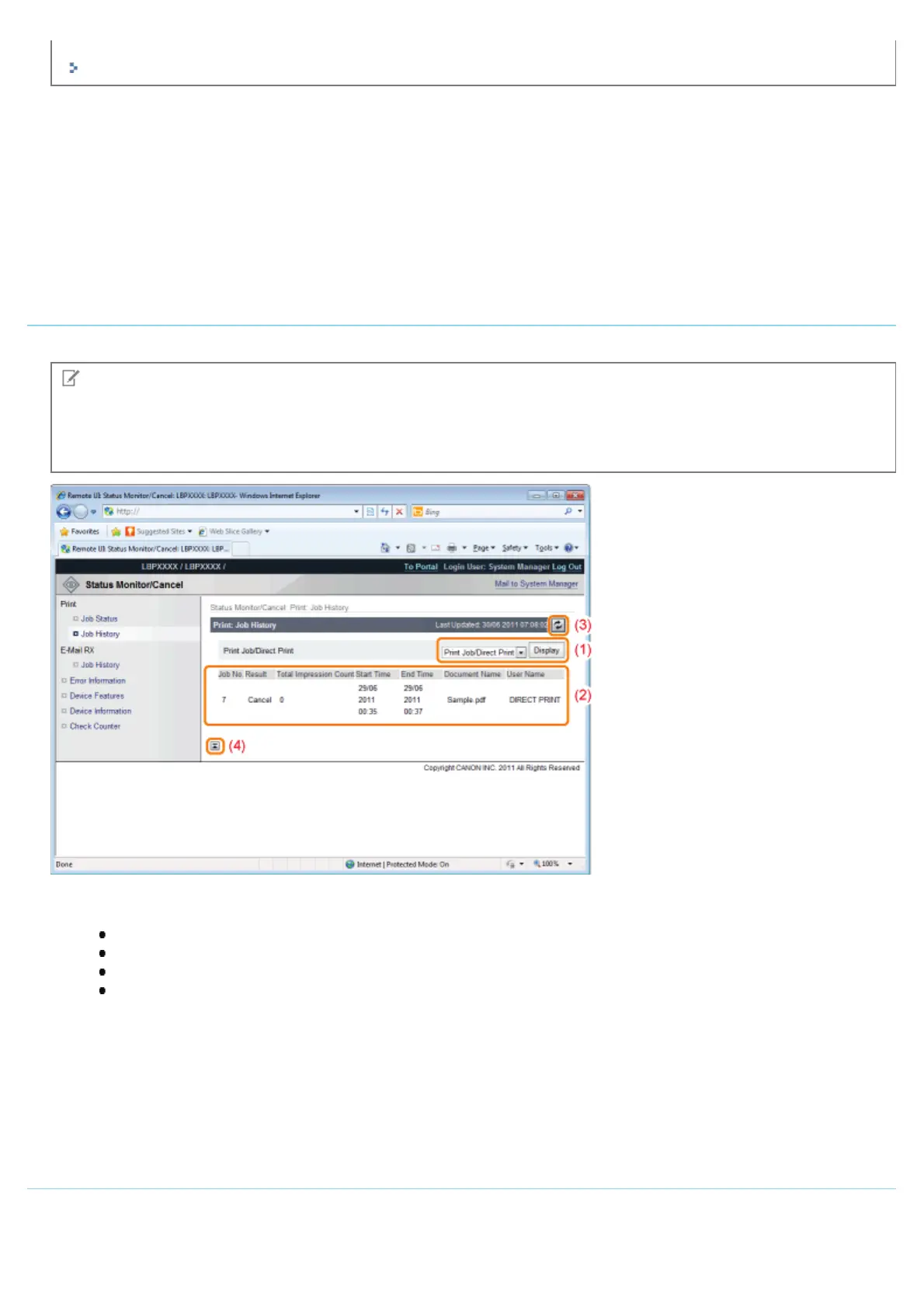
Print: [Job History] Page
The Print Job/Direct Print, saved job, report printing and e-mail Job History are displayed.
NOTE
[Job History] Page Display
It is possible to display Job History only when displaying job history is permitted by [Display Job History] of
[Settings/Registration] - [Management Settings] - [Security].
(1) Display Toggling
Select the job history to display. Only the selected type of job history is displayed in the list.
[Print Job/Direct Print]
[Stored Job]
[Report]
[E-Mail Print]
(2) Display Job History
The output job history list is displayed.
(3) Update Button
It refreshes the [Job History] page display to the latest status.
(4) [Back to Page Top]
It moves the scroll box up to the top of the page.
E-Mail RX: [Job History] Page
It displays the received e-mail history.
㻡㻟㻠㻌㻛㻌㻥㻣㻜



 To Next Page