Adjusting the Printing Position
Next, check the printout results of the Printing Position Adjustment Print and specify the direction and position to be
adjusted.
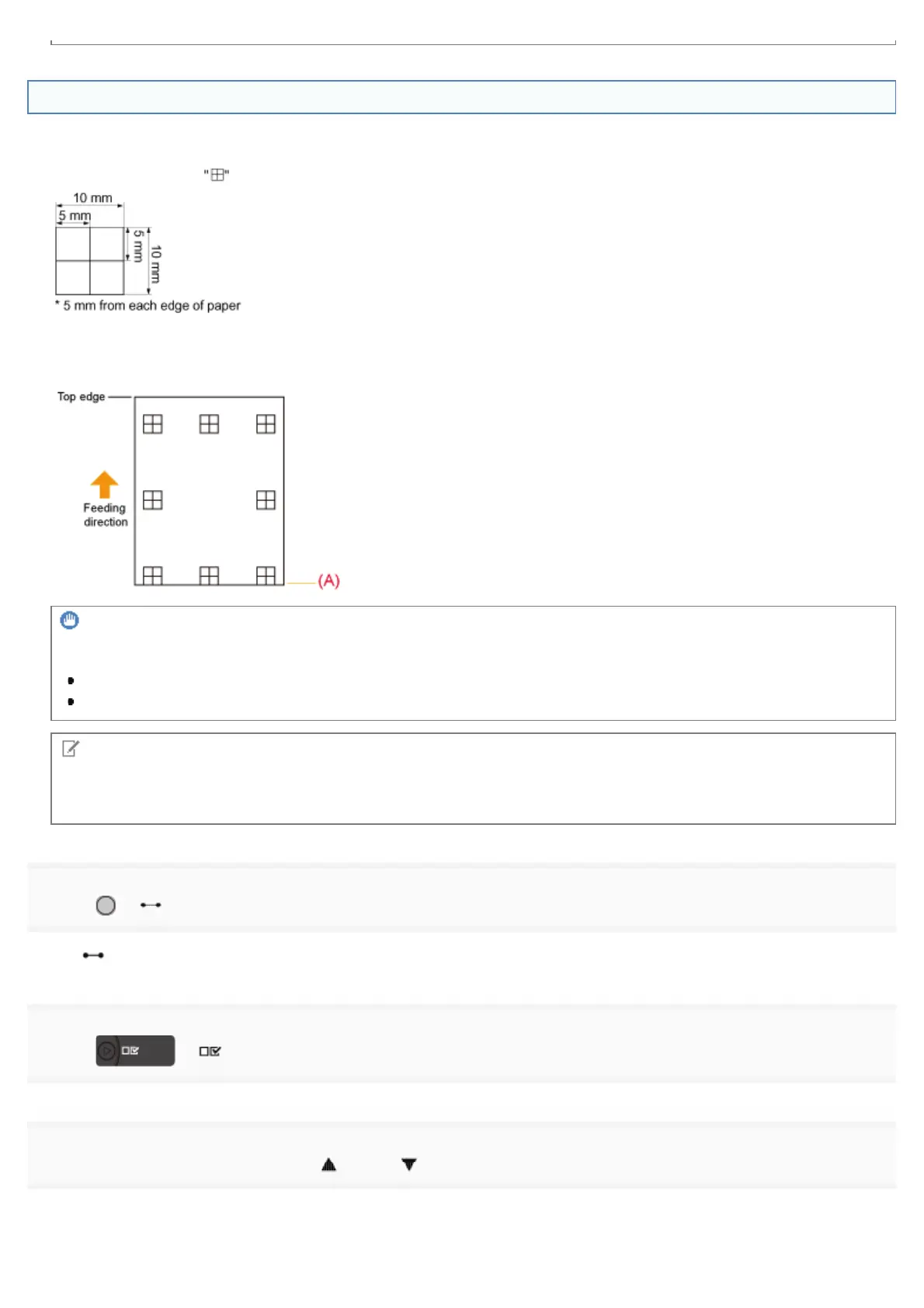
The measurements of
printed on paper are as the following:
This section describes the setting procedure for the following Printing Position Adjustment Print printed with Drawer 1
specified, as an example.
In this case, adjust "Y position" by "-5.0 mm" because the printing position of (A) should be moved upward by 5 mm.
IMPORTANT
Adjusting the printing position for 2-sided printing
Adjust the printing position of the first page using [Offset Y (2-Sided)] and [Offset X (2-Sided)].
The printing position of the second page depends on the settings for each paper source.
NOTE
Adjustable area
The printing position can be adjusted within a range from -5.0 to +5.0 mm.
1
Press [ ] ( : Online).
The
(Online) indicator goes off, allowing you to specify the settings on the control panel.
2
Press [ ] ( : Settings).
3
Select [User Maintenance] using [ ] and [ ], and then press [OK].
㻣㻣㻌㻛㻌㻥㻣㻜



 To Next Page