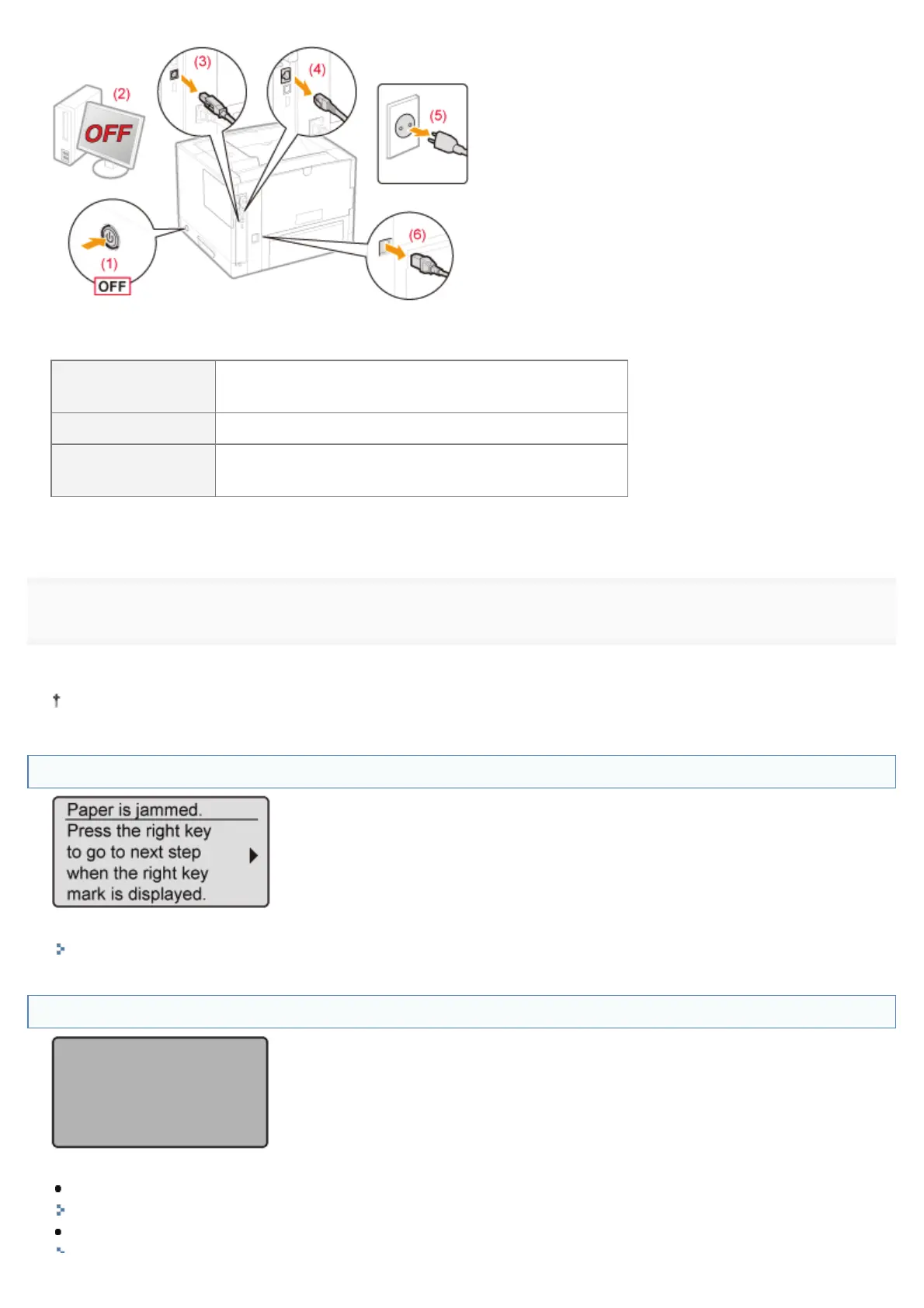
<How to disconnect the cable or cord>
USB cable
*
(2) Turn the computer off.
(3) Disconnect the cable from the printer.
LAN cable
*
(4) Disconnect the cable from the printer.
Power cord
(5) Disconnect the power plug from the AC power outlet.
(6) Disconnect the cord from the printer.
*
Whether the cable is connected or not varies depending on your environment.
4
Contact your local authorized Canon dealer to request service.
When contacting your Canon dealer, please report also the error code which you noted down in Step 2.
If you are not sure what the problem is, contact your local authorized Canon dealer.
A Message Appears in the Display
See the following and solve the problem according to the message.
"A Message Appears in the Control Panel"
The Display Is Turned Off
The printer has entered Sleep Mode while it is offline.
Release Sleep Mode.
"Sleep Mode"
Place the printer online.
㻤㻤㻤㻌㻛㻌㻥㻣㻜


 To Next Page
 Loading...











