Section 4: Tutorial
4 - 32 Euphonix CS3000/2000 Operation Manual
F3F1 F2 F4
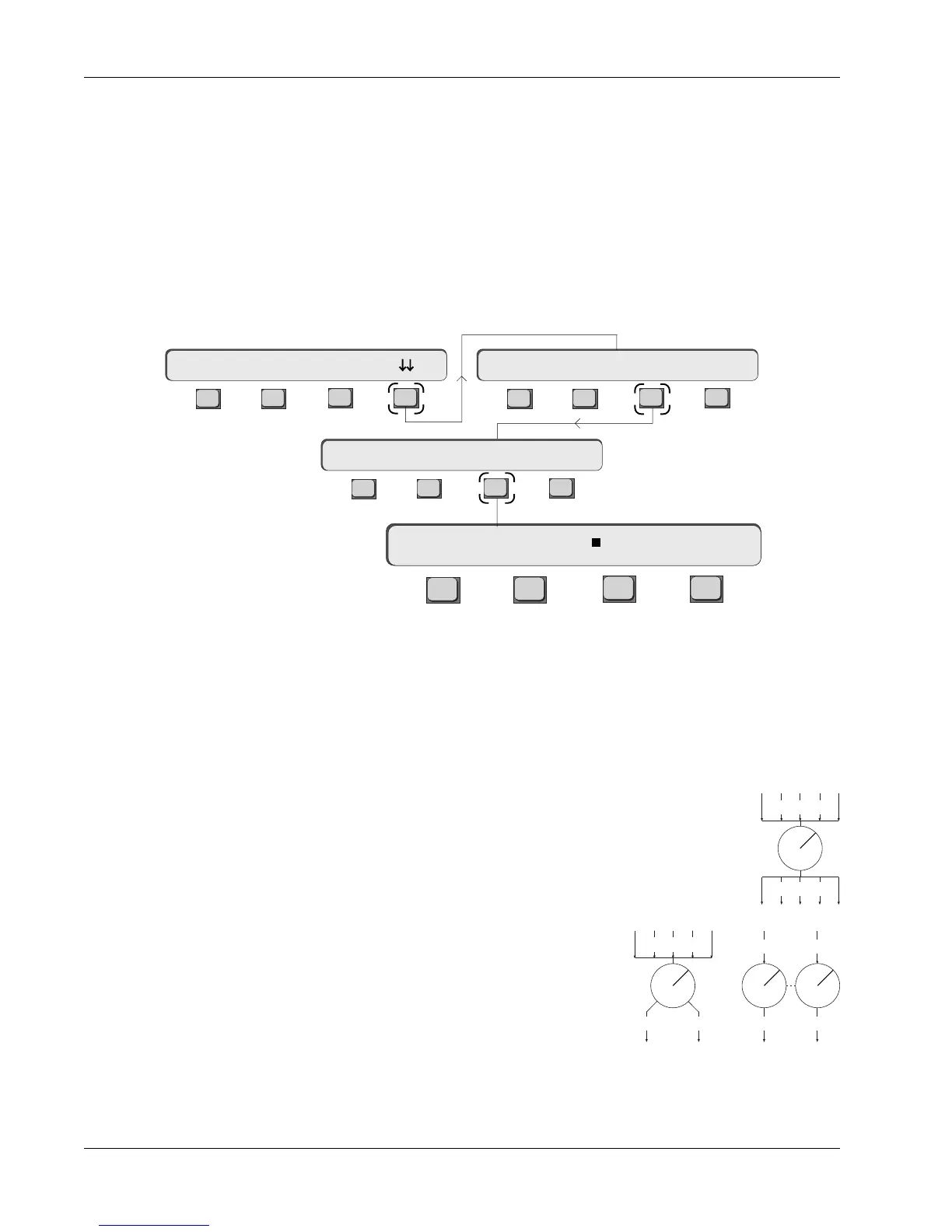
The small square indicates that the 0dB lock is engaged.
CS3000/2000 aux sends can be configured many different ways for different
applications. It is essential that the aux Modes be set
before
Source and
Assign primarily because under certain conditions, aux mode selection will
clear source and assign selections.
There are two mode groups. These are Mono Independent and Level/Pan
linked.
Mono Ind mode configures the A, B, C and D aux sends as
independent controls, each with separately selected source
modes and assigns. The first two Exercises delt exclusively with
Mono Ind mode.
L/P mode links the A/B or C/D aux block pairs
into mono in, stereo out level/pan linked
configurations or stereo in, stereo out level/
balance linked configurations.
Once source tracking is enabled, an aux control’s routing is automatically set
to Post fader. After setting an aux send to track an Upper fader, the PostLF
option becomes unavailable in the top level Aux Status menu. Conversely, if
tracking is set to Lower fader, the PostUF option becomes unavailable.
This concludes Exercise 6.
Additionally, you can lock the Mono Ind aux level control at 0dB. You can
access this mode from the top-level Aux Status menu by pressing [F4], [F3] and
then [F3] again:
Configuring Aux
Send Modes
Mono Ind Modes
(mono in/mono out)
Mono Independent
”0dB” Locked Mode
1B-> Mono 0dB L/P?
F3F1 F2 F4
F3F1 F2 F4
F3F1 F2 F4
16A-> SRC MODE ASGN
Aux Mode Select Menu
16A-> Mono 0dB L/P?
16A-> ON pre
Level/Pan Linked Modes
(mono in/stereo out)
(stereo in/stereo out)
M1 M2 ... L4
Bus 1 2 ... 8
M1 M2 ... L4
Odd Even
Odd Even
Odd Even



 To Next Page