Section 7: Automation
7 - 38 Euphonix CS3000/2000 Operation Manual
From the first Edit menu, press [F4] to toggle the selection:
F3F1 F2 F4
A third mode will be seen called REC.
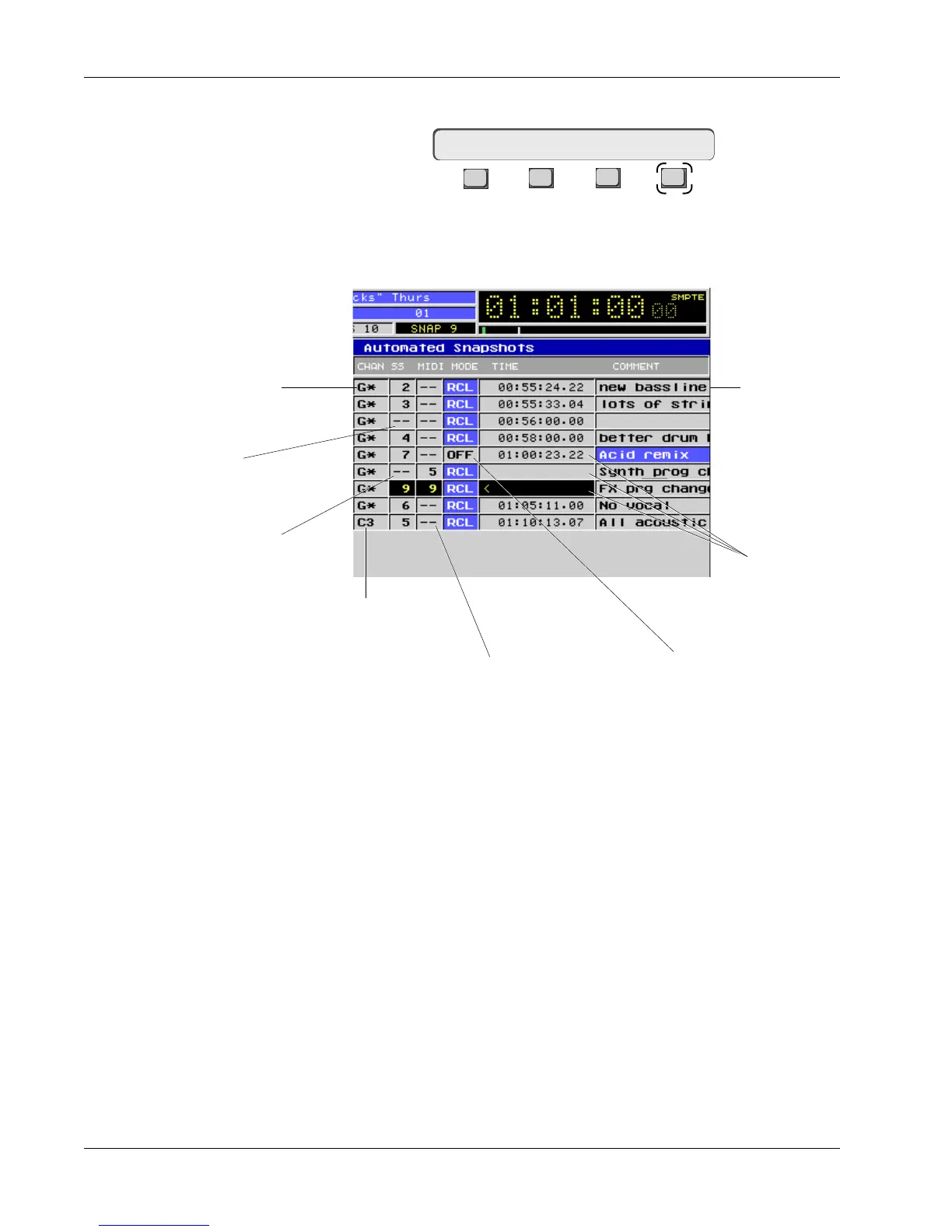
Following is a quick overview of the Automated Snapshot screen:
SnapShot
Suppression and
Automated
SnapShots
G* means global
with Master Section
Snapshot will recall
into channel 3 only
Neither channel nor MIDI
SnapShot will recall even
though event is in RCL mode
No channel SnapShot
will recall
No MIDI SnapShot will recall
3 simultaneous events
timecode blanked
Comments are from
the original channel
SnapShot name
OFF mode will prevent
event from firing
[G*] SS29 T/C RCL
One Final Note: SnapShot Suppression can be used to optimize the effective-
ness of Automated SnapShots. Suppressing SnapShot Recall from those
blocks which have automation prevents possible conflicts between Automa-
tion moves and snapshot recall. Since a block is automatically SnapShot
Suppressed the first time it is automated, this is handled in the background.
See the Snapshot Suppression heading earlier in this section for more infor-
mation.



 To Next Page