Section 4: Tutorial
Euphonix CS3000/2000 Operation Manual 4 - 7
F3F1 F2 F4
F3F1 F2 F4
**CH->Aud:OFF Aud->OFF
Mode I/O Master
Meter Config Menu
Meter Menu
F3F1 F2 F4
F3F1 F2 F4
1CH->Aud:OFF Aud->OFF
1CH-> OUTs METER Route
The two asterisks (**) preceding the channel designator indicate that we are
affecting all I/O meters simultaneously.
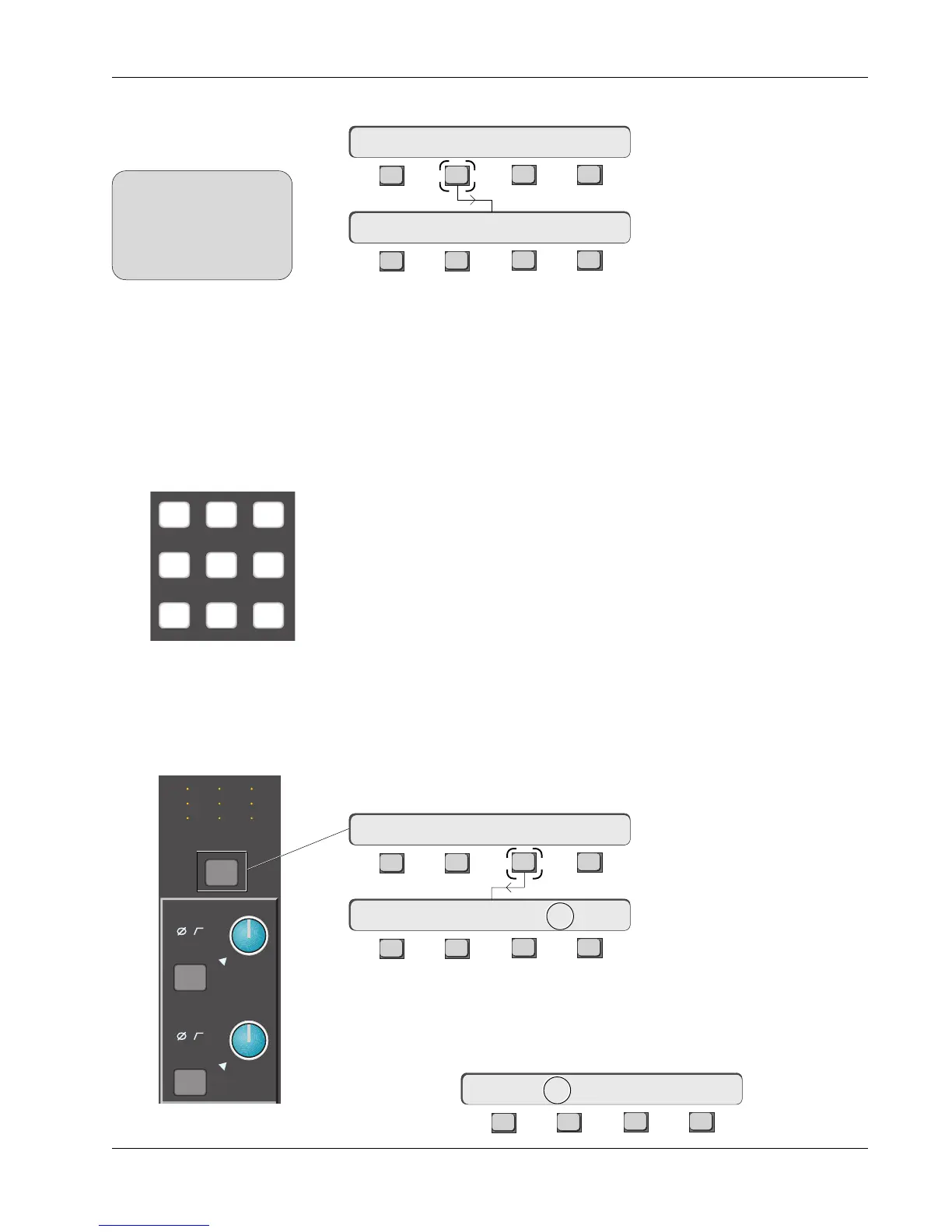
Metering presets allow you to easily configure meter pairs. Pressing any of the
DSC Numeric keypad keys recalls these Meter selection presets. Following is
a list of the available presets:
KEY LEFT METER: RIGHT METER:
E Rev F Rev E Rev F Rev
[0] — Aud:OFF Aud:OFF Aud:OFF Aud:OFF
[1] — Aud:M1 Aud:M1 Aud:M2 Aud:M2
[2] — Aud:L3 Aud:L1 Aud:L4 Aud:L2
[3] — Aud:MT Aud:L3 Aud:L4 Aud:L4
[4] — Aud:LFL Aud:CMB Aud:LFR Aud:MT
[5] — Aud:UFL Aud:MT Aud:UFR Aud:CMB
[6] — Lvl:UF Aud:LFL Lvl:LF Aud:LFR
[7] — Lvl:M1 Aud:UFL Lvl:M2 Aud:UFR
[8] — - - - Lvl:UF - - - Lvl:LF
[9] — - - - Lvl:M1 - - - Lvl:M2
Pressing the DSC [*ST] key while the Meter Config menu is visible, switches
you into individual meter config mode. There is another way to set meter
modes for individual channels. Press a channel’s attention key located just
under the I/O channel’s meter array, then press [F3] (METER):
For the global setup, press the DSC [Mtrs] key, then [F2] (I/O):
Global Channel (I/O)
Meter Mode Selection
SIDE NOTE:
Assigning meter modes
globally by using the DSC
Mtrs key, always overrides
and changes any individual
channel meter assignments.
Metering Mode Presets
789
456
123
Individual Channel (I/O)
Meter Mode Selection
M
L
L
M
L
L
M
L
L
M1
M2
Out 1 Out 2 Out 3
ovld
Pwr
Pad
12
12
34
12
12
34
12
12
34
ovld
Pwr
Pad
Starting with unconfigured meters, attention is initially directed to the right
channel meter as indicated by the arrow between Aud and OFF shown above.
Press [F2] to direct attention to the left meter:
F3F1 F2 F4
1CH->Aud->OFF Aud:OFF



 To Next Page