Section 4: Tutorial
Euphonix CS3000/2000 Operation Manual 4 - 69
F3F1 F2 F4
F3F1 F2 F4
F3F1 F2 F4
F3F1 F2 F4
RollBack 10 Secs Max90
Cycle Head Edit
Roll Preroll
PreRoll 0 Secs Max10
RollBack Menu
PreRoll Menu
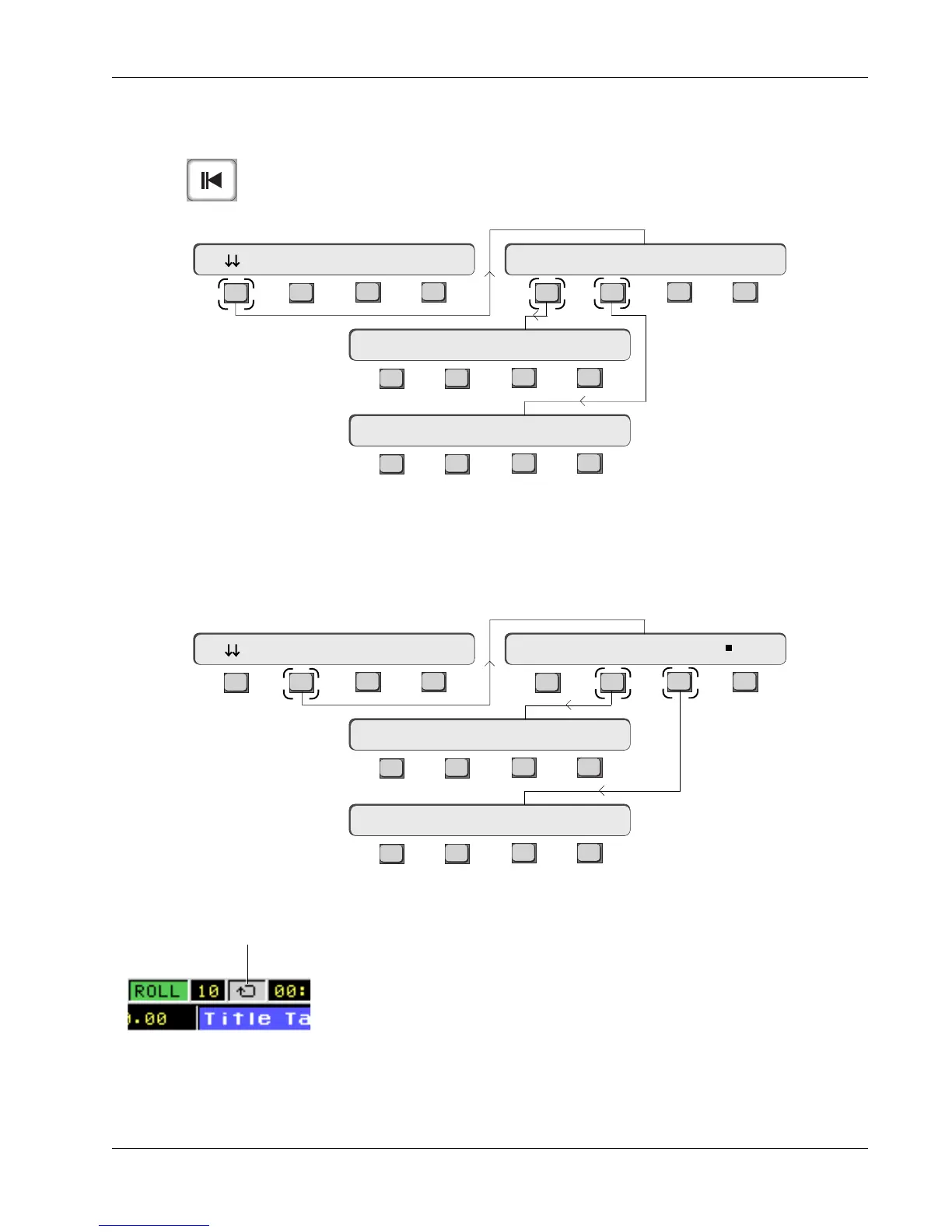
The RollBack function enables the user to locate the MMC device or VTM a
predetermined amount before the current position. This predetermined amount
is set in the RollBack menu. PreRoll is a timecode value that is applied to any
Locate, Cycle or RollBack. From the Cue List menu, press [F1] (down arrows)
and [F1] (Roll) to access the RollBack menu or [F2] (Preroll) to access the
PreRoll menu:
Cycling
By inputting the appropriate timecode values under the Start and End menus,
you can get the tape to cycle between these two timecode points.
Pressing [F1] in the Cycle menu toggles cycling on and off. When cycling is on,
the Cycle icon in the Cue list turns from gray to green.
The three choices in this menu, Head, Cue, and Now, let you input cycle start
and end points at the push of a single button. “Head” (F2) automatically inputs
the title’s Head timecode value; “Cue” (F3) inputs the location of the cue
currently highlighted in the Cue list; “Now” (F4) inputs the timecode location
F3F1 F2 F4
F3F1 F2 F4
F3F1 F2 F4
F3F1 F2 F4
Start : Head Cue Now
Cycle Head Edit
End : Tail Cue Now
Off Start End LTS
Cycle icon turns green
when Cycling is on
Cue list
RollBack and
PreRoll
Rollback key
Time values for RollBack and PreRoll are entered using the DSC Numeric
keypad.
Cycling is set up via the Cycle menu. From the Cue List menu, press [F2] (Cycle)
and then [F2] (Start) or [F3] (End):



 To Next Page