Section 4: Tutorial
Euphonix CS3000/2000 Operation Manual 4 - 63
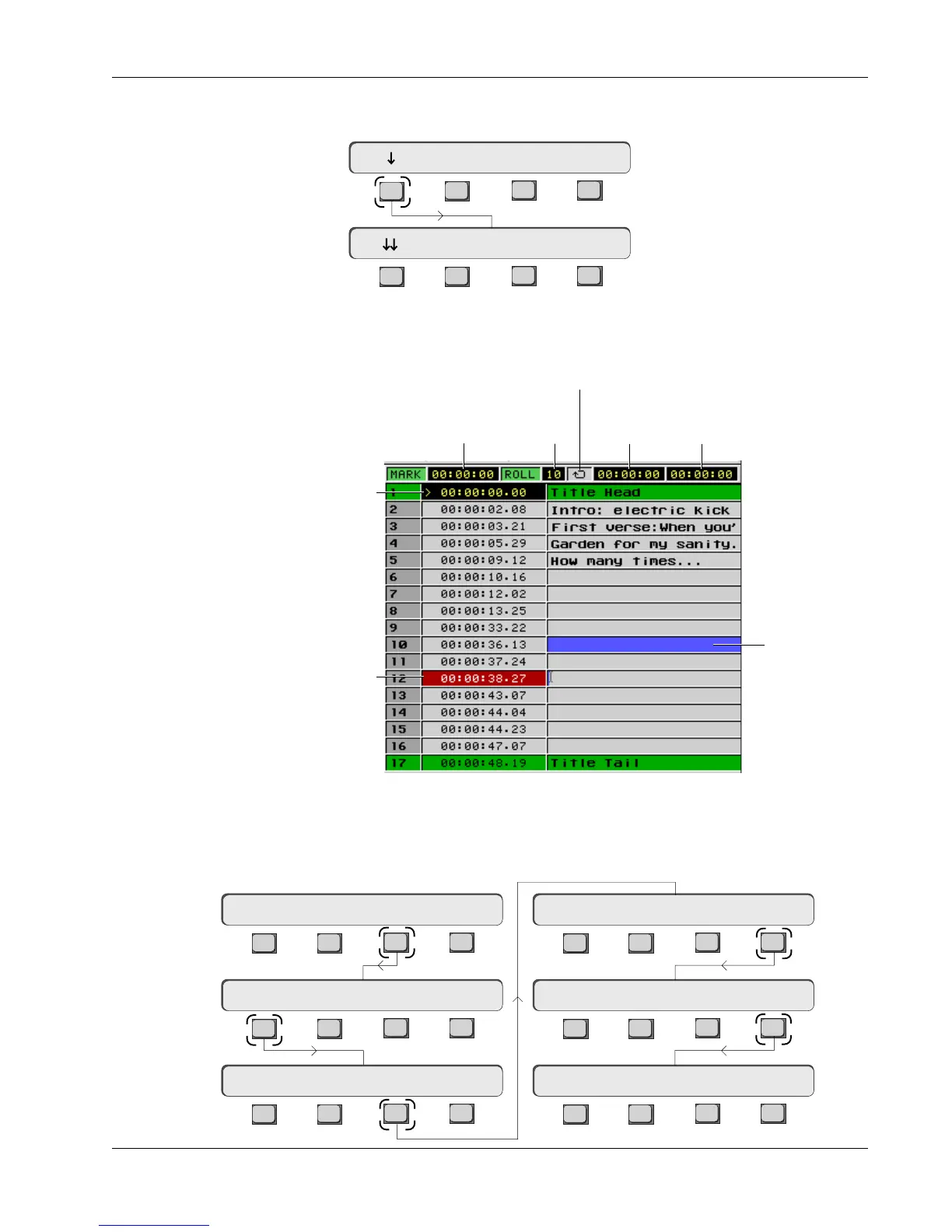
The Cue List menu and screen are viewed by pressing [F1] (down arrow) from
the Locate menu:
Cue List and Menu
The Cue List includes the Title Head and Tail for reference. The Title Head and
Tail are shown in the Pass Control screen cue window as well. These points
are edited in the Title Setup menu:
Manipulation of cues is done via the Cue List menu and its submenus. The Cue
List screen itself does not appear until the Cue List menu is displayed:
F3F1 F2 F4
F3F1 F2 F4
Cycle Head Edit
00:00:00.00 Mark Cue
Cue List Menu
Locate Menu
F3F1 F2 F4
F3F1 F2 F4
F3F1 F2 F4
F3F1 F2 F4
F3F1 F2 F4
F3F1 F2 F4
Setup Snap System Grps
File F-Link GPI MIDI
Disk Project Title Mix
ReNm? Del? Copy? Setup
New? Load? Save? Utils
T/C Display hh:mm:ss
A typical Cue list
White numbers on red
background indicate time-
code value being edited
Yellow numbers on black
background indicate
current position of MMC
device or VTM
Mark
Position
Roll-
Back
Cycling
End T/C
Cycling
Start T/C
Cycling Indicator
Current Cue
Name Field



 To Next Page