Section 8: Grouping System & Fader Linking
8 - 4 Euphonix CS3000/2000 Operation Manual
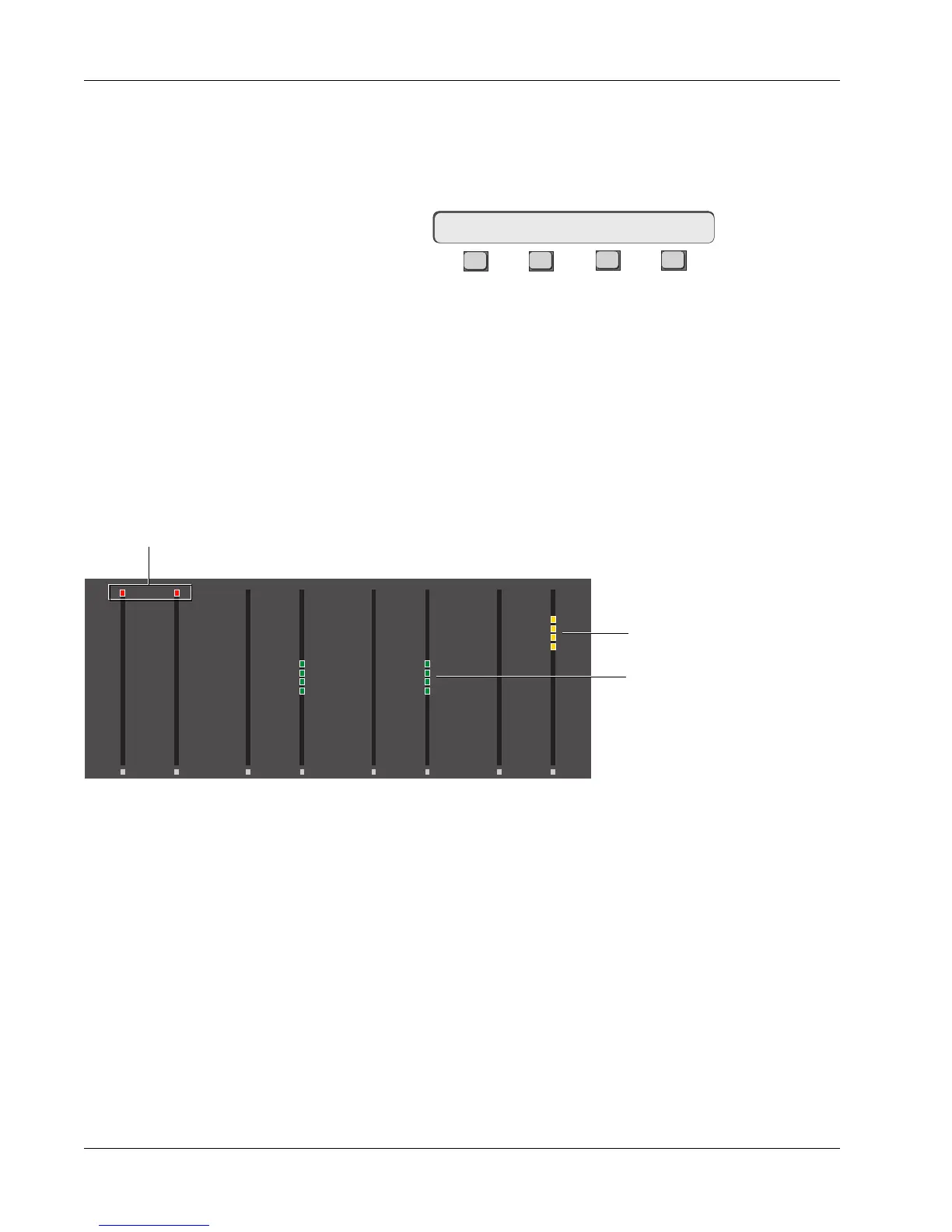
You will see four (4) amber segments light on the master fader’s channel meter
block above the “7” mark.
Once you have selected a master, the SmartDisplay automatically changes to
show the Slave Select menu:
F3F1 F2 F4
At this point the next fader block key you press will assign that fader as a
slave. Assign lower faders 22 & 23 as slaves. 4 green LED segments will
illuminate on each channel’s right-hand meter, indicating that these lower
faders are now slaves to the channel 24 lower fader master.
As seen on the previous page, group masters are indicated by 4 amber LEDs
above the 7 mark on the meter bar. Slaves are shown in green below the 7
mark on the meter bar. Upper fader masters and slaves are indicated in the
channel’s left meter and lower fader masters and slaves are indicated in the
channel’s right meter. Faders not available to be grouped as masters or slaves
(i.e., those faders that are already part of a group) are indicated with a single
red segment at the top of the channel meter bar.
6
3
3
6
12
33
6
3
3
6
12
33
6
3
3
6
12
33
6
3
3
6
12
33
6
3
3
6
12
33
6
3
3
6
12
33
6
3
3
6
12
33
6
3
3
6
12
33
00 00 00 00
0
6
12
18
24
30
36
42
48
60
0
6
12
18
24
30
36
42
48
60
0
6
12
18
24
30
36
42
48
60
0
6
12
18
24
30
36
42
48
60
0
6
12
18
24
30
36
42
48
60
0
6
12
18
24
30
36
42
48
60
0
6
12
18
24
30
36
42
48
60
0
6
12
18
24
30
36
42
48
60
UF LF
24
UF LF
23
UF LF
22
UF LF
21
Any faders not available
(those in other groups) show
red at the top of the meter.
Masters are shown in amber
Slaves are shown in green
Slave Select: MSTR
Meters in Group Mode
Select Group Slaves
The channel meters will revert to normal input and output signal metering
when you have completed your selections and [Esc] back to the Main menu.
Press [Esc] twice to exit the Groups menus and return to the Main menu. With
audio going through lower faders 22 & 23 (CD player for example), check the
grouping by setting relative levels on 22 & 23 and then adjusting them with
the master fader on channel 24, having first nulled the master. With the
master fader at the null point (the 8 mark on the fader scale) you will get no
level change in the slaves. Moving the master up or down from the null point



 To Next Page