Section 4: Tutorial
4 - 16 Euphonix CS3000/2000 Operation Manual
F3F1 F2 F4
The range of the Q on the mid bands is variable from 0.32 at its broadest to
11.6 at its narrowest. The default Q value is 0.51.
Musical Note Value
Display
16E1–> lmF E7 –>M1>-
SmartDisplay in Musical Note mode
Q Range
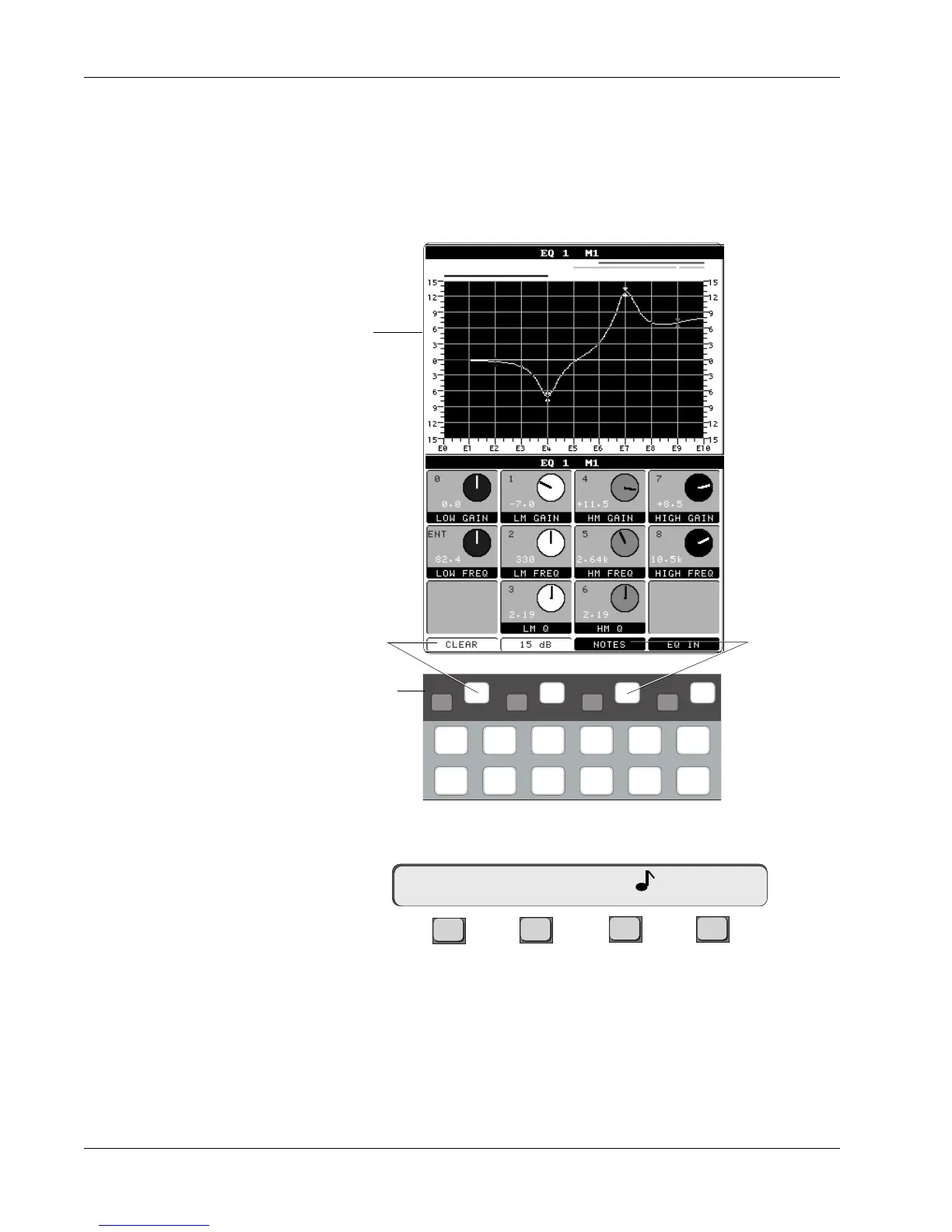
The EQ can be switched from Frequency to Note mode. In Note mode, the
horizontal scale on the graph as well as the SmartDisplay frequency values
will show musical notes on a 12 note, A440 scale as the controls are adjusted.
Note mode can be entered while in EQ mode by pressing the Special Function
key corresponding to the Notes function in the DSC screen (see diagram
below), or by pressing the SmartDisplay [F3] key:
i
dt
i
dt
i
dt
i
dt
DynEQ
Pg 1 Pg 2 Pg 3 Pg 4
Aux Pan
Assign
Bus
Master
Chan
List
[F3] changes
to Note mode
Screen display
EQ screen
[F1] clears EQ and
resets to default
Special Function keys
of Assignable Rotary
Control Set



 To Next Page