Section 9: Dynamics
9 - 30 Euphonix CS3000/2000 Operation Manual
Adjusting
Dynamics
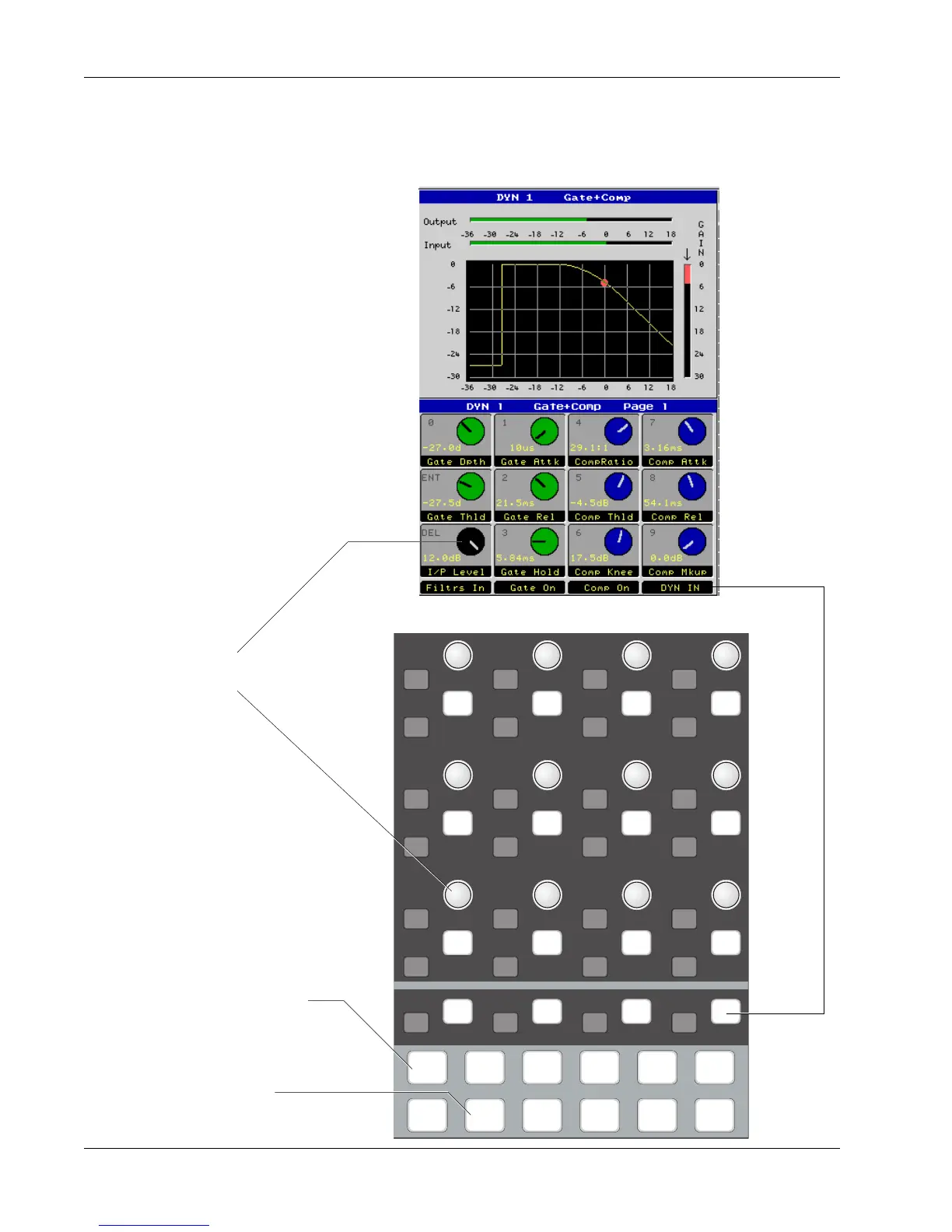
Dynamics operation from the DSC is very intuitive. The rotary controls map up
to the knobs on the screen which show each knob's position, function and
parameter value. Turning the knob makes the virtual knob move at the same
time.
i
dt
i
dt
i
dt
i
dt
i
dt
i
dt
i
dt
i
dt
i
dt
i
dt
i
dt
i
dt
i
dt
i
dt
i
dt
i
dt
i
dt
i
dt
i
dt
i
dt
i
dt
i
dt
i
dt
i
dt
i
dt
i
dt
i
dt
i
dt
DynEQ
Pg 1 Pg 2 Pg 3 Pg 4
Aux Pan
Assign
Bus
Master
Chan
List
Dynamics key illuminates to
show control is available
Page 1 key illuminates to show
Page 1 (Gate/Compressor)
This screen control
maps down to this
knob
Assignable Switch
Function (Dynamics
In/Out)
Dynamics Page 1



 To Next Page