Section 7: Automation
7 - 8 Euphonix CS3000/2000 Operation Manual
DSC Dedicated
Automation Keys
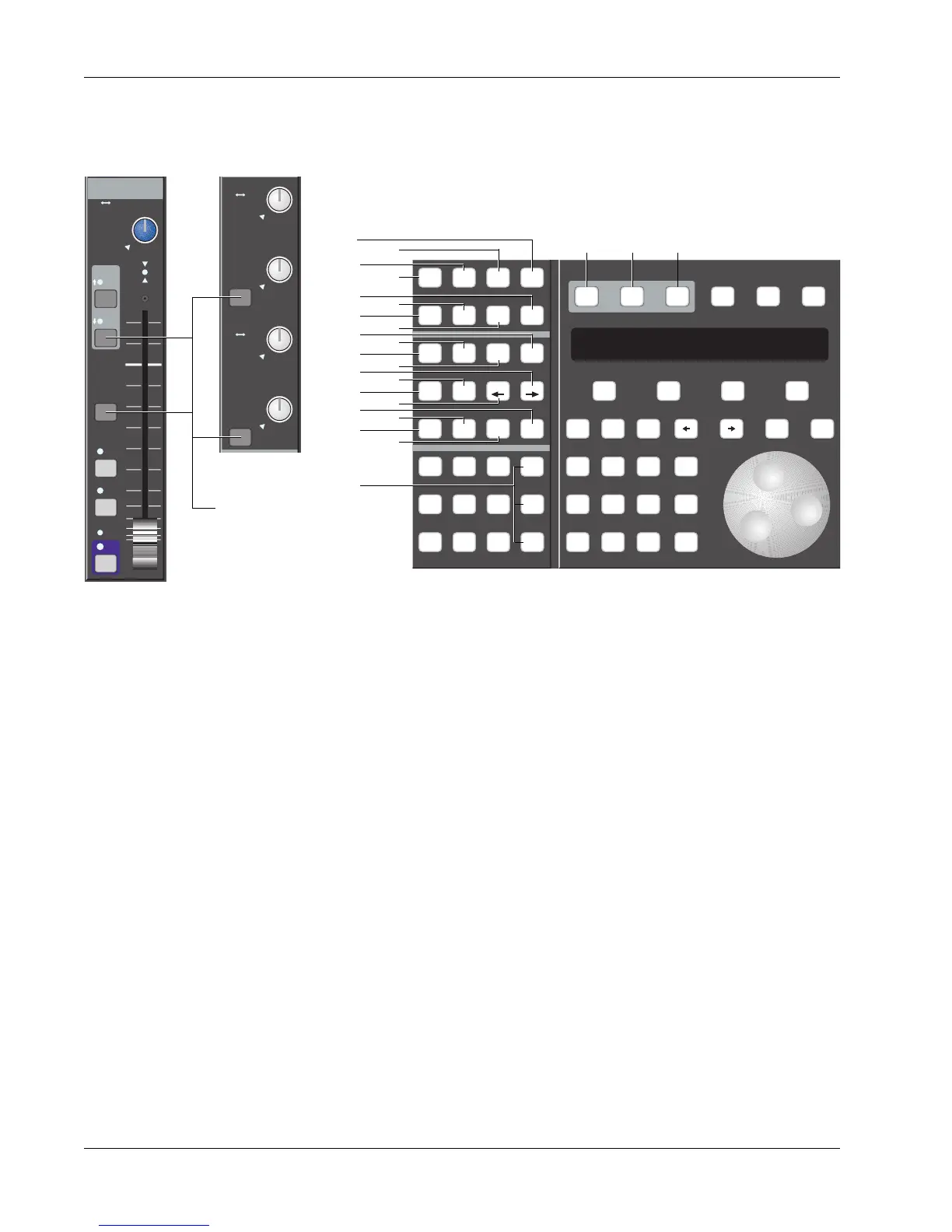
At the bottom of the DSC, are the Dedicated Automation keys. This is the
main control area for the automation system. The Dedicated Automation
keys and their functions are listed below. Mix On, Pass Rec, Pnch, and at
least one of the four Object Select Keys must be lit for automation to record
your moves. The Attn, Pnch and Tplt keys change the function of the console
block attention keys when in Pass Record mode.
1. [Attn]: When lit, console is in Attention mode. Dark grey block keys on I/O function as Attention keys.
2. [Pnch]: When lit, console is in Punch mode. Dark grey block keys on I/O function as Automation Punch keys.
3. [Tplt]: Accesses template screen/SmartDisplay for viewing and configuring the various system templates.
4. [Auto SS]: When lit, snapshot recalls are recorded to timecode. Screen display shows recorded event list.
5. [Mix On]: Turns Mix On when a title is loaded.
6. [Pass Rec]: Indicates when automation is armed. Also initiates a new pass without stopping the tape.
7. [Pass Ctrl]: Accesses Automation Viewer screen of pass tree, cues, automated SnapShots and mix moves.
8. [Set]: Template “Set” mode. Automation will not play back on an object in Set mode.
9. [Iso]: Template “Isolate” mode. Isolates entire channel from automation Punch-in and SnapShot Recall.
10. [Dyn]: Template “Dynamic” mode. Allows automation playback & record on a console object.
11. [Safe]: Template “Safe” mode. Locks console objects into their Set, Iso, and Dyn modes.
12. [Fader/A]: Object Select key. Selects fader and Aux A for punch-in and template configuration.
13. [Pan/B]: Object Select key. Selects pan and Aux B for punch-in and template configuration.
14. [On/C]: Object Select key. Selects On and Aux C for punch-in and template configuration.
15. [D] (EQ/D): Object Select key. Selects Aux D and EQ for punch-in and template configuration.
16. [Trim]: Automation Trim mode. Retains move data but allows relative level trim of element in record.
17. [ATO]: Currently unused.
18. [W in]: Write In. When lit, the object’s level/position at punch out will be written back to 00:00:00.00.
19. [W out]: Write Out. When lit, the object’s level/position at punch out will be written out to 24:00:00.00.
20. [ABS Offset]: Currently unused.
21. [MBR]: Monitor Before Record key. Allows audio preview before automation write.
22. [Move Rec]: Activates touch-record feature of the DSC moving faders.
23. [Glide]: Currently unused.
24. “All“ keys: Applies in template modes, object selections and punch-in to all upper, all lower or all auxes.
Setup Snap System Grps
Mix
On
Pass
Rec
Pass
Ctrl
Grps Mtrs
Attn Pnch Tplt Auto
SS
Set Iso Dyn Safe
Fader
A
Pan
B
On
CD
Trim ATO W in W out
Abs
Offset
MBR Move
Rec
Glide
M1 M2 DIR All
aux
L1 L2 ST1 All
upper
L3 L4 ST2 All
lower
F1 F2 F3 F4
789
456
123
0 Enter Del
*
ST
-
DIR
+
Bus
Clr Esc
23
21
24
22
20
18
16
19
13
8
11
2
14
17
15
10
9
1
4
3
675
BUS
BUS
A
B
C
D
A1 A2
A3 A4
A5 A6
A7 A8
PAN BAL
M1 M2
L1 L2
L3 L4
ovld
A1 A2
A3 A4
A5 A6
A7 A8
PAN BAL
M1 M2
L1 L2
L3 L4
ovld
Input
EQ•Dyn
BUS
Grp
1
2
L
R
ON
AFL
PFL
DIR
ST1
M1 M2
L1 L2
L3 L4
ovld
PAN BAL
ST2
Block
attention
keys



 To Next Page