Section 1: Introduction
1 - 8 Euphonix CS3000/2000 Operation Manual
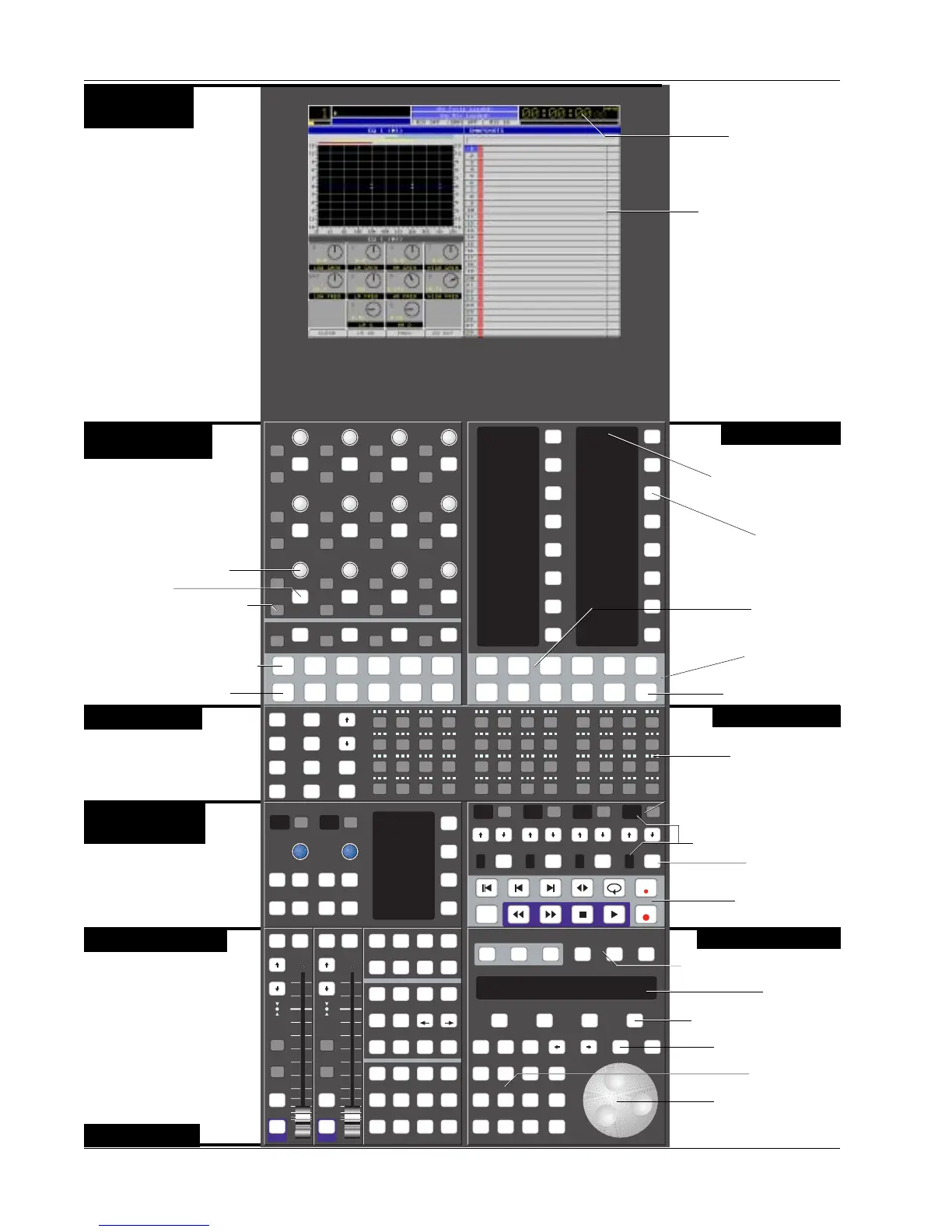
The DSC
Assignable Keys
Twin Moving Faders
Master Control Panel
Channel Selection
Dedicated Keys
Machine Control
Assignable Rotary
Controls
Safe Safe
i
d t
i
d t
i
d t
i
d t
i
d t
i
d t
i
d t
i
d t
i
d t
i
d t
i
d t
i
d t
i
d t
i
d t
i
d t
i
d t
i
d t
i
d t
i
d t
i
d t
i
d t
i
d t
i
d t
i
d t
i
d t
i
d t
i
d t
i
d t
REC
Slct
onln
REC
Slct
onln
REC
Slct
onln
REC
Slct
onln
REC
Slct
onln
REC
Slct
onln
1
2
4
6
8
1
2
4
6
8
i
d t
i
d t
i
d t
i
d t
1
2
3
4
5
6
7
8
9
10
11
12
13
14
15
ComMic
Talk
16
Setup Snap System Grps
Rec
Auto
DynEQ
Faders
Mon
Select
Snap
Shot
Preset Macro
Pg 1 Pg 2 Pg 3 Pg 4
Store
Mon
Cnfg
Solo
Mstr
Ctrl
TC
Slave
Studio
Route
2
4
6
1
3
5
Pg 1 Pg 2 Pg 3 Pg 4
Aux Pan
Assign
Bus
Master
Chan
List
45
16 17
678
18 19 20
9101112
21 22 23 2413 14 15
!
1
@
2
#
3
$
4
%
5
^
6
&
7
*
8
(
9
)
0
_
-
+
=
Q W E R T Y U
del
I O P
123
tab
25
shft
26
A
27
S
28
D
29
F
30
G
31
H
32
J
33
K
34
L
35
:
;
36
"
'
37
spc
38
Z
39
X
40
C
41
V
42
B
43
N
44
M
45
<
,
46
>
.
47
?
/
48
ent
Rec Rec Rec Rec
Mix
On
Pass
Rec
Pass
Ctrl
Grps Mtrs
Attn Pnch Tplt Auto
SS
Set Iso Dyn Safe
Fader
A
Pan
B
On
CD
Trim ATO W in W out
Abs
Offset
MBR Move
Rec
Glide
M1 M2 DIR All
aux
L1 L2 ST1 All
upper
L3 L4 ST2 All
lower
Solo Solo
GrpGrp
On On
F1 F2 F3 F4
789
456
123
0 Enter Del
*
ST
-
DIR
+
Bus
Clr Esc
Loc
Assignable key
SnapShot Mode key
Mode Select for
Assignable keys
Page Select for
Assignable keys
Snapshot List showing the
50 snapshots instantly
available to the engineer by
use of the Master Control
Panel or Assignable keys
8-character
Alphanumeric display
Track & Machine indicators
Record Arm key
Machine/MIDI
Transport controls
32 Dedicated Keys for use
during routing and automation
to speed up access time.
Twin moving faders with
Automation, Solo, & Mute keys.
You have the ability to assign
any channel to these faders for
central moving fader control &
automation.
MIDI Machine Control of
multiple machines.
Rotary Control Mode keys
Automation keys for punching
Rotary control and switches
showing Iso, Dyn, & Trim status.
Assignable key
Assignable Rotary control
12 assignable Rotary controls
with illuminated switches can
be selected to adjust EQ,
Dynamics, Aux sends, and Bus
Masters.
Built-in TFT active-matrix color
graphics screen eliminates the
need for an external graphics
monitor. When adjusting EQ &
dynamics, controls on the screen
are mapped down to the
Assignable Rotary Control Set at
the top of the DSC to provide
interactive control display &
parameter indication.
Unique Dynamics & EQ display
screens provide real-time visual
display of processing status
Timecode Window
continuously displays
incoming code and code type
Mode Select for Rotary controls
Other lists include Disks,
Projects, Titles, Mixes,
Passes, and Cue Points.
Selection is made from
SmartDisplay Function keys.
Currently unimplemented.
Programmable Monitor Macro
keys with 8-character
Alphanumeric displays.
4 Sets of Bus/Tape and Record
Keys that can be assigned to any
individual or group of tracks.
48 Routing, Solo, &
Attention keys
Dedicated Fast Access keys
SmartDisplay
SmartDisplay Function keys
Clear Current Selection
Numeric Keypad
SpinKnob for data entry
and list scroll
Color Graphics
Display
Monitor Controls
& Keys



 To Next Page