Section 9: Dynamics
Euphonix CS3000/2000 Operation Manual 9 - 25
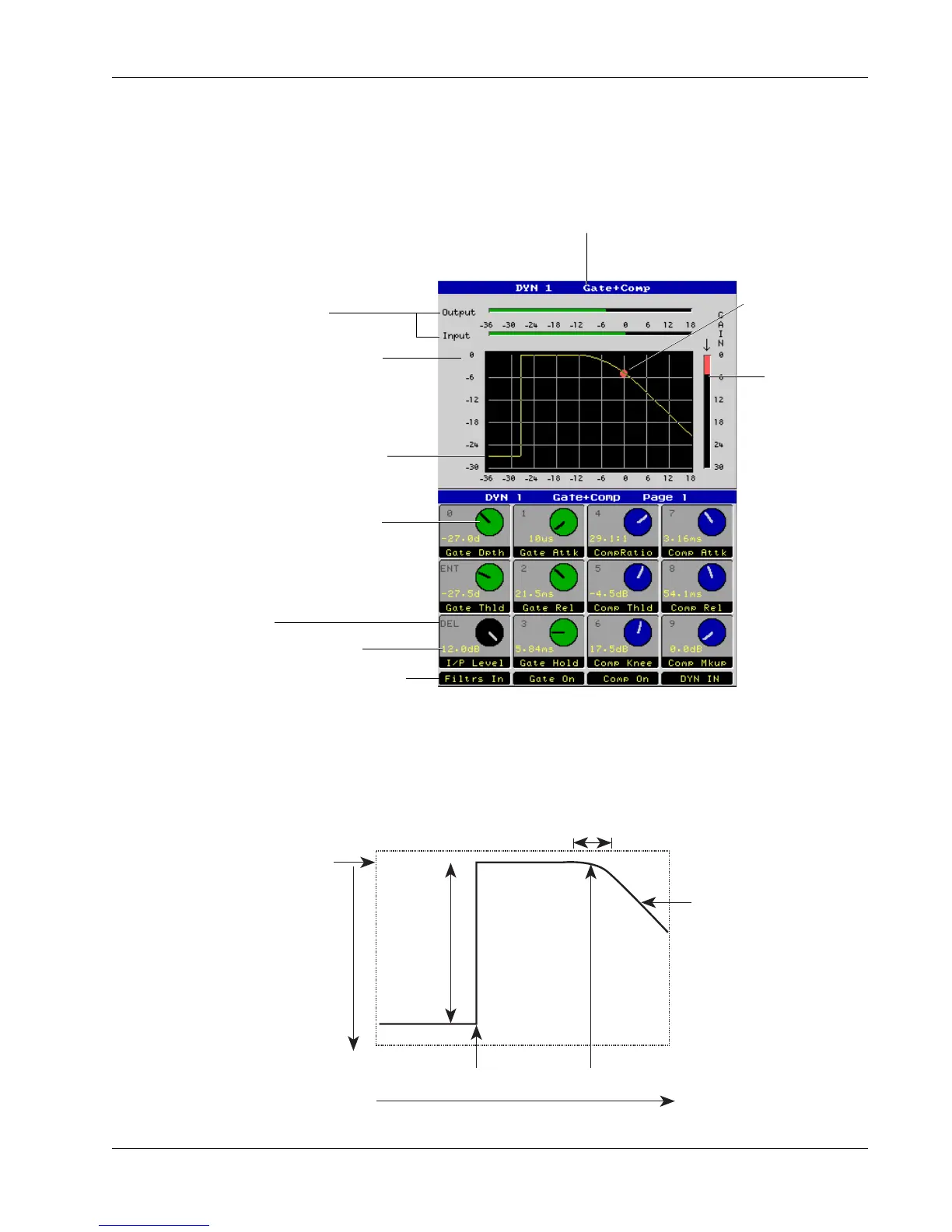
Dynamics Screen
Top of Left Axis
shows Makeup
Gain
Gate Depth
Gate Threshold
Compressor Threshold
(middle of knee)
Slope Indicates
Compression Ratio
Horizontal = 1:1
(No compression)
45° = Limiting
>45° = Negative Ratio
(inverse compression)
Compressor Knee
(width of curved portion of the line)
Side Chain Level
Gain
Reduction
Gain Curve
The screen display shows how the audio of the current channel is affected by
the dynamics processor, as well as the current parameter settings.
Shows keypad address for
adjusting from keypad and
SpinKnob
Indicates Dynamics Processor 1 or 2
and selected mode of processor
Indicates Gain
Reduction
Parameter value
Status of the four assignable
function switches at the
bottom of the DSC's Rotary
Control Set
Shows DSC rotary control
position
Input and Output Meters
show signal level into and out
of the processor
GainBall™
illustrates current
gain/time
constant settings
Top of graph shows Comp
Makeup (0.0dB)
Horizontal line shows gate
depth. Vertical line shows
gate threshold (-27.5dB)



 To Next Page