Section 1: Introduction
1 - 14 Euphonix CS3000/2000 Operation Manual
Using the
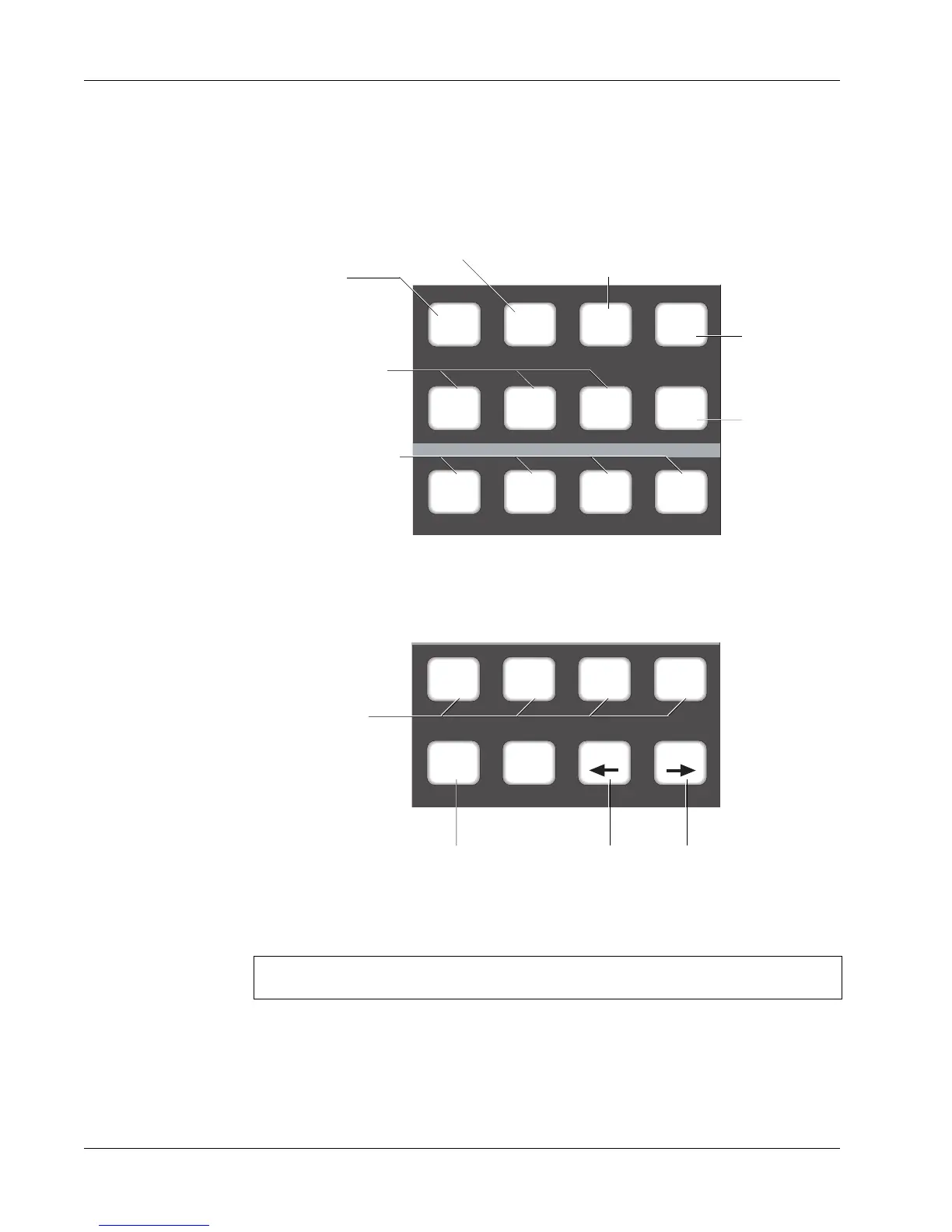
Dedicated Keys
Below are the basic functional descriptions of the Dedicated Keys. A more
detailed description can be found in the Automation section. The purpose of
these keys is to provide quick access to menu items in the SmartDisplay.
Fader
A
Pan
B
On
CD
Trim ATO W in W out
Attn Pnch Tplt Auto
SS
Set Iso Dyn Safe
Fader
A
Pan
B
On
CD
Punch Mode Key
Automated
snapshot
functions
Use in conjunction
with Set, Iso, &
Dyn during auto-
mation. Also
accessable from
SmartDisplay
Access template on screen display
and Template menu in SmartDisplay.
Automation modes
change directly from
these Dedicated Keys
Attention Mode Key
Select individual
Automation Punch
control of Fader, Pan,
Mutes, and Aux ABCD
Selects Trim mode when
running automation system
Used in conjunction with
Mode Change keys to
configure the template
and allow different
control combinations in
Punch mode.
Write In, Write Out, Write
Through automation.
See the Automation section for a full description of the key functions labelled above.



 To Next Page