Section 7: Automation
7 - 6 Euphonix CS3000/2000 Operation Manual
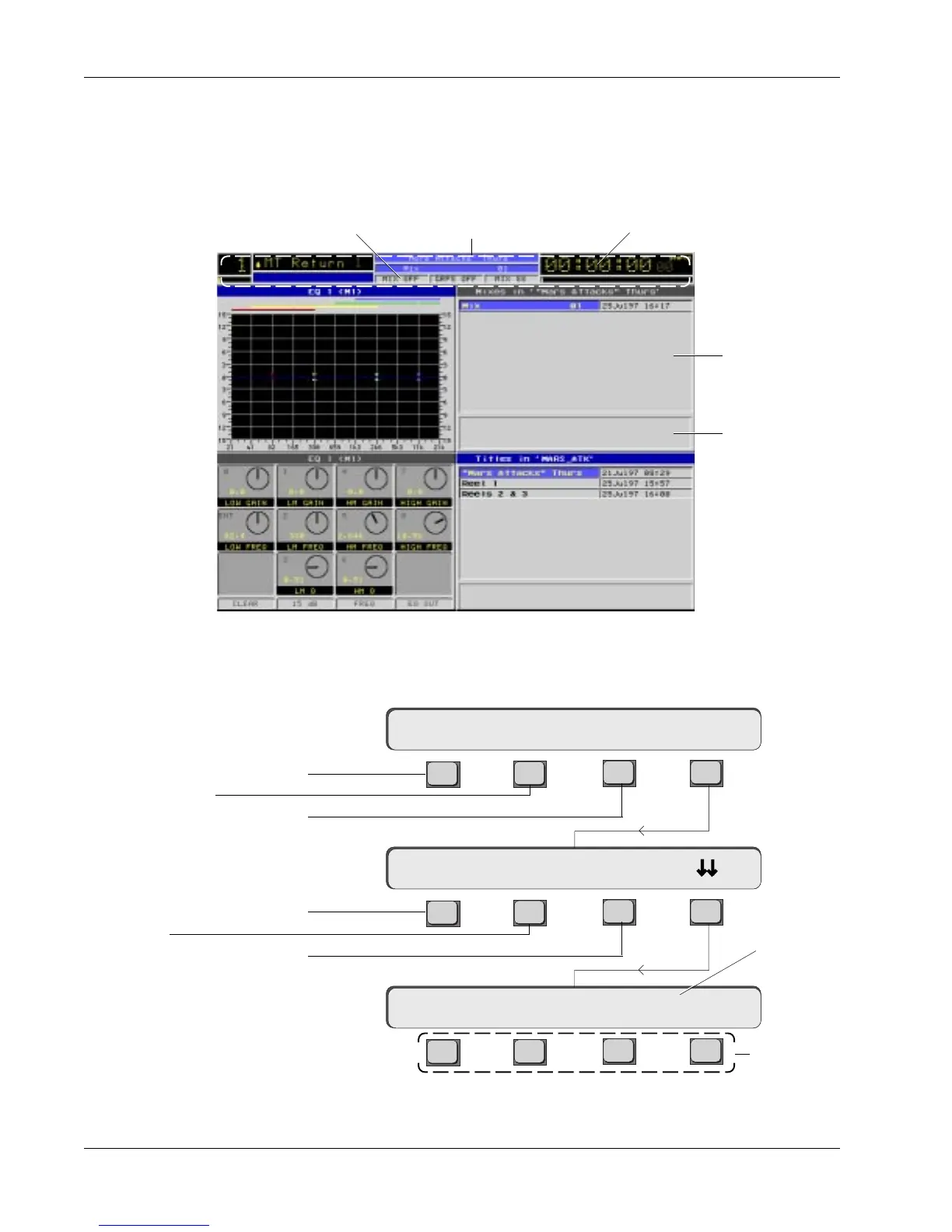
Following is an explanation of the Mix menus:
F3F1 F2 F4
F3F1 F2 F4
F3F1 F2 F4
Mix Menu
Mix Screen
When the Mix menu in the screen display is active (blue header), pressing the
QWERTY keyboard [Tab] key will put the cursor into the Mix Comments field.
You can now type in comments about the currently selected mix (highlighted in
the mix list). Press [Tab] again to get out of this mode:
Mix Comments
New? Load? Save? Utils
Mix Menu
Mix Utilities Menu
offset: ±00:00:00.00
Mix Setup Menu
ReNm? Del? Copy?
TimecodeStatus Bar
Mix Comments
Mix List
Mix Status
Load selected mix
Create new mix
Save current mix
No function in
this menu
Enter using Numeric
keypad & [
+
]/[
–
]
keys on Master
Control Panel
Rename mix
Delete mix.
Requires
keyboard
confirmation
Copy mix to.
Specify Disk,
Project & Title



 To Next Page