Section 9: Dynamics
Euphonix CS3000/2000 Operation Manual 9 - 21
To save assignments simply save the title. When you reload the title, your
dynamics assignments will recall just as snapshots and mixes do.
As mentioned earlier a single dynamics per channel should be wired between
OUT1 and L1. If a second processor is available per channel, wire this between
OUT2 and L2. Once the ES108As have been installed and wired properly, the
processors should be configured and assigned in software (see previous
section). After these steps have been completed, the dynamics need to be
inserted at the appropriate point in the signal path.
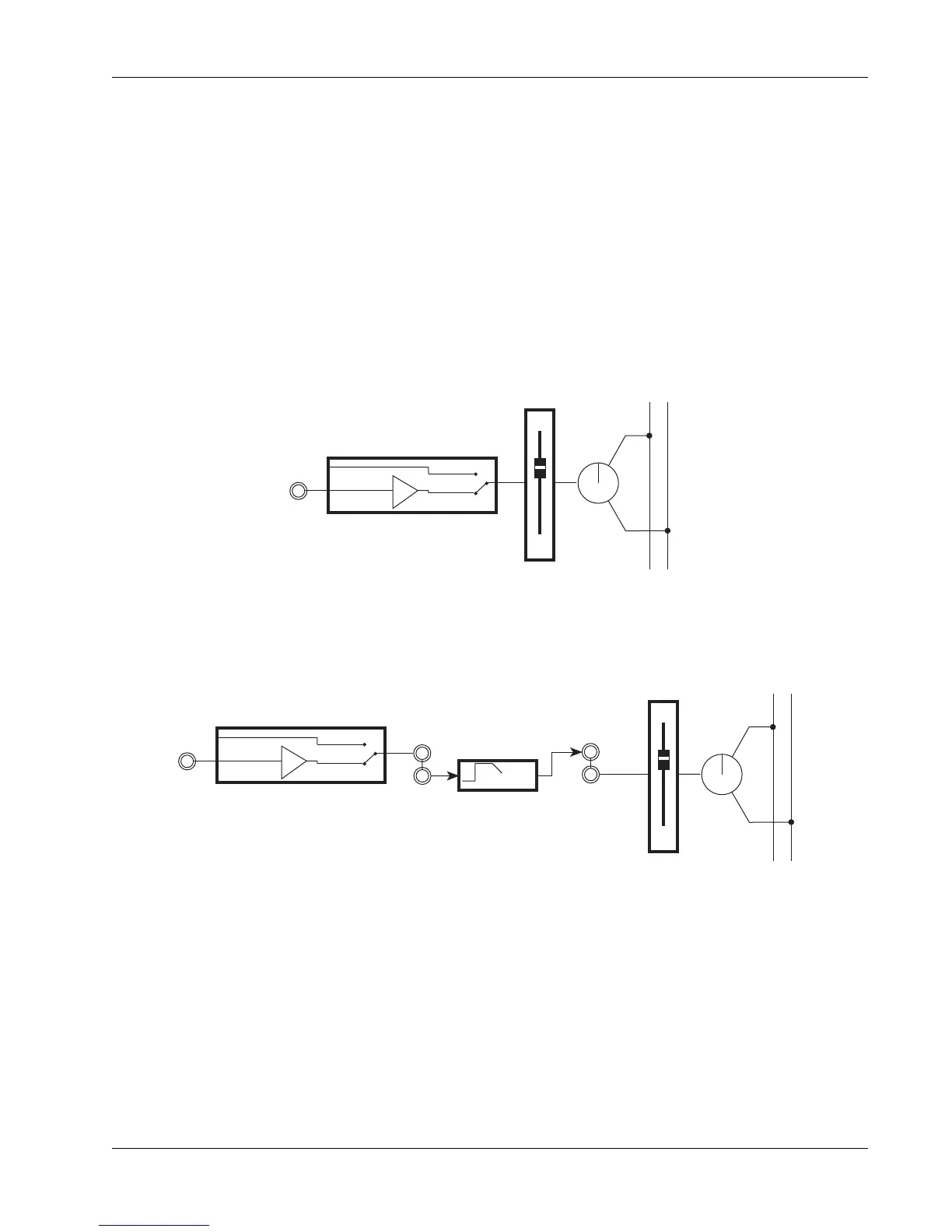
Say you have a simple signal path of the tape return coming into L4 and going
to the stereo bus:
Saving Dynamics
Assignments
Inserting the Dynamics
in the Signal Path
LF
L4
STEREO 1 BUS
L R
PAN
Line Input 4
BUS
LF
L4
STEREO 1 BUS
L R
PAN
Line Input 4
BUS
DYN
OUT1
L1
The fader is sourcing L4 and routing to ST1. To insert the dynamics, feed OUT1
from L4 and change the fader source from L4 to L1, the return from the dynam-
ics:
You can bypass the dynamics by switching the fader source back from L1
(Dynamics Output) to L4 (Signal Input), or you can use the processor's own
relay-driven hard bypass.



 To Next Page