Section 4: Tutorial
4 - 38 Euphonix CS3000/2000 Operation Manual
F3F1 F2 F4
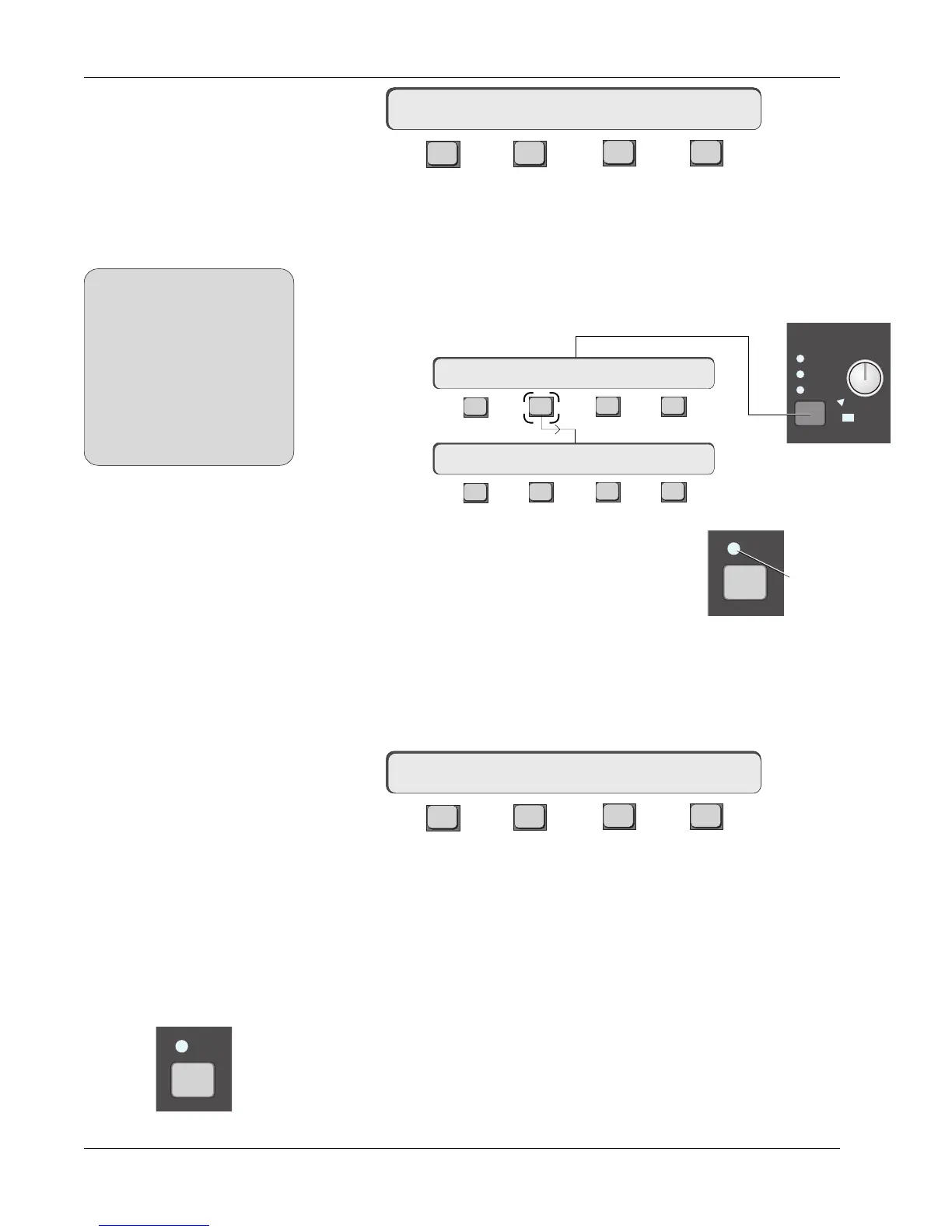
Pressing [F2] in the Configuration (Cnfg) menu toggles between Normal (AFL)
& Kill Solo operation. When in the Kill Solo mode, pressing an AFL key next to
a fader will cut all other faders. This mode implements “solo in place”.
Very often you want to leave effects returns on during a Solo operation to
“solo wet”. Solo Safe mode allows you to do this. From the Solo menu, (press
the solo block key), press [F2]:
F3F1 F2 F4
F3F1 F2 F4
Now you can select which faders you want to be Solo
Safed by pressing fader AFL keys. Safed faders show a
green indication above the fader AFL key. [Esc]ape out
of this menu. Now if you select any fader’s AFL key to
put it in Kill Solo, those faders set in the Safe mode will
not mute.
From the Solo menu press [F4] to get to the Configuration (Cnfg) menu:
F3F1 F2 F4
Pressing [F3] toggles between All mode and I/C (Intercancelling mode). When
in the All mode, the AFL keys latch on until they are individually or globally
deselected (by pressing [F3] from the Solo menu). When the I/C mode is
active, pressing a second [AFL] key deselects the first so that only one fader is
soloed at a time.
Pressing a [PFL] key on any fader block sends a Pre Fader Listen signal to the
AFL/PFL bus and out via the Solo level control. PFL can be in mono or stereo;
the fader mode determines which. PFL will operate in the same mode that the
AFL button is in (i.e., I/C or All. There is no such thing as Kill solo for PFL).
PFL
KILL SOLO Mode
(Solo In Place)
mSO-> KILL ALL ASGN
mSO-> SAFE CLR Cnfg
mSO-> select SOLO SAFEs
Solo Menu
Intercancelling Solo
Mode
mSO-> NORMAL ALL ASGN
PFL Mode
When you want to solo wet, make
sure that the aux sends to FX
devices you are using have been
set as post-fader sends (the
default setting is pre-fader). Press
the appropriate aux block attention
key, select the mode, and then
toggle [F4] through the options to
choose either PLF (Post Lower
Fader) or PUF (Post Upper Fader).
SIDE NOTE:
SOLO
A
B
C
Active
Kill
Kill Solo Safe
AFL
Turns green
when Safed



 To Next Page