Section 4: Tutorial
4 - 40 Euphonix CS3000/2000 Operation Manual
If for example, a stereo source is feeding into the upper fader via M1 & M2,
we can construct a mono summed, post-fader output of this source without
putting the fader in mono mode. We will use DIR1 for the example. Selecting
DIR from the DSC’s dedicated assign keys (as previously described) will only
provide the left signal (M1) to DIR1. To get a truly mono sum of M1 & M2 ,
both M1 & M2 must be assigned to DIR1.
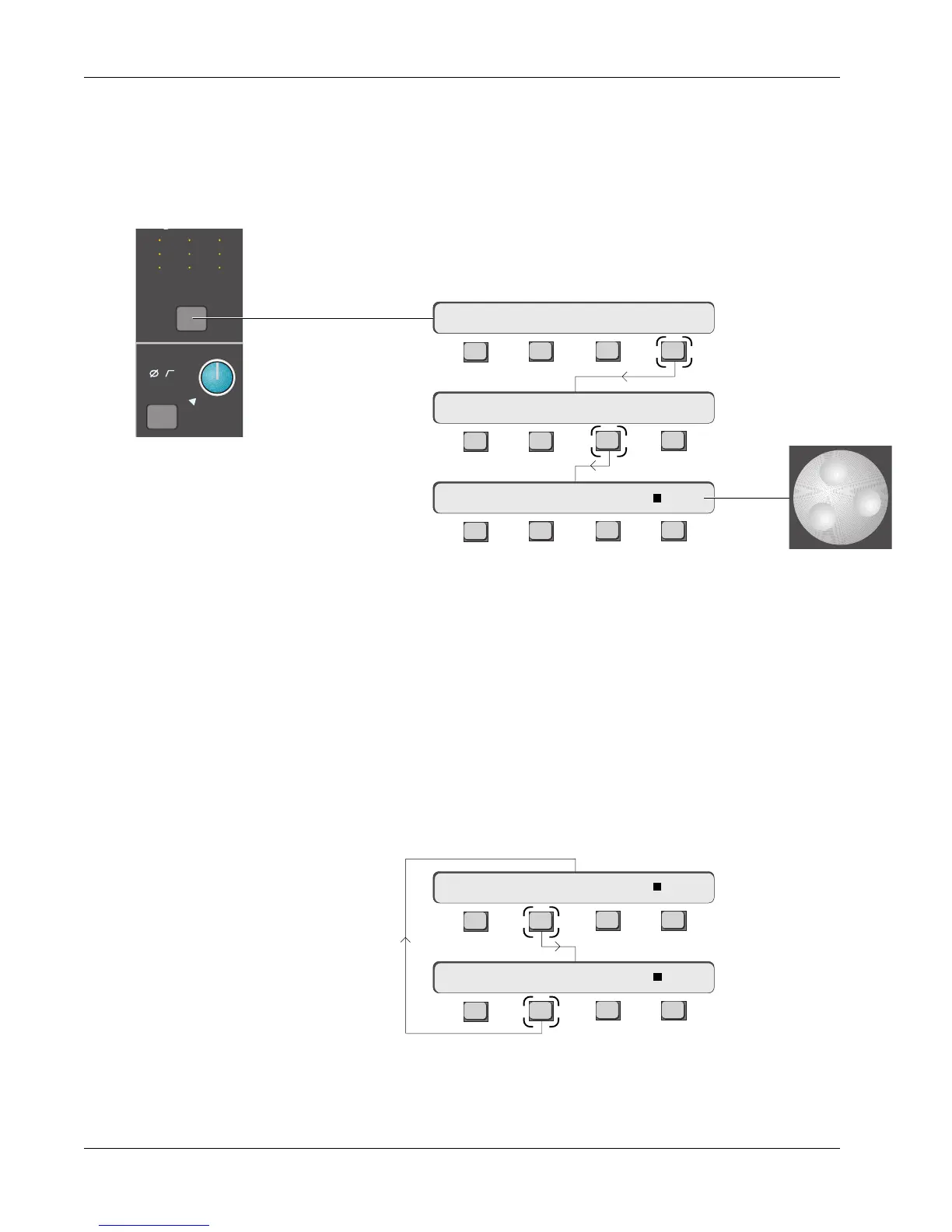
To set up this mono feed, first go to the channel menu by pressing the channel
block key:
F3F1 F2 F4
F3F1 F2 F4
F3F1 F2 F4
The square to the left of “BUS” indicates that the DIR is being fed from the
channel bus amp. As mentioned, this is the default DIR assignment and is
normally the main feed to the multitrack recorder. BUS will be deselected
when any of the other 5 sources are selected. Use the SpinKnob to view the
different options. The following signals can be set to feed the Direct Outputs:
BUS Channel’s Multitrack Bus summing amp output (default configuration)
CMB The Combiner output
UFL Post-Upper Fader Left
UFR Post-Upper Fader Right
LFL Post-Lower Fader Left
LFR Post-Lower Fader Right
Pressing [F2] toggles the menu between DIR1 and DIR2 selection:
F3F1 F2 F4
F3F1 F2 F4
Exactly the same sources are available for DIR2.
16CH–> DIR1 OUT:∑ BUS
16CH–> L4 DIRs CMB
16CH–> OUTs METER Route
Press [F4] to select
routing options:
Press [F3] to assign
the DIRs:
16CH–> DIR1 OUT:∑ BUS
16CH–> DIR2 OUT:∑ BUS
M
L
L
M
L
L
M
L
L
M1
Out 1 Out 2 Out 3
12
12
34
12
12
34
12
12
34
ovld
Pwr
Pad



 To Next Page