Section 8: Grouping System & Fader Linking
8 - 8 Euphonix CS3000/2000 Operation Manual
attention key and you will now see lower fader 22 & 23 displayed as slaves as
well as lower fader 24 as the master.
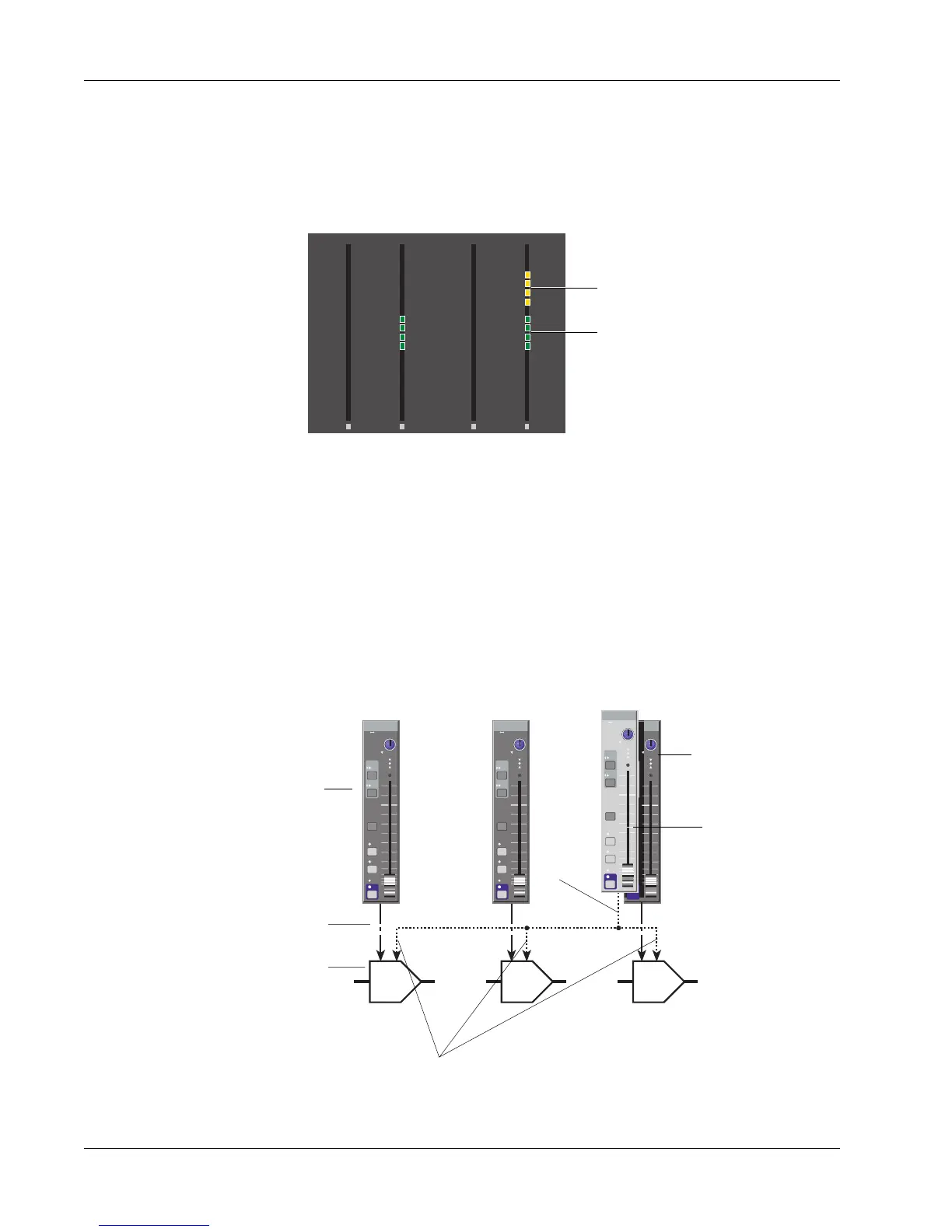
Now if you press lower fader 24’s attention key again, you will include its DCA
into the group as a slave. Lower fader 24’s DCA is now part of the group and is
indicated by the channel meters:
6
3
3
6
12
33
6
3
3
6
12
33
6
3
3
6
12
33
6
3
3
6
12
33
00 00
0
6
12
18
24
30
36
42
48
60
0
6
12
18
24
30
36
42
48
60
0
6
12
18
24
30
36
42
48
60
0
6
12
18
24
30
36
42
48
60
UF LF
24
UF LF
23
Masters are shown in amber
LF 24 added into group as a slave
and shown in green
At this point your choices are: add more slaves to this group by pressing
previously unassigned faders’ block attention keys; remove slaves from the
group by pressing individual fader block attention keys; press [Esc] once to
select more group masters; or press [Esc] twice to quit the Groups menus,
activate the groups, and resume normal metering.
Press [Esc] twice to exit Group Configuration mode. In Master mode, the
grouping system now looks like this:
DIR
ST1
M1 M2
L1 L2
L3 L4
ovld
PAN BAL
ST2
Input
EQ•Dyn
BUS
Grp
1
2
L
R
ON
AFL
PFL
DCADCA DCA
Input
EQ•Dyn
BUS
Grp
1
2
L
R
ON
AFL
PFL
DIR
ST1
M1 M2
L1 L2
L3 L4
ovld
PAN BAL
ST2
Input
EQ•Dyn
BUS
Grp
1
2
L
R
ON
AFL
PFL
DIR
ST1
M1 M2
L1 L2
L3 L4
ovld
PAN BAL
ST2
Input
EQ•Dyn
BUS
Grp
1
2
L
R
ON
AFL
PFL
DIR
ST1
M1 M2
L1 L2
L3 L4
ovld
PAN BAL
ST2
Lower fader
Lower fader DCA
Fader control line
Trims group slave DCAs
22 2423
Group
control
line
Underlying fader still
controls the DCA
Surface fader is
master and will now
group trim its own
DCA as well
This concludes Exercise 2.



 To Next Page