Section 1: Introduction
1 - 10 Euphonix CS3000/2000 Operation Manual
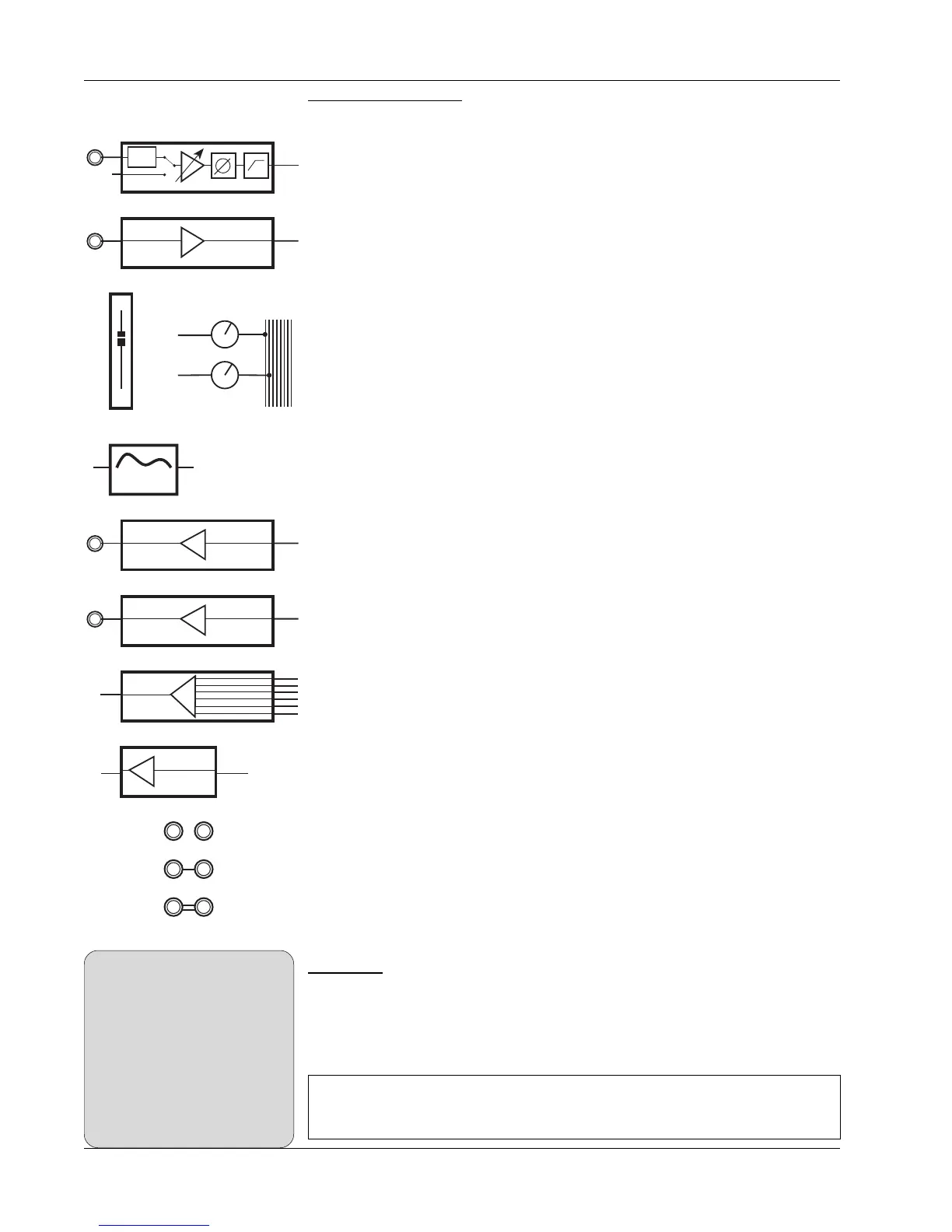
Block diagram symbols. These symbols represent the functional blocks of
audio circuits and are used to illustrate the finer points of signal flow and
routing through the console.
Universal Input Amplifier, with phantom power, gain, phase reverse, and high-
pass filter
Line Input with buffer
Fader
Auxiliary Bus
4-Band EQ
Line Output with buffer
Direct Output with buffer
6-into-1 Combiner with summing amplifier
Bus Summer with summing amplifier
Un-normalled patch point
Half-normalled patch point
Fully-normalled patch point
Side Notes give solutions to potential problems and general hints about using
product features effectively.
PWR
4 Band EQ
LF
Aux B
Aux A
AUX BUS
1 - 8
Combiner
∑
Direct Out
Line Out
Line Input
∑
Bus
Summing
Amp
When you try to solo wet, make
sure that the aux sends to FX
devices you are using have been
set as post-fader sends (the
default setting is pre-fader). Press
the appropriate aux block attention
key, select the mode, and then
toggle [F4] through the options to
choose either PLF (Post Lower
Fader) or PUF (Post Upper Fader).
SIDE NOTE:
Note: Throughout this manual, keys to be pressed are represented
by bold type and brackets as shown in this example: [Esc].



 To Next Page