LCD Operation D2 Series Servo Drive User Manual
7-32 HIWIN MIKROSYSTEM CORP.
(1) Mode selection
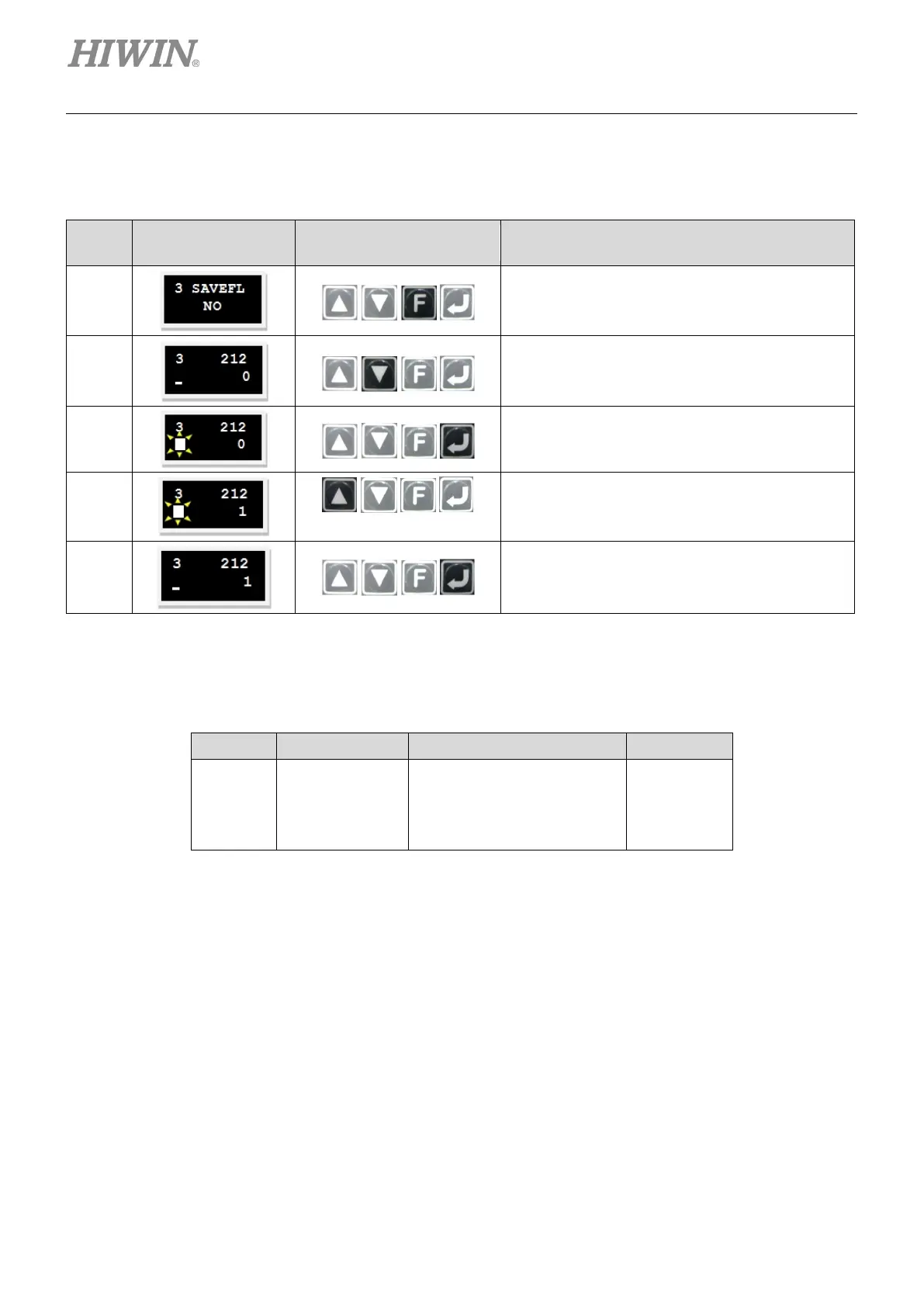
Use following steps to select the position mode via LCD.
Table7.7.1.1
Step
LCD Display After
Operation
Used Keys Operation
1
Press the F key to change the LCD screen to the
parameter change page.
2
Press and hold the Down key to go to LCD No.
212 page (refer to note 1), i.e. the setting page of
operation mode.
3
Press the Enter key to enter the edit mode.
4
Press the Up key once to set this parameter to 1,
i.e. the position mode.
5
Press the Enter key to complete the setting.
Note:
The operation mode can be set via the following parameter.
Table7.7.1.2
LCD No. Parameter Definition Initial value
212
X_oper_mode1
0: Stand-Alone
1: Position mode
2: Velocity mode
0
(2) Pulse format selection
D2 drive supports three types of command format, referring to Section 3.1.1.
Use following steps to select the pulse format via LCD.


 To Next Page
 Loading...