Chapter 4: Creating and Editing Messages
Linx 4900 Operating Manual 48 MP65492–1
4.1 Introduction
4.1.1 Message Fundamentals
Messages are made up of one or more fields. A message can be a single
field, for example, a text field, or it can contain several fields of varying
type and size.
Text is just one of the field types that you can incorporate into a message;
other types are logos, sequential numbers, time and date, and remote data.
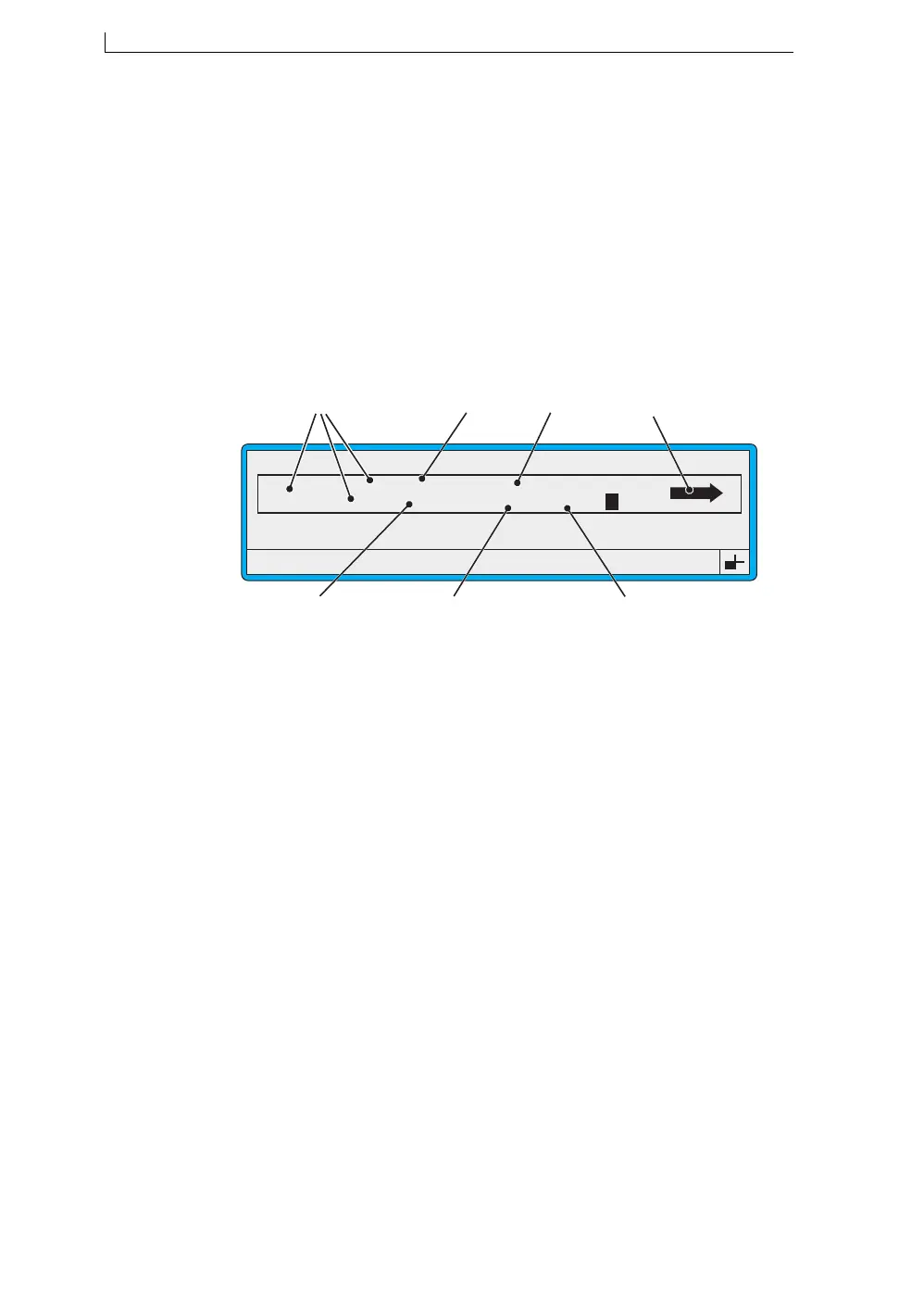
The following illustration shows an example message, as viewed at the
EDIT MESSAGE screen, containing the different field types:
Figure 4-1 Example Field Types
The next subsection ‘About Field Types’ describes each type of message
field.
A Text fields (various sizes)
B Date field
C Remote field
D Logo field
E Timed Message field
F Time field
G Sequential Number field
49106
F1 : Size 7 FH (Caps)
F3 : Field Type
F2 : Bold Off
F4 : Save & Exit
EDIT MESSAGE : MESSAGE 1
Sell by dd mmm yy
BATCH 9999
hh:mm Night Shift
*********
A
C
B
G
F
E
D
LINX
4900 Op Manual.book Page 48 Tuesday, September 9, 2003 12:32 PM



 To Next Page