70
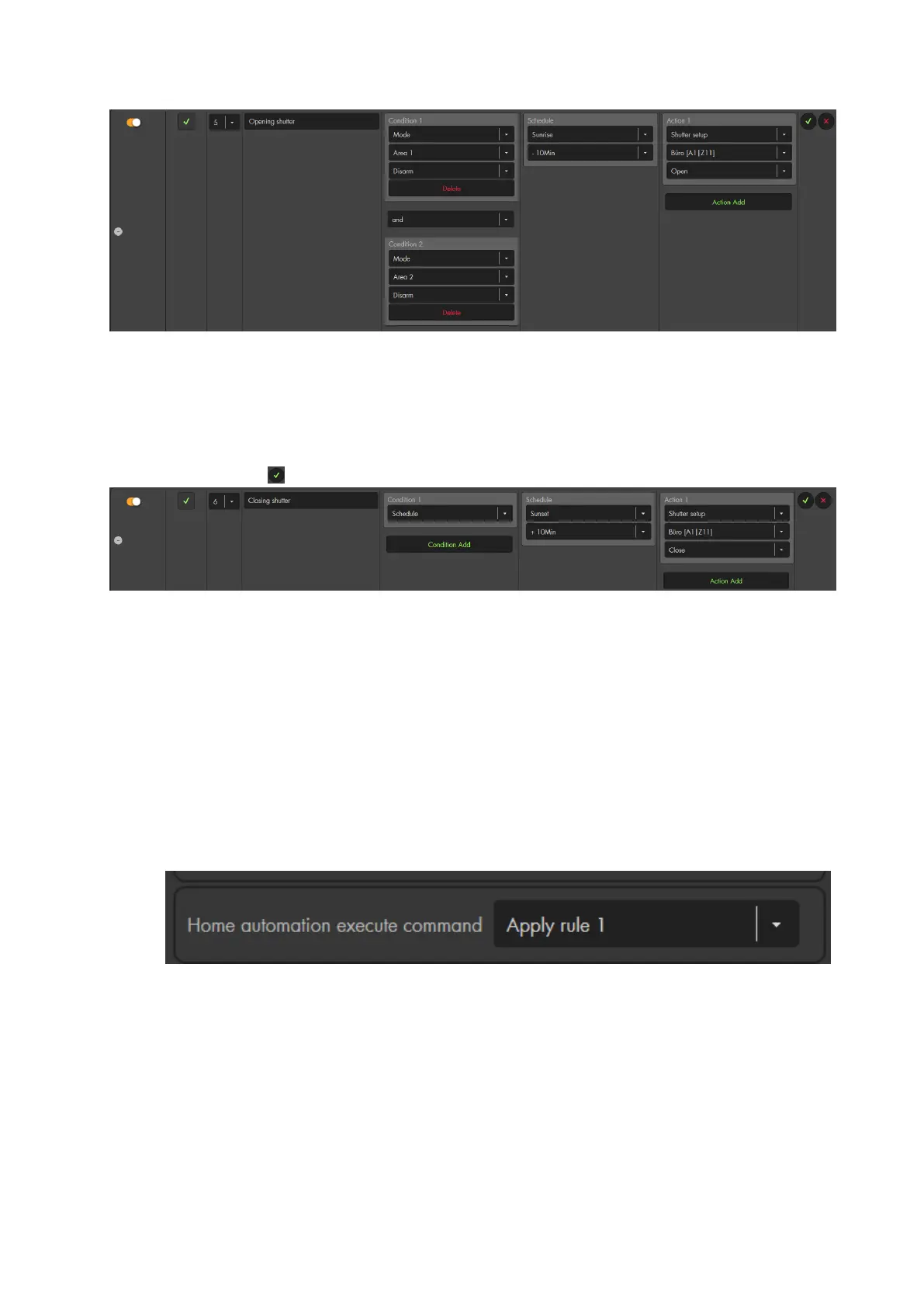
Create a second rule.
Select “Condition” “Schedule”.
Select “Schedule” “Sunset” “+10 minutes”.
Select “Action” Shutter setup” “Area 1 Zone 11” “Close”.
Click on the to the right of the rule.
Example 4 – Using a sensor triggered event, the “or” connection and night
schedule
Aim: We want to switch on a dimmable lamp for one minute if we pass by one of our
two motion detectors during the night.
Settings:
First, we need to open the edit sensor menu of our motion detectors (“Sensors”
“List” “Sensorlist”).
In both motion detectors, we set “execute home automation command” to “apply
rule 1”.
Now, we go to the menu “Smarthome” “Automation” “Rules”
Create a new rule
Select “Condition” “Triggered sensor action” “Area 1” “Sensor event 1”
Add another “condition” “Triggered sensor action” “Area 1” ““Sensor
event 1” and connect the conditions with “or”.
Select “Schedule” “Daytime” “Night”. Make sure that you have set your
location and date in “Alarm system” “Settings” “Date & Time”)
Select “Action” “Dimmer setup” “Area 1 zone 13” “Turn on” “60
seconds”.



 To Next Page