215575 246 Revision B
Installing Driven Sprocket
Be sure that the drive and driven sprockets are correctly aligned before reinstalling the drive chain.
$
%
&
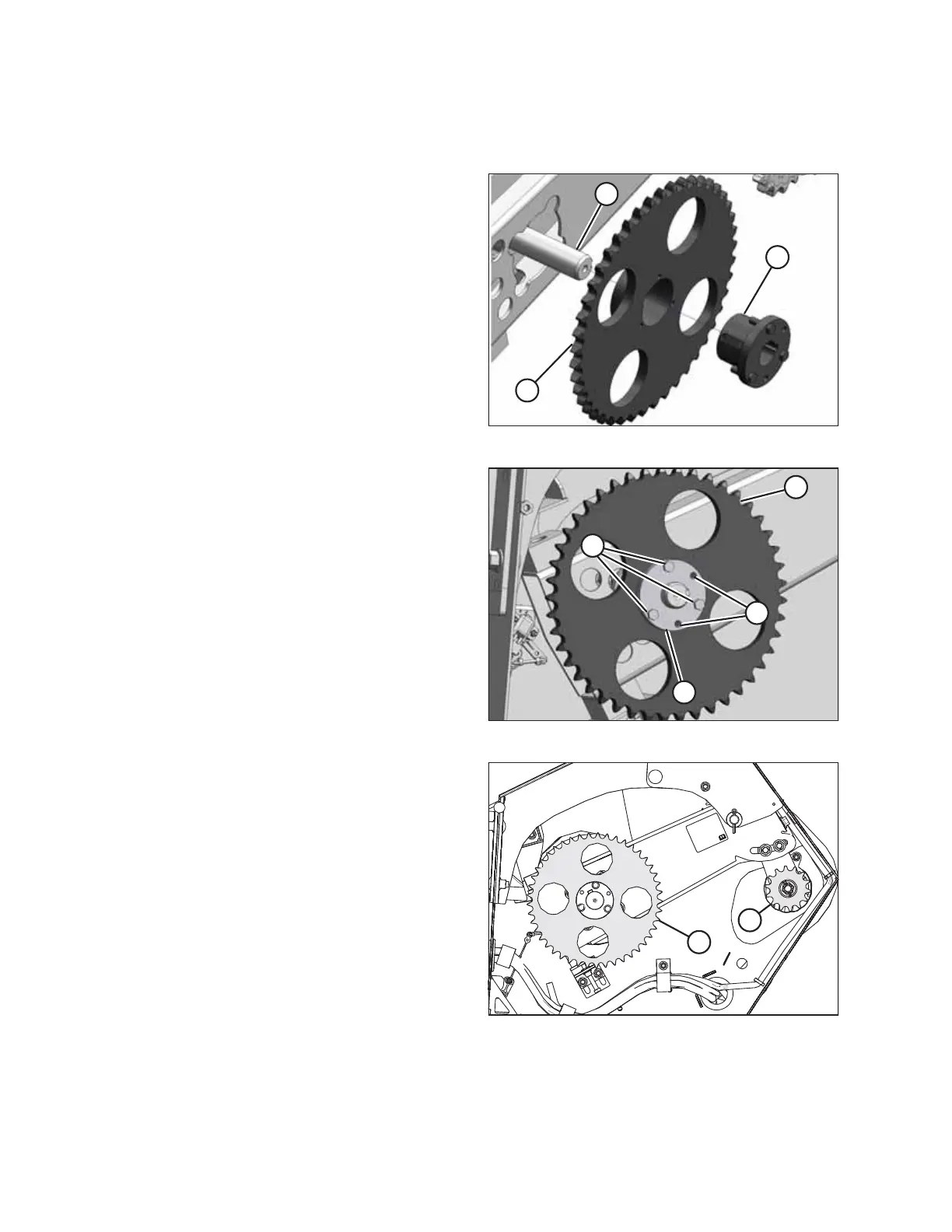
Figure 5.58: Driven Sprocket
1. Apply anti-seize compound to the mating surfaces of
driveshaft (A), tapered bushing (B), and sprocket (C).
2. Install the keys into driveshaft (A) and tapered bushing (B).
3. Insert tapered bushing (B) into sprocket (C) while aligning
the key with the keyway in the sprocket.
4. Align key in driveshaft (A) with keyway in tapered
bushing (B), and slide bushing and sprocket (C) onto the
driveshaft.
$
&
%
'
Figure 5.59: Driven Sprocket
5. Remove two M10 hex bolts from threaded holes (B) in
tapered bushing (D).
6. Reinstall three M10 hex bolts (A) through tapered
bushing (D) and into sprocket (C). Do NOT tighten the
bolts yet.
$
%
Figure 5.60: Sprockets
7. Align driven sprocket (A) with drive sprocket (B) using a
straight edge. The sprockets are aligned when the two faces
are within 1 mm (3/64 in.) of each other.
MAINTENANCE AND SERVICING



 To Next Page