215575 271 Revision B
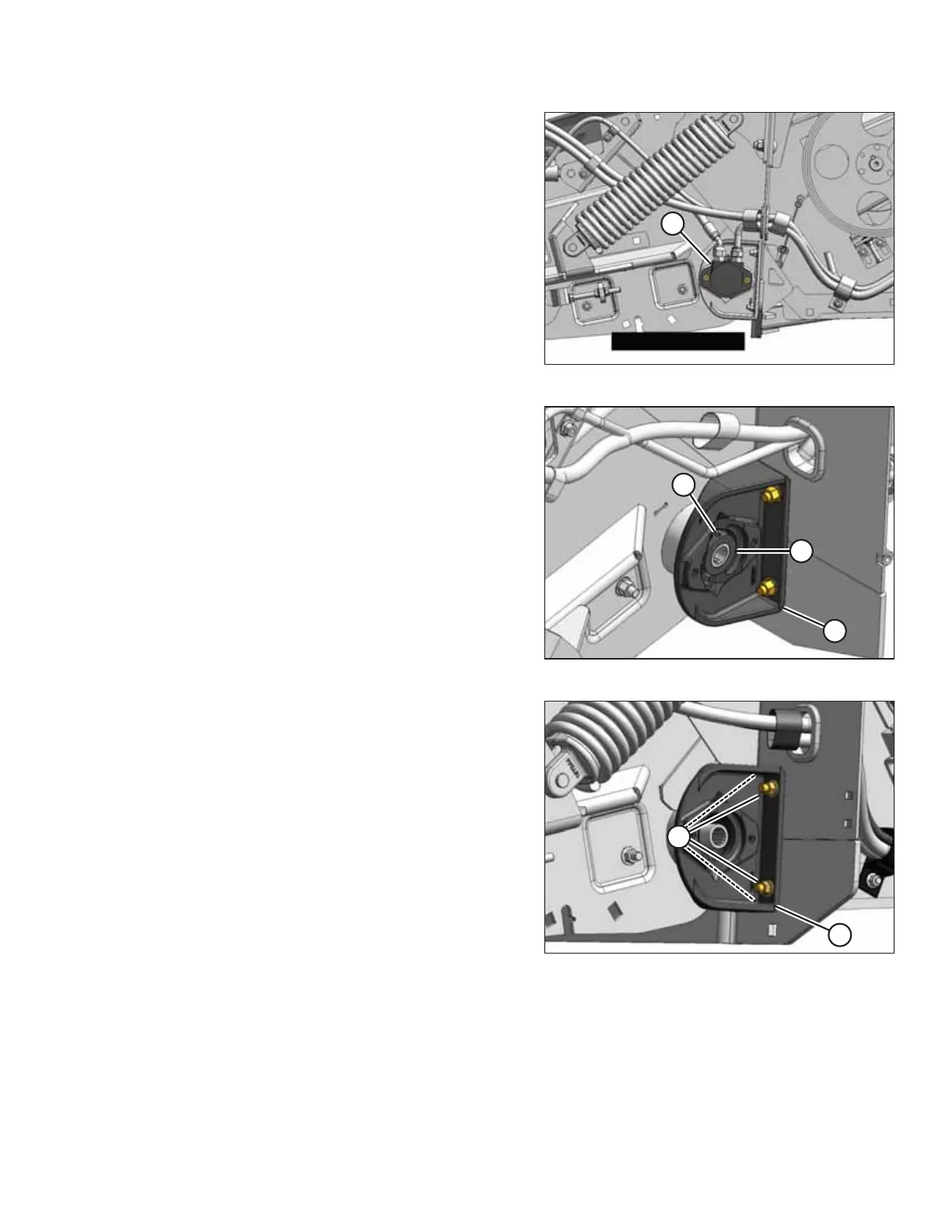
Figure 5.115: Rear Hydraulic Motor
7. Remove rear hydraulic motor (A). Refer to Removing Rear
Hydraulic Motor, page 236 for instructions.
Figure 5.116: Left Rear Deck
8. Turn the roller manually until set screw (A) in lock collar (B)
lines up with the recess in bearing support (C).
9. Loosen set screw (A) in lock collar (B). Rotate the collar
counterclockwise to loosen it. Remove the collar.
Figure 5.117: Left Rear Deck
10. Ensure that the deck is fully supported, and check that the
float spring assembly is loose. You may need to raise the
deck slightly to loosen the assembly.
11. Remove four nuts (A) attaching bearing support (B) to
the frame.
NOTE:
Ensure that the height controller is not damaged when
removing the bolts.
12. Pull bearing support (B) off of the roller shaft.
MAINTENANCE AND SERVICING



 To Next Page