215575 284 Revision B
$
%
%
&
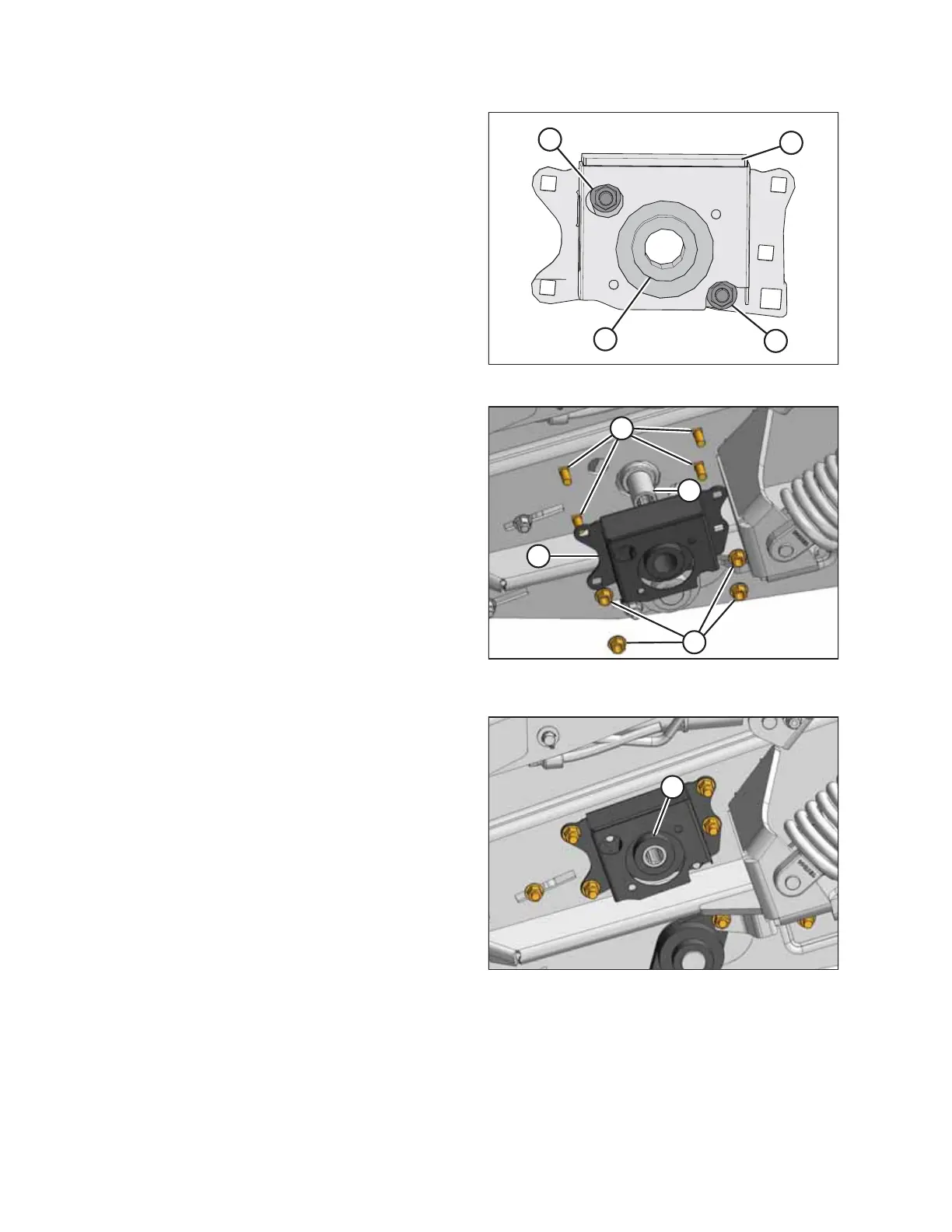
Figure 5.148: Bearing in Motor Support
11. Remove two M12 bolts (B) securing bearing (A) to motor
support (C). Remove bearing (A).
12. Using two M12 x 40 carriage bolts and lock nuts (B), install
new bearing (A) into motor support (C).
%
&
$
'
Figure 5.149: Motor Support With New Bearing
Installed
13. Place motor support (A) onto roller shaft (B).
14. Secure housing (A) with four M12 x 35 bolts (C) (the bolt
heads must face inboard) and lock nuts (D). Tighten the
lock nuts.
$
Figure 5.150: Left Front Deck
15. Install lock collar (A) onto the roller shaft, and turn it
clockwise until tight.
16. Remove the support from under the drive roller.
17. Turn the roller manually until the set screw in lock collar (A)
is accessible.
18. Tighten the set screw.
19. Remove the wooden block.
20. Reinstall the front hydraulic motor. Refer to Installing Front Hydraulic Motor, page 235 for instructions.
21. Align the draper deck rollers. Refer to Aligning Front Draper Deck Rollers, page 287 for instructions.
22. Tension the drapers.
23. Close the left endshield. Refer to 3.3.2 Closing Left Endshield, page 26 for instructions.
MAINTENANCE AND SERVICING



 To Next Page