Configuration with the web interface
98-137654-A Chapter 6: Configuration 6-29
6666
Configuration
6.3.10 Sending statistics reports
SAILOR 100 Satellite TV can send a statistics report at fixed intervals
through an external Internet connection. This report contains
historical information from the SAILOR 100 Satellite TV of up to 1
month. It is sent as a zipped attachment to an e-mail. The file format
is a comma separated value file (csv). The report can then be
processed in spreadsheet applications, e.g. Microsoft Excel.
To set up sending a statistics report, do as follows:
1. Configure e-mail first, see E-mail setup on page 6-28.
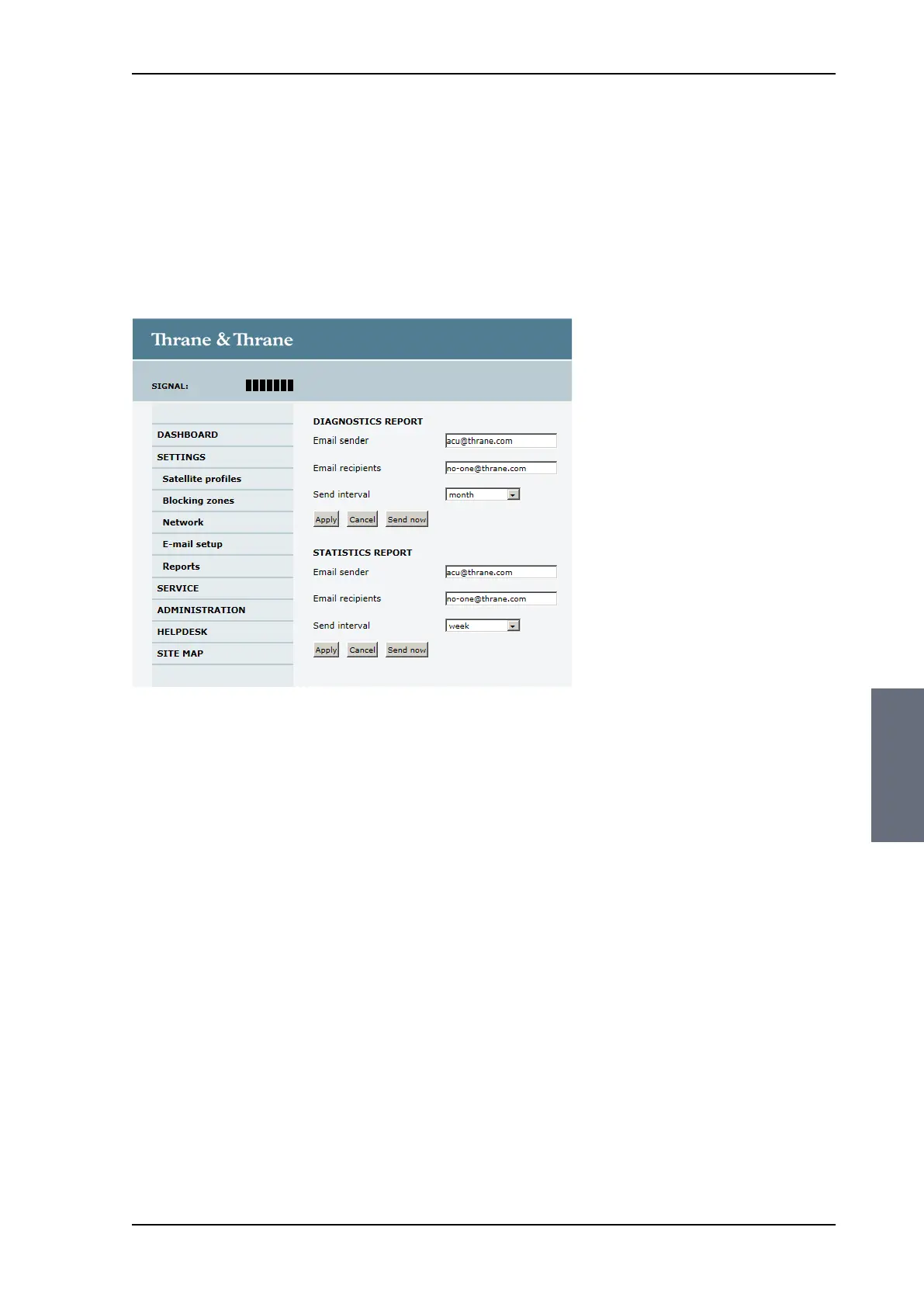
2. Go to SETTINGS > Reports.
3. In the section STATISTICS REPORT enter the following:
• Email sender.
• Email recipients (comma separated).
• Send interval: Select disabled, day (default) with 2-minute
samples, week with hourly samples or month with hourly
samples. The report contains statistics data for the selected
intervals.
4. Click Apply.
You can also send the report at any time by clicking Send now. Use
Send now to validate the e-mail setup. See also Download of a
diagnostic report or a statistics report on page 8-2.
Figure 6-22: Web interface: SETTINGS, Reports (example)
SAILOR100TM.book Page 29 Tuesday, January 29, 2013 2:44 PM



 To Next Page