Vista Digital Mixing System
Date printed: 05.08.03 SW V3.3 Parameters 3-51
User Setting
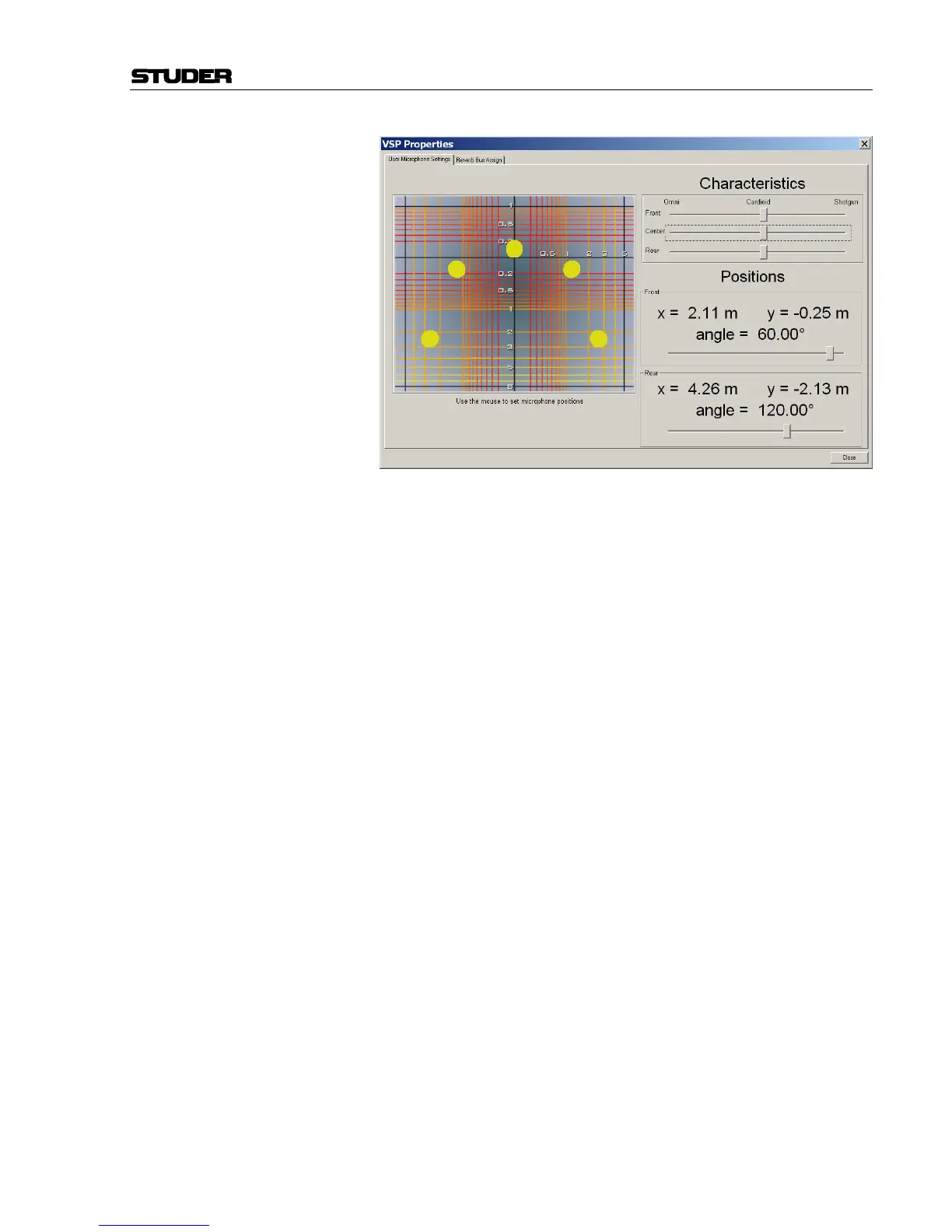
With the Microphone Simulation Tool, the mix engineer is able to set up
his/her own microphone simulation using the dialog box which is available
in the Options/VSP menu.
The settings may be changed as follows:
Microphone Positioning The front left and right microphones may be moved by grabbing one of
them with the mouse and positioning them as desired. The opposite micro-
phone moves to a symmetrical location. The same may be done with the
rear left and right microphones. The center microphone cannot be moved.
Microphone Pattern The Front, Center, and Rear microphones may be independently changed
as to their polar characteristics. This may be done using the sliders. Each
pattern can be changed from omni-directional, all the way through to shot-
gun patterns.
Microphone Angle The Front and Rear microphones may also be independently changed as to
their positioning angle. This may be done using the angle sliders, or by
double-clicking and dragging with the mouse.
So when a VSP Channel Pan Mode is selected to the USER setting, the
settings within the Microphone Simulation Tool will be used as a basis for
the underlying VSP panning law. These settings may be changed in real
time, and the changes will be audible as they are being made. This is an
exciting and functional tool that the mix engineer now has exclusively
with the use of the VSP panning system within the Studer D950 or Vista
consoles.



 To Next Page