Vista Digital Mixing System
Date printed: 05.04.2005 SW V3.5 Vista 8 Differences 8-33
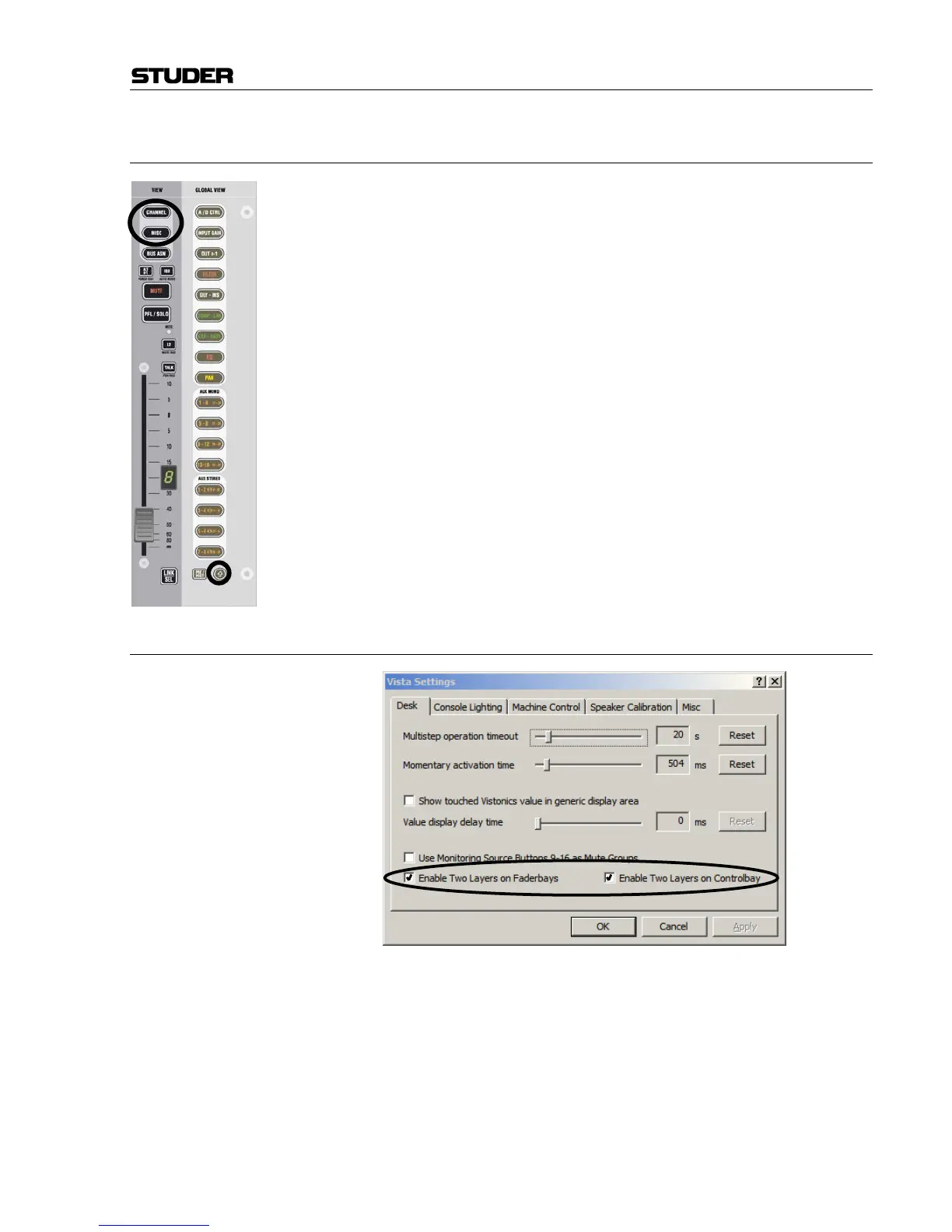
8.6.5 View MISC and CHANNEL with × (Shift) Key
If the × (shift) key is activated on a fader bay, it is possible to see up to 40
mono and 20 stereo auxiliaries when pressing MISC and CHANNEL on a
channel strip. This is useful when working with multiple auxiliary and ma-
trix buses.
8.6.6 Single Fader Switch to Second Layer
By activating “Enable Two Layers…” in the “Option: Vista Settings”
menu, the virtual desk may be reduced from six to three sections. Scrolling
will then be possible only between sections 1 and 3. The previous sections
4...6 now serve as a lower second (lower) layer of the console.
By pressing the L2 key on the channel strips, one individual channel strip
can be switched between the upper and the lower half of the console. If a
channel strip is currently displaying the third channel of section 1, it will
afterwards display the third channel of section 4. This function may be
helpful when working e.g. with backup microphones. In this way it is easy
to switch to a different channel while leaving the other ones untouched.



 To Next Page